What Is a WAF? A Practical Guide to Web Application Firewalls for Beginners
Attackers probe websites daily for weaknesses. A single SQL injection or cross-site scripting flaw can expose customer data or deface a site. A Web Application Firewall (WAF) stops these threats before they reach your application code. This guide explains how a WAF works, how it differs from a network firewall, and how to deploy one using open-source tools.
Table of Contents
- Why Your Website Needs More Than a Network Firewall
- What a WAF Actually Does
- How a WAF Fits Into Your Architecture
- Blacklist vs Whitelist: Two Ways to Filter Traffic
- The OWASP Core Rule Set: Your Ready-Made Defense
- Types of WAF Deployment
- Hands-On Lab: Deploy a WAF with Docker in 10 Minutes
- Hands-On Lab: Install ModSecurity on Nginx
- Testing Your WAF With Real Attack Payloads
- Tuning for False Positives
- Best Practices for Running a WAF in Production
- Conclusion
Why Your Website Needs More Than a Network Firewall
A traditional network firewall guards your infrastructure perimeter. It blocks traffic based on IP addresses, ports, and protocols. However, it does not understand HTTP. It cannot tell the difference between a legitimate login request and a SQL injection payload hiding inside a POST body.
Attackers know this. They craft malicious requests that look perfectly normal at the network layer. A WAF closes this gap by inspecting the actual content of web traffic. It reads headers, query strings, cookies, and POST data. When it spots a known attack pattern, it blocks the request before your application ever sees it.
Think of your security as layers. The network firewall is the outer wall. The WAF is the guard at the door who checks what people are actually carrying inside.
What a WAF Actually Does
A WAF operates at Layer 7 of the OSI model, the application layer. This means it understands HTTP and HTTPS. When a visitor submits a form, uploads a file, or sends an API call, the WAF examines every part of that request.
Modern WAFs use several techniques to detect threats:
- Signature-based detection: The WAF matches incoming requests against a database of known attack patterns. For example, it recognizes the classic
' OR '1'='1SQL injection string. - Anomaly scoring: Instead of blocking on a single match, the WAF assigns points for each suspicious element. If the total score crosses a threshold, the WAF blocks the request. This reduces false positives.
- Behavioral analysis: Some WAFs learn normal traffic patterns over time and flag deviations, such as a sudden spike in login attempts from a single IP.
- Virtual patching: When a new vulnerability emerges in your application framework, you can write a WAF rule to block exploitation attempts while you prepare the actual software patch.
A good WAF also inspects responses. It can strip sensitive server headers or block data exfiltration if an attacker somehow compromises the backend.
How a WAF Fits Into Your Architecture
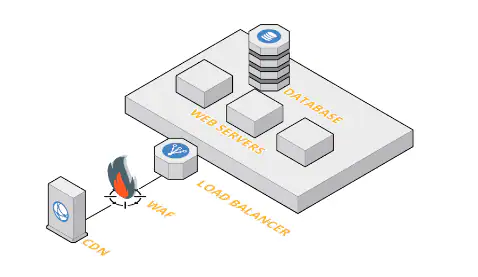
Most WAFs run as reverse proxies between the internet and your web server. The visitor connects to the WAF, and the WAF connects to the backend. This gives the WAF full visibility into both requests and responses.
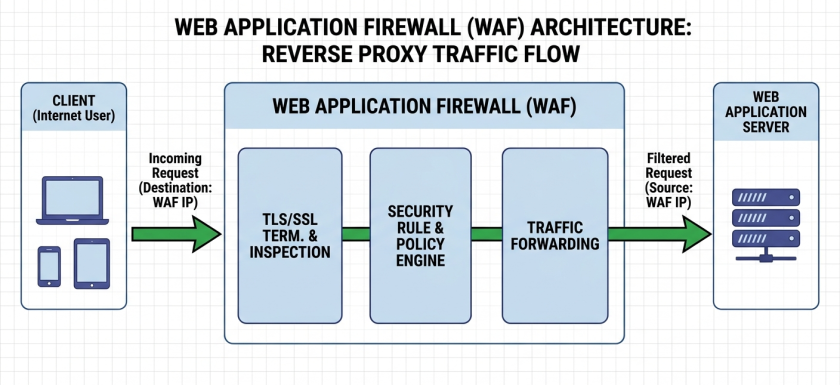
The reverse proxy model offers several advantages. The WAF terminates TLS, so it inspects encrypted traffic in plaintext. It can load balance requests across multiple backend servers. It also hides the real IP addresses and topology of your internal network.
Other deployment options exist. Some WAFs run as modules inside the web server itself, like ModSecurity for Apache. Others operate in transparent bridge mode, where they pass traffic through without changing IP addresses. Cloud WAFs, such as AWS WAF or Cloudflare, run at the edge of content delivery networks and protect applications without any local installation.
Blacklist vs Whitelist: Two Ways to Filter Traffic
WAFs apply two core security philosophies. Understanding both helps you choose the right approach for your application.
The Blacklist Model (Negative Security)
A blacklist WAF allows all traffic except what matches known attack signatures. The OWASP Core Rule Set works this way, containing hundreds of rules that describe SQL injection patterns, XSS payloads, remote code execution attempts, and protocol violations.
The blacklist approach is easy to deploy. You load the rule set, turn on the engine, and you immediately gain protection against common attacks. The downside? A novel or obfuscated attack that does not match any existing signature might slip through.
The Whitelist Model (Positive Security)
A whitelist WAF blocks everything except traffic you explicitly define as legitimate. For example, you might declare: “The id parameter on the /product page must contain only integers between 1 and 999999.” Anything else gets blocked immediately.
This model provides stronger security because it assumes everything is dangerous until proven otherwise. However, building and maintaining a whitelist demands deep knowledge of your application. Every endpoint and parameter must be documented, which can become a full-time job on complex applications.
Most production environments use a hybrid approach. They start with a blacklist rule set for broad coverage, then layer whitelist rules on critical endpoints like payment forms or admin panels.
The OWASP Core Rule Set: Your Ready-Made Defense
You do not need to write WAF rules from scratch. OWASP maintains the Core Rule Set (CRS), a free collection of attack-detection rules for ModSecurity and compatible WAF engines.
CRS covers the entire OWASP Top 10, including:
- SQL injection (SQLi)
- Cross-site scripting (XSS)
- Remote code execution (RCE)
- Local file inclusion (LFI)
- XML external entity attacks (XXE)
- Broken access control
The rule set uses anomaly scoring by default. Each triggered rule adds points to a transaction score. You set thresholds for inbound and outbound traffic. If a request scores above the inbound threshold, the WAF blocks it. If a response scores above the outbound threshold, the WAF can block data leakage.
CRS also defines four paranoia levels:
| Paranoia Level | Description | Best For |
|---|---|---|
| Level 1 | Basic protection, minimal false positives | Production sites with standard traffic |
| Level 2 | Extended protection, some tuning needed | E-commerce, customer portals |
| Level 3 | Strict protection, significant tuning required | Financial services, healthcare |
| Level 4 | Maximum security, extensive tuning essential | High-security environments |
Start with Level 1. Monitor your logs. Raise the level only after you have eliminated false positives.
Types of WAF Deployment
Not every team has the same infrastructure or budget. Fortunately, WAFs come in several flavors.
Cloud-Based WAFs
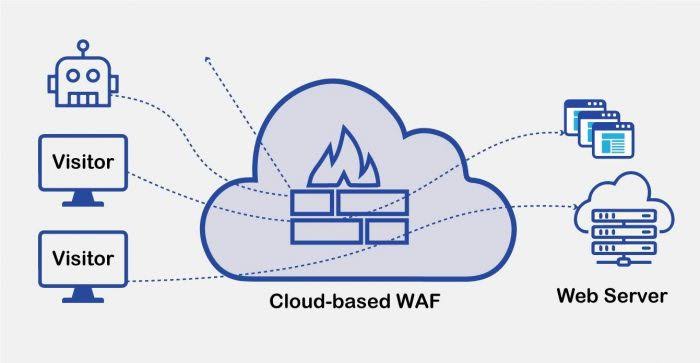
Services like AWS WAF, Cloudflare, and Azure Front Door integrate directly into your DNS or CDN. You point your domain at their edge network, configure rules through a web console, and protection begins immediately. Cloud WAFs scale automatically and require no server maintenance.
Software WAFs
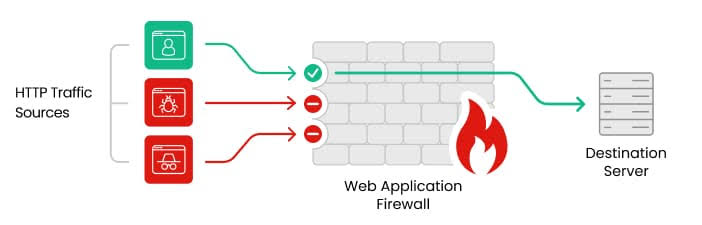
Open-source engines like ModSecurity run on your own servers. You install them as reverse proxies or web server modules. This option gives you full control over rules, logging, and tuning. It suits teams with dedicated operations staff who can maintain the configuration.
Hardware WAFs
Physical appliances from vendors like F5 or Imperva sit in your data center. They offer high throughput and dedicated hardware acceleration. Large enterprises with strict compliance requirements often prefer hardware WAFs for their performance and centralized management.
Container-Native WAFs
In Kubernetes environments, sidecar proxies like Envoy with WebAssembly filters or dedicated ingress controllers can enforce WAF policies at the pod level. This approach fits microservice architectures where traditional reverse proxies are too heavy.
Hands-On Lab: Deploy a WAF with Docker in 10 Minutes
The fastest way to see a WAF in action is to run ModSecurity with the OWASP Core Rule Set inside Docker. You need a Linux machine with Docker and Docker Compose.
Step 1: Create the Project Directory
Open a terminal and create a folder for this lab:
mkdir ~/lab-waf && cd ~/lab-wafStep 2: Write the Docker Compose File
Create a file named docker-compose.yml with the following content:
version: "3.9"

services:
  backend:
    image: nginxdemos/hello:plain-text
    container_name: site-backend

  waf:
    image: owasp/modsecurity-crs:nginx
    container_name: waf-modsecurity
    ports:
      - "8080:8080"
    environment:
      BACKEND: "http://backend"
      MODSEC_RULE_ENGINE: "On"
      PARANOIA: "1"
    depends_on:
      - backend
This configuration uses the official OWASP CRS image. The BACKEND variable tells the WAF where to forward legitimate traffic. MODSEC_RULE_ENGINE: On enables blocking mode, and PARANOIA: 1 keeps false positives low.
Step 3: Start the Containers
Run the following command:
docker compose up -dVerify both containers are running:
docker compose psYou should see site-backend and waf-modsecurity in the Up state.
Step 4: Test Normal Traffic
Open your browser or use curl to visit the demo site:
curl http://localhost:8080You should receive a greeting from the Nginx demo page, confirming the reverse proxy path works.
Step 5: Test a Malicious Request
Now try an SQL injection payload:
curl -i "http://localhost:8080/?id=1' OR '1'='1"The WAF should respond with a 403 Forbidden status. The request never reached the backend. You have just blocked your first attack.
![Screenshot of terminal showing curl command returning 403 Forbidden from WAF] Image Title: WAF Blocking SQL Injection AttemptAlt Text: Terminal screenshot showing a curl command with an SQL injection payload being blocked by ModSecurity with a 403 Forbidden response
Step 6: Check the Logs
Inspect the ModSecurity audit log inside the container:
docker exec waf-modsecurity tail -20 /var/log/modsec_audit.logLook for the rule ID that triggered the block. You should see a reference to SQL injection detection, proving the WAF evaluated the request and took action.
To clean up when finished:
docker compose downHands-On Lab: Install ModSecurity on Nginx
Docker works well for testing, but production servers often need a native installation. Here is how to install ModSecurity on Nginx with Ubuntu 24.04.
Step 1: Install Dependencies
Update your package list and install build tools:
sudo apt update
sudo apt install -y git build-essential libpcre3 libpcre3-dev zlib1g \
  zlib1g-dev libssl-dev libxml2 libxml2-dev uuid-dev
Step 2: Compile the ModSecurity Library
Download and build the ModSecurity engine:
cd /opt
sudo git clone --depth 1 -b v3/master https://github.com/SpiderLabs/ModSecurity.git
cd ModSecurity
sudo git submodule init
sudo git submodule update
sudo ./build.sh
sudo ./configure
sudo make
sudo make install
Step 3: Build the Nginx Connector
Nginx cannot load ModSecurity directly. You need a connector module compiled against your exact Nginx version:
cd /opt
sudo git clone --depth 1 https://github.com/SpiderLabs/ModSecurity-nginx.git
NGINX_VERSION=$(nginx -v 2>&1 | awk -F '/' '{print $2}')
sudo wget https://nginx.org/download/nginx-${NGINX_VERSION}.tar.gz
sudo tar -xzf nginx-${NGINX_VERSION}.tar.gz
cd nginx-${NGINX_VERSION}
sudo ./configure --with-compat --add-dynamic-module=../ModSecurity-nginx
sudo make modules
sudo mkdir -p /etc/nginx/modules
sudo cp objs/ngx_http_modsecurity_module.so /etc/nginx/modules/
Step 4: Download OWASP CRS
Install the Core Rule Set:
cd /etc/nginx
sudo git clone --depth 1 https://github.com/coreruleset/coreruleset.git modsec-crs
cd modsec-crs
sudo cp crs-setup.conf.example crs-setup.conf
Step 5: Configure ModSecurity
Create the main configuration file:
sudo mkdir -p /etc/nginx/modsec
sudo tee /etc/nginx/modsec/main.conf > /dev/null << 'EOF'
Include /etc/nginx/modsec/modsecurity.conf
Include /etc/nginx/modsec-crs/crs-setup.conf
Include /etc/nginx/modsec-crs/rules/*.conf
EOF
Copy the recommended engine configuration:
sudo cp /opt/ModSecurity/modsecurity.conf-recommended /etc/nginx/modsec/modsecurity.conf
sudo sed -i 's/SecRuleEngine DetectionOnly/SecRuleEngine On/' /etc/nginx/modsec/modsecurity.confImportant: For your first deployment, keep SecRuleEngine DetectionOnly. This logs attacks without blocking anything, giving you time to tune false positives.
Step 6: Load the Module in Nginx
Edit /etc/nginx/nginx.conf and add this line at the top, outside any block:
load_module modules/ngx_http_modsecurity_module.so;Then add the WAF to your server block in /etc/nginx/sites-available/default:
server {
    listen 80;
    server_name example.com;

    modsecurity on;
    modsecurity_rules_file /etc/nginx/modsec/main.conf;

    location / {
        proxy_pass http://127.0.0.1:8080;
    }
}
Step 7: Restart and Verify
Test your configuration and restart Nginx:
sudo nginx -t
sudo systemctl restart nginx
Confirm ModSecurity loaded by checking the error log:
sudo grep -i modsecurity /var/log/nginx/error.logTesting Your WAF With Real Attack Payloads
A WAF you have not tested is a WAF you do not trust. Use curl to fire safe but realistic attack patterns at your application.
SQL Injection Test
curl -i "http://localhost/?id=1' UNION SELECT null, username, password FROM users--"Cross-Site Scripting Test
curl -i "http://localhost/?search=<script>alert('xss')</script>"Local File Inclusion Test
curl -i "http://localhost/?page=../../../etc/passwd"Remote Code Execution Test
curl -i "http://localhost/?cmd=whoami"If your WAF runs in detection-only mode, check the audit log after each test:
sudo tail -f /var/log/modsec_audit.logYou should see JSON entries naming the specific CRS rule that matched. Look for fields like ruleid and message. If a payload slips through, verify that CRS loaded correctly.
Tuning for False Positives
Every WAF administrator fights false positives. A legitimate user submits a contact form containing the word “select,” and the WAF blocks it because that word looks like SQL injection. Here is how to handle this without turning off security.
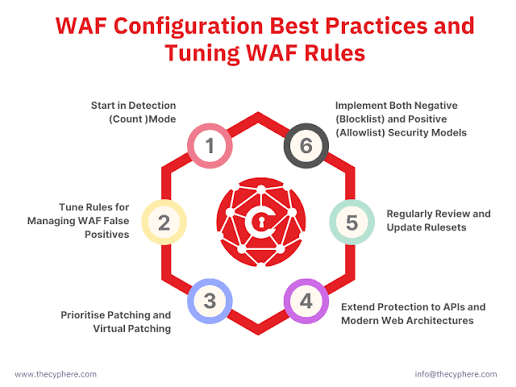
Start in Detection-Only Mode
Never enable blocking on day one. Run in detection-only mode for at least one week. Collect logs. Identify which rules trigger on normal traffic.
Use Rule Exclusions
When a rule produces false positives for a specific parameter, create an exclusion instead of disabling the rule entirely. Add this to /etc/nginx/modsec/rules/REQUEST-900-EXCLUSION-RULES-BEFORE-CRS.conf:
# Disable rule 942100 only for the 'comment' parameter on /contact
SecRule REQUEST_URI "@streq /contact" \
    "id:1001,phase:2,pass,nolog,\
    ctl:ruleRemoveTargetById=942100;ARGS:comment"
This removes the target parameter from that single rule. All other rules still inspect the comment field, and rule 942100 still protects other parameters.
Adjust Paranoia Levels
If you see many false positives at Level 2, drop to Level 1. Raise the level only after your application has proven stable at the current setting.
Whitelist Trusted IPs
For internal tools or known API consumers, you can bypass the WAF entirely:
SecRule REMOTE_ADDR "@ipMatch 203.0.113.0/24" \
    "id:1002,phase:1,pass,nolog,ctl:ruleEngine=Off"
Use this sparingly. Every exception is a potential gap in your defense.
Best Practices for Running a WAF in Production
Deploying the software is only half the battle. Keeping it effective requires ongoing work.
Keep Your Rule Set Current
The OWASP CRS team releases updates regularly. New attack patterns emerge constantly. Schedule a monthly task to check for CRS updates and review the changelog:
cd /etc/nginx/modsec-crs
sudo git pull
sudo nginx -t && sudo systemctl reload nginx
Centralize Your Logs
A WAF that writes only to local files is a WAF nobody monitors. Ship your audit logs to a SIEM or log aggregation platform like the ELK stack or Splunk. Correlated data reveals attack campaigns that individual log entries hide.
Set Up Rate Limiting
CRS detects malicious patterns, not volume. Pair your WAF with Nginx rate limiting to stop brute-force attacks and scraping:
limit_req_zone $binary_remote_addr zone=waf_limit:10m rate=10r/s;

server {
    location / {
        limit_req zone=waf_limit burst=20 nodelay;
        modsecurity on;
        modsecurity_rules_file /etc/nginx/modsec/main.conf;
        proxy_pass http://backend;
    }
}
Write Virtual Patches
When a new CVE drops against your CMS or framework, and the vendor patch takes weeks to arrive, write a custom ModSecurity rule to block the exploit pattern:
# Block CVE-202X-XXXXX exploit pattern
SecRule REQUEST_URI "@contains /vulnerable-endpoint" \
    "id:1000001,phase:2,deny,status:403,msg:'Virtual patch for CVE-202X-XXXXX'"
Place custom rules in a file numbered above 1000000 so future CRS updates never overwrite them.
Test Before Every Change
Always validate configuration syntax before reloading:
sudo nginx -tMaintain a staging environment that mirrors production. Run your curl test suite after every rule change. A single typo in a rule exclusion can disable protection for an entire parameter.
Monitor Performance
Rule inspection consumes CPU. If your server handles thousands of requests per second, watch your load average. Deeper paranoia levels and full response body inspection cost cycles. Tune SecRequestBodyLimit and SecResponseBodyAccess to match your hardware capacity.
![Dashboard screenshot showing WAF metrics like blocked requests, false positive rate, and response time] Image Title: WAF Monitoring DashboardAlt Text: Grafana-style dashboard displaying Web Application Firewall metrics including blocked requests per minute and anomaly scores
Conclusion
A Web Application Firewall is not a magic shield, but it is an essential layer in any modern security strategy. It understands the language of the web in ways that network firewalls cannot, blocking SQL injection, XSS, and countless other attacks before they touch your application.
You have learned how a WAF works, where it sits in your architecture, and how blacklist and whitelist models differ. You have also walked through two practical deployments: a quick Docker lab for experimentation and a native Nginx installation for production. Finally, you explored tuning techniques and best practices that keep your WAF accurate without frustrating legitimate users.
Security is a process, not a product. Start with detection-only mode. Tune your rules. Monitor your logs. Over time, your WAF will become a silent guardian that blocks threats while your users enjoy a seamless experience.
Want more articles and tutorials like this?
Get new tutorials, security alerts, and IT tips straight to your inbox.