Web Application Firewalls: A Practical Guide to Protecting Your Apps
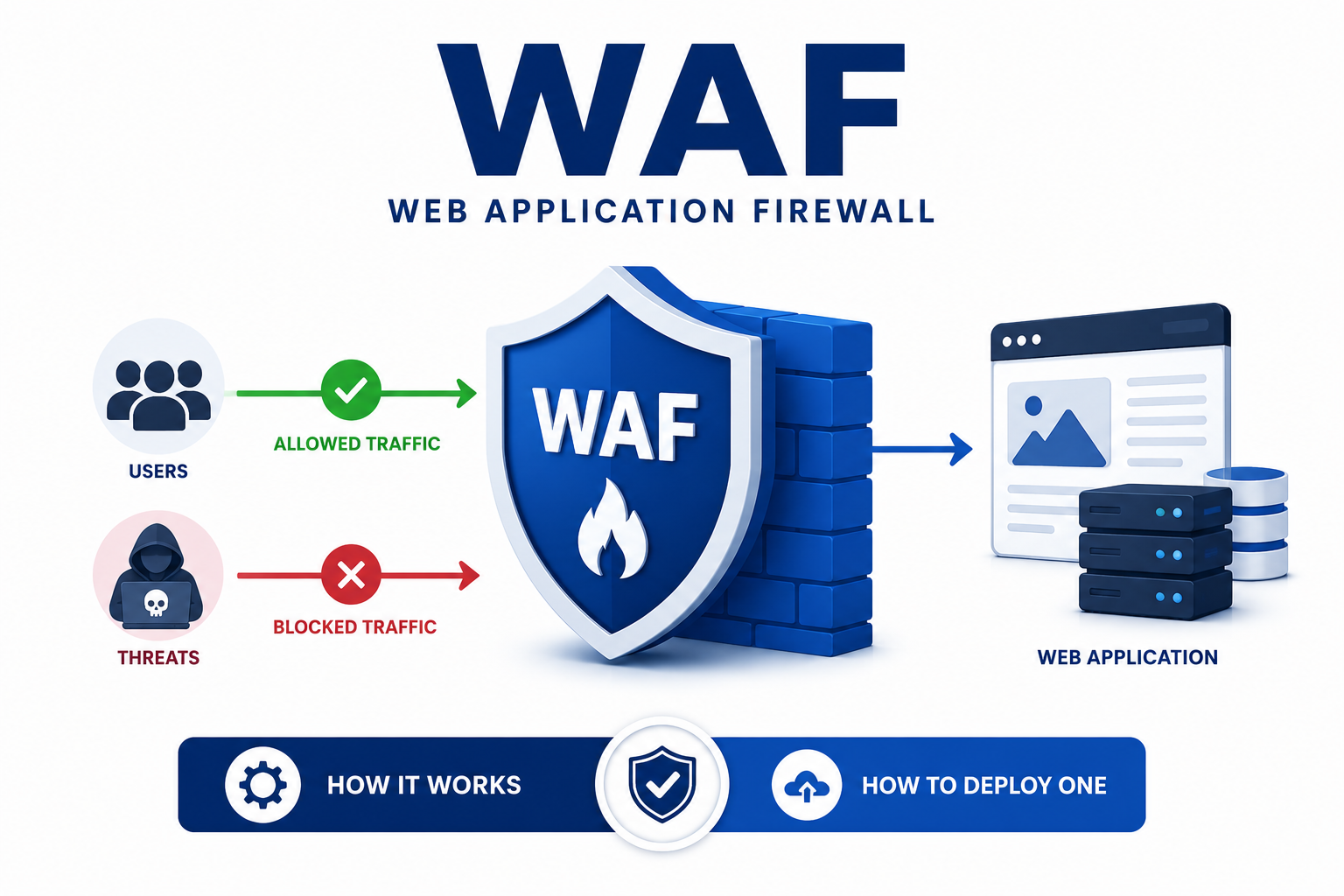
Table of Contents
- What Exactly Does a WAF Do?
- How WAFs Differ from Network Firewalls and IPS
- Core Deployment Patterns
- Security Models: Blacklist vs Whitelist
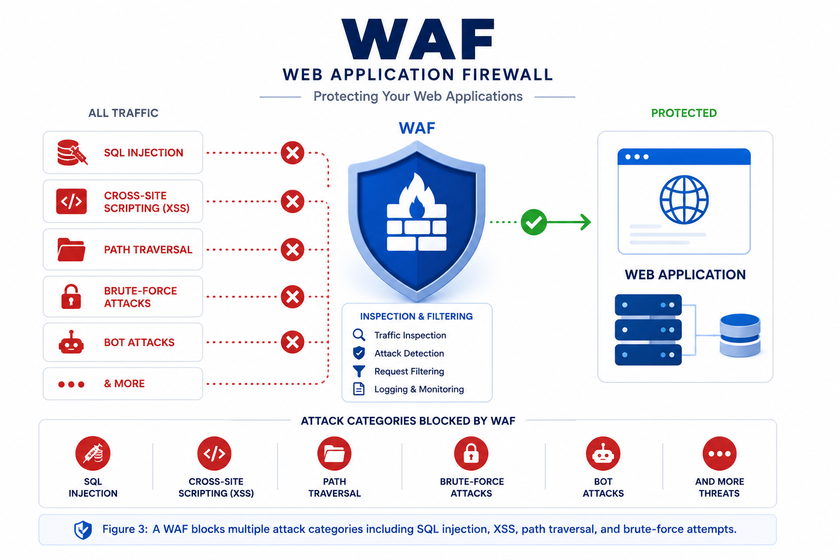
- Threats a WAF Can Block
- Understanding OWASP Core Rule Set Paranoia Levels
- Top Open-Source WAF Engines in 2026
- Hands-On Lab: Deploy a WAF with Docker
- Tuning Your WAF and Handling False Positives
- Limitations and What WAFs Cannot Fix
- Conclusion
What Exactly Does a WAF Do?
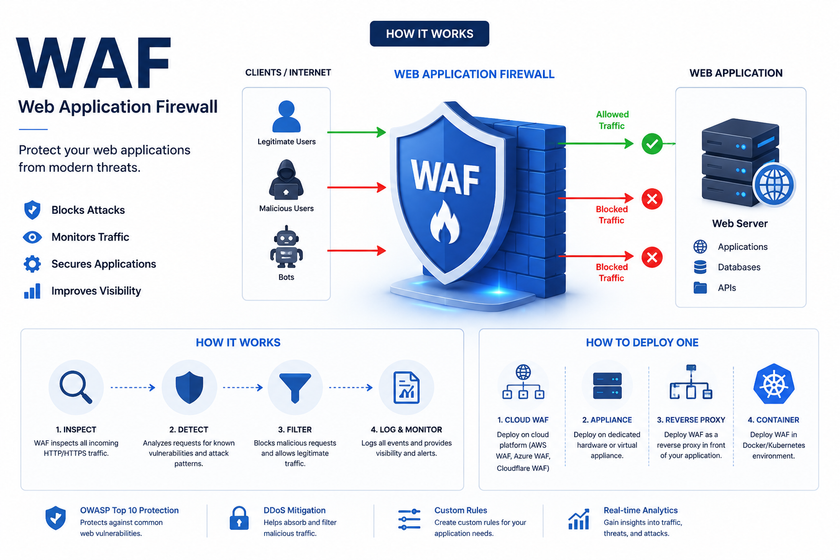
A WAF operates at Layer 7 of the OSI model. Unlike traditional firewalls that only check IP addresses and ports, a WAF reads the actual content of HTTP requests. It examines URLs, headers, cookies, form data, and query parameters to spot attack patterns.
Think of it as a security guard at the entrance of a building. A network firewall checks if you have a valid ID card. A WAF listens to what you actually say and blocks you if you start making threats.
This deep inspection allows a WAF to catch attacks that slip past perimeter defenses. For example, a standard firewall sees a legitimate POST request to /login. A WAF notices that the username field contains ' OR '1'='1 and blocks the SQL injection attempt.
Common WAF Deployment Formats
You can deploy a WAF in several ways:
- Physical or virtual appliances: Hardware boxes or VMs placed inline before your web servers. Vendors like F5 and Fortinet offer these.
- Software modules: Direct integration into web servers. ModSecurity for Apache follows this model.
- Reverse proxy containers: Dockerized WAFs that sit between clients and your application. This approach dominates modern cloud-native deployments.
- Cloud services: AWS WAF, Cloudflare, and Azure WAF filter traffic at the edge before it reaches your infrastructure.
How WAFs Differ from Network Firewalls and IPS
Beginners often confuse these three technologies. They complement each other rather than compete.
Network Firewall
A network firewall works at Layers 3 and 4. It asks: “Is this IP address allowed to reach this port?” It blocks traffic based on source and destination IPs, port numbers, and protocols. It cannot read HTTP request bodies. If port 443 is open, an SQL injection passes through just like any other HTTPS request.
IDS/IPS
Intrusion Detection and Prevention Systems monitor network traffic across all protocols. They look for attack signatures in SMB, DNS, FTP, and HTTP traffic. While broader than a WAF, they lack the granular understanding of web application context. An IPS might detect a known exploit signature but miss a subtle SQL injection encoded in a JSON API payload.
WAF
The WAF specializes in HTTP and HTTPS. It decodes URL encodings, normalizes Base64, inspects each parameter, and applies rules tailored to web attacks. Modern WAFs also understand JSON, XML, and GraphQL payloads, making them essential for API protection.
Table
| Device | OSI Layer | What It Inspects | Primary Role |
|---|---|---|---|
| Network Firewall | 3-4 | IP, port, protocol | Perimeter access control |
| IPS | 3-7 (all protocols) | Packet signatures across protocols | Network threat detection |
| WAF | 7 | HTTP/HTTPS content, headers, body | Web application protection |
These three layers work together. The network firewall filters bulk traffic, the IPS watches for anomalies across protocols, and the WAF protects your specific web applications.
Core Deployment Patterns
Reverse Proxy Mode
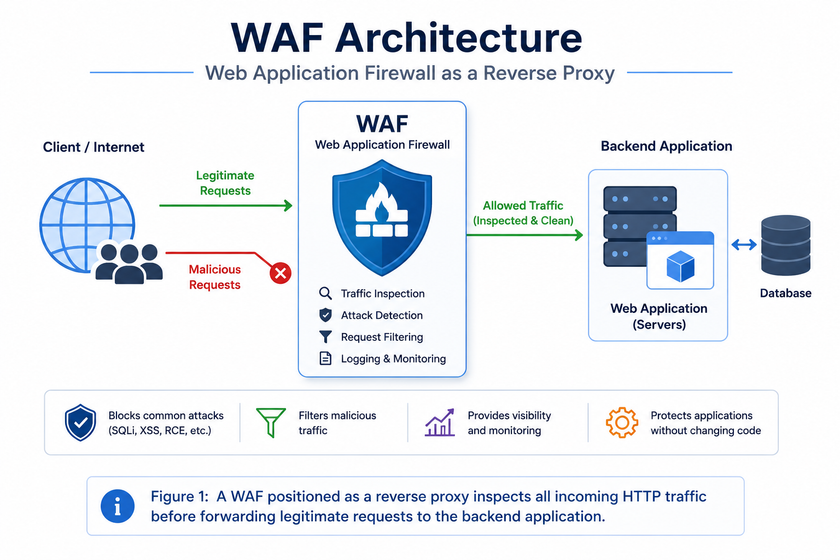
Most WAFs run as reverse proxies. They terminate TLS connections, decrypt traffic for inspection, then forward clean requests to backend servers. Clients never talk directly to your application. This mode gives the WAF full visibility into encrypted traffic.
Cloud WAFs and containerized solutions almost exclusively use this pattern. It scales horizontally and fits naturally into Kubernetes ingress architectures.
Bridge Mode
Also called transparent mode, this places the WAF inline without changing IP addresses. Traffic flows through it like a network bridge. This works well when you cannot modify DNS or application configurations.
Server Module
ModSecurity historically deployed as an Apache module. It runs inside the web server process itself. While efficient, this ties your WAF to a specific server and complicates updates.
Security Models: Blacklist vs Whitelist
WAFs apply two filtering philosophies. Most production deployments combine both.
Negative Security Model (Blacklist)
The blacklist approach allows all traffic except known attack patterns. The OWASP Core Rule Set works this way. It contains hundreds of rules describing SQL injection syntax, XSS payloads, and path traversal sequences.
Advantages: Quick to deploy. Works out of the box with generic rules.
Drawbacks: Unknown or heavily obfuscated attacks may slip through. Attackers constantly invent new bypass techniques.
Positive Security Model (Whitelist)
The whitelist approach blocks everything except explicitly defined legitimate traffic. For example, you might declare: “The /api/users endpoint accepts only GET requests with a numeric id parameter between 1 and 10 digits.”
Advantages: Extremely robust. Unknown attacks fail automatically because they do not match the allowed pattern.
Drawbacks: Requires deep knowledge of your application. Maintenance overhead grows as your application changes.
Anomaly Scoring
Modern WAFs like ModSecurity with CRS use anomaly scoring instead of blocking on the first match. Each triggered rule adds points to a cumulative score. The WAF blocks only when the score exceeds a threshold. This reduces false positives while maintaining strong detection.
For instance, a request might trigger a minor warning (3 points) for an unusual user-agent and a critical alert (5 points) for SQL injection patterns. With a blocking threshold of 5, the request gets blocked. If only the minor warning fired, the request proceeds.
Threats a WAF Can Block
The OWASP Top 10 lists the most critical web application risks. A properly configured WAF directly mitigates several of these threats.
SQL Injection (SQLi)
Attackers insert malicious SQL into input fields. A classic payload like 1' OR '1'='1 forces a database query to return all records. WAFs detect keywords like UNION, SELECT, and -- plus encoded variations.
Cross-Site Scripting (XSS)
XSS injects JavaScript into pages viewed by other users. Attackers steal session cookies or deface websites. WAFs flag suspicious tags like <script>, event handlers like onerror=, and protocols like javascript:.
File Inclusion and Path Traversal
Local File Inclusion (LFI) and path traversal attacks access sensitive files using sequences like ../../../etc/passwd. WAFs normalize encodings and block these patterns.
Command Injection
When applications execute system commands with user input, attackers inject their own commands using characters like ;, |, and `. WAFs detect shell metacharacters and common command keywords.
Brute-Force and Credential Stuffing
WAFs limit login attempts per IP address using rate limiting. This slows password guessing attacks and credential stuffing campaigns that replay leaked passwords.
Known Vulnerability Exploitation
When researchers disclose new CVEs, WAF vendors publish virtual patches. These rules block exploitation attempts while your team develops and tests actual code fixes. This “virtual patching” capability alone justifies deploying a WAF.
Understanding OWASP Core Rule Set Paranoia Levels
The OWASP Core Rule Set (CRS) remains the gold standard for open-source WAF rules. CRS 4, released in 2024, introduced a plugin architecture, better UTF-8 handling, and over 500 bypass fixes. CRS organizes rules into paranoia levels that control strictness.
PL1 (Default)
PL1 provides solid OWASP Top 10 coverage with minimal false positives. Most production sites start here. It catches obvious attacks without disrupting legitimate users.
PL2 (Enhanced)
PL2 adds rules for applications handling sensitive data. Expect tuning work, especially around complex forms and APIs. A WordPress site moved to PL2 might generate around 1,400 false positives in the first week until you configure targeted exclusions.
PL3 (Strict)
PL3 suits high-security environments like banking or healthcare. Plan a dedicated tuning phase before enabling blocking mode.
PL4 (Maximum)
PL4 flags unusual character distributions and near-paranoid patterns. It produces so many alerts that security teams often ignore them. A tuned PL1 or PL2 that everyone trusts protects far more than an ignored PL4.
CRS 4 also separates detection paranoia from blocking paranoia. You can log higher-level rules without blocking them, previewing false positives before tightening enforcement.
Table
| Paranoia Level | Best For | False Positive Rate |
|---|---|---|
| PL1 | General production use | Very low |
| PL2 | Sensitive data applications | Low to moderate |
| PL3 | Banking, healthcare APIs | Moderate to high |
| PL4 | High-security, locked-down apps | Very high |
Top Open-Source WAF Engines in 2026
The open-source WAF landscape has evolved significantly. Here are the leading options available today.
ModSecurity with OWASP CRS
ModSecurity, created in 2002, remains the most battle-tested open-source WAF engine. It runs as an Apache module and supports Nginx through connectors. Trustwave maintained it until 2024, when it transitioned to community-driven development under OWASP.
Best for: Apache servers, legacy deployments, teams with SecLang experience.
Coraza
Coraza is a modern Go-based WAF engine designed as ModSecurity’s successor. It maintains full compatibility with SecLang rules and OWASP CRS v4 while eliminating C dependencies. Coraza integrates with Caddy, Traefik, HAProxy, and Envoy via proxy-wasm.
Best for: New cloud-native deployments, Caddy/Traefik users, Kubernetes environments.
BunkerWeb
BunkerWeb wraps Nginx with pre-configured protections including ModSecurity, CRS, IP blacklists, rate limiting, and automatic Let’s Encrypt certificates. It provides a web administration interface that simplifies WAF management.
Best for: Teams wanting a hardened reverse proxy with minimal configuration.
open-appsec
Developed by Check Point, open-appsec uses machine learning instead of signatures. It learns your application’s normal traffic patterns and detects anomalies, enabling zero-day protection without rule updates.
Best for: Organizations wanting signatureless protection and automated threat detection.
SafeLine
SafeLine uses semantic analysis rather than traditional signatures. It parses requests to understand intent, reducing reliance on pattern matching.
Best for: Teams seeking alternatives to rule-based detection.
| WAF | Engine | Best Integration | Key Strength |
|---|---|---|---|
| ModSecurity + CRS | C/Apache | Apache, Nginx | Maturity, extensive documentation |
| Coraza | Go | Caddy, Traefik, Envoy | Cloud-native, no C dependencies |
| BunkerWeb | Nginx + ModSecurity | Docker, reverse proxy | Easy web UI, auto HTTPS |
| open-appsec | ML-based | Nginx, Kubernetes | Zero-day detection, no signatures |
| SafeLine | Semantic analysis | Standalone, Docker | Intent-based detection |
Hands-On Lab: Deploy a WAF with Docker
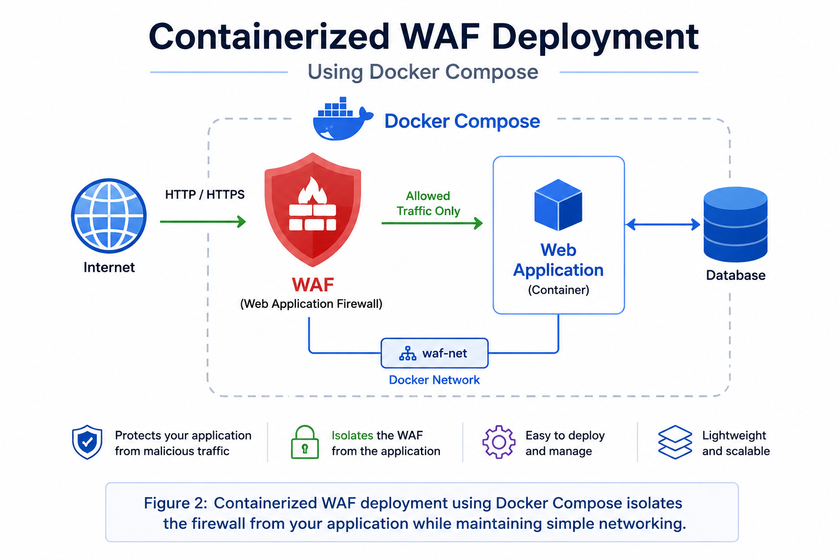
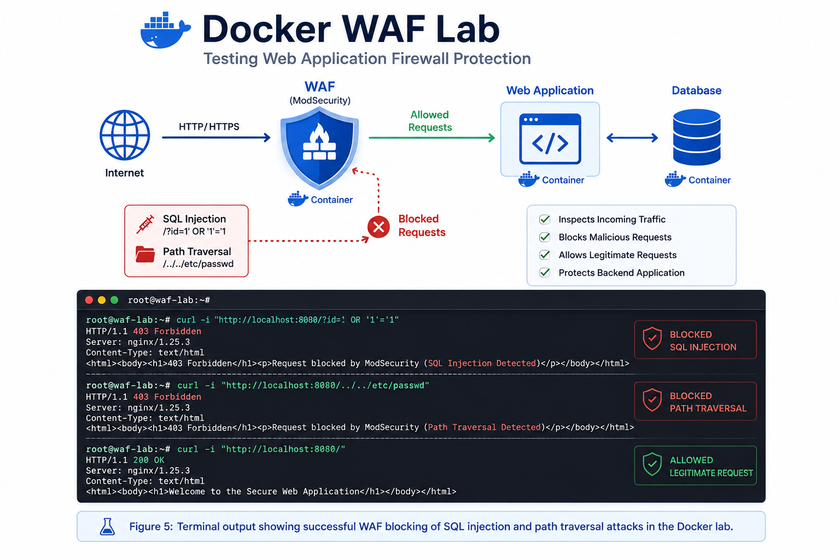
This lab deploys ModSecurity with OWASP CRS as a reverse proxy in front of a demo application. You need Docker and Docker Compose installed.
Step 1: Create the Project Directory
mkdir -p ~/lab-waf && cd ~/lab-wafStep 2: Create the Docker Compose File
Create docker-compose.yml:
services:
  backend:
    image: nginxdemos/hello:plain-text
    container_name: site-backend
    networks:
      - waf-net

  waf:
    image: owasp/modsecurity-crs:nginx
    container_name: waf-modsecurity
    ports:
      - "8080:8080"
    environment:
      BACKEND: "http://backend"
      MODSEC_RULE_ENGINE: "On"
      PARANOIA: "1"
      PORT: "8080"
    depends_on:
      - backend
    networks:
      - waf-net

networks:
  waf-net:
    driver: bridge
The BACKEND variable points to the demo application. MODSEC_RULE_ENGINE: On enables blocking mode. Use DetectionOnly during initial testing.
Step 3: Start the Lab
docker compose up -dVerify both containers run:
docker compose psStep 4: Test Legitimate Traffic
curl -i http://localhost:8080/You should see HTTP/1.1 200 OK with the Nginx demo response.
Step 5: Simulate an SQL Injection Attack
curl -i "http://localhost:8080/?id=1%27%20OR%20%271%27=%271"The WAF returns HTTP/1.1 403 Forbidden. The attack never reaches the backend.
Step 6: Test Path Traversal
curl -i "http://localhost:8080/?file=../../../../etc/passwd"Again, the WAF responds with 403 Forbidden.
Step 7: Review the Logs
docker compose logs waf | grep ModSecurityLook for the rule IDs triggered. Rule 942100 detects SQL injection via libinjection. Rule 949110 shows the anomaly score exceeding the threshold.
Here is a sample log entry:
{
  "transaction": {
    "client_ip": "172.18.0.1",
    "time_stamp": "Tue Jun 16 10:30:00 2026",
    "request": {
      "method": "GET",
      "uri": "/?id=1%27%20OR%20%271%27=%271"
    },
    "response": {
      "http_code": 403
    },
    "messages": [
      {
        "message": "SQL Injection Attack Detected via libinjection",
        "details": {
          "ruleId": "942100",
          "severity": "2"
        }
      },
      {
        "message": "Inbound Anomaly Score Exceeded (Total Score: 8)",
        "details": {
          "ruleId": "949110"
        }
      }
    ]
  }
}
Step 8: Switch to Detection Mode
Before production deployment, always start in detection mode. Modify your docker-compose.yml:
environment:
  MODSEC_RULE_ENGINE: "DetectionOnly"
Then restart:
docker compose up -dIn detection mode, the WAF logs attacks but returns 200 OK to the client. This lets you tune rules without breaking your application.
Tuning Your WAF and Handling False Positives
Deploying a WAF is not a one-time task. Ongoing tuning keeps it effective without disrupting users.
Start in Detection Mode
Always run new WAF deployments in detection mode for days or weeks. Analyze logs to identify legitimate traffic that triggers rules. Create exclusions for these false positives before enabling blocking.
Understand Your Application
Document your application’s endpoints, parameters, and expected inputs. A WAF tuned for WordPress needs different rules than one protecting a REST API. API-specific protections include JSON validation, strict HTTP method enforcement, and granular rate limiting.
Create Targeted Exclusions
When a rule blocks legitimate traffic, create a narrow exclusion rather than disabling the entire rule. If rule 942100 blocks a specific form field, exclude only that field rather than turning off SQL injection detection globally.
Here is an example ModSecurity exclusion rule:
# Allow specific parameter for known legitimate use
SecRule REQUEST_URI "@streq /api/search" \
    "id:1000,phase:1,pass,nolog,\
    ctl:ruleRemoveTargetById=942100;ARGS:search_query"
This removes the search_query parameter from inspection by rule 942100 only on the /api/search endpoint.
Monitor Key Metrics
Track these KPIs to measure WAF effectiveness:
- Blocking percentage: Should catch real threats without blocking legitimate users.
- False positive rate: Keep under 1-2% to avoid user frustration.
- Latency overhead: WAF inspection should add less than 50ms. Monitor this during peak load.
Integrate with SIEM
Feed WAF logs into your Security Information and Event Management system. Correlated with other security data, WAF alerts reveal coordinated attacks and reconnaissance campaigns.
Update Regularly
Threats evolve constantly. Update your WAF engine and rule sets monthly. Subscribe to your vendor’s security advisory feed. When new CVEs drop, check for virtual patch availability within 24 hours.
Limitations and What WAFs Cannot Fix
A WAF strengthens your defenses but does not replace secure coding practices. Understand its boundaries.
False Positives
Legitimate requests sometimes match attack patterns. A blog post about SQL injection might trigger SQLi rules. Tuning resolves most of these, but some edge cases persist.
Bypass Techniques
Skilled attackers use encoding tricks, payload fragmentation, and syntax variations to evade rules. No WAF catches everything. Regular red team exercises test your WAF’s effectiveness.
Business Logic Flaws
A WAF cannot detect logical vulnerabilities. If one user can view another user’s invoices by changing an ID parameter, the request looks perfectly legitimate to a WAF. Only proper access controls in your application fix this.
Maintenance Overhead
WAFs require ongoing care: rule updates, log analysis, exclusion tuning, and performance monitoring. An unmaintained WAF slowly becomes ineffective. Assign clear ownership for WAF management within your team.
Not a Replacement for Patching
Virtual patching buys time, but it does not fix underlying vulnerabilities. You still need to patch your applications, frameworks, and libraries regularly.
Conclusion
A Web Application Firewall belongs in every web application architecture. Positioned between users and your servers, it inspects HTTP traffic deeply and blocks the most common application-layer attacks. From SQL injection to XSS, from path traversal to credential stuffing, a WAF stops threats before they reach your code.
We have seen that WAFs complement rather than replace network firewalls and IPS devices. They form one layer of a defense-in-depth strategy alongside secure development, patch management, and penetration testing.
The open-source ecosystem offers powerful options for every environment. ModSecurity and OWASP CRS provide battle-tested protection. Coraza brings modern cloud-native performance. BunkerWeb simplifies deployment with its web interface. open-appsec adds machine learning for zero-day threats.
Start with the Docker lab in this guide. Run it in detection mode, study the logs, and experiment with paranoia levels. Once you understand how your traffic interacts with the rules, move to blocking mode with confidence.
Want more articles and tutorials like this?
Get new tutorials, security alerts, and IT tips straight to your inbox.