What Should You Know About pfSense? The Complete Beginner-to-Business Guide
Anyone who has spent time managing a network eventually runs into the same question: which firewall should sit at the edge, protecting everything behind it? pfSense keeps coming up in that conversation, usually praised by hobbyists and IT consultants alike. But between the free Community Edition, the paid Plus version, dozens of add-on packages, and a handful of serious competitors, picking the right path isn’t always obvious. This guide breaks pfSense down in plain terms, so you can decide if it belongs in your network.
Table of Contents
- What Is pfSense?
- A Quick History
- pfSense CE vs pfSense Plus: What’s the Real Difference?
- pfSense Pricing: What Will It Actually Cost You?
- Core Features That Make pfSense Stand Out
- pfSense Packages: Extending the Firewall
- pfSense vs Other Firewalls
- Who Should Use pfSense (and Who Shouldn’t)
- Is pfSense Good for Beginners?
- Basic Setup: Installing pfSense CE
- Common Mistakes to Avoid
- FAQ
- Conclusion
What Is pfSense?
pfSense is firewall and router software built on FreeBSD, an operating system known for stability and strong networking internals. Instead of buying a dedicated appliance from a big vendor, you install pfSense on ordinary hardware — a mini PC, a repurposed server, or a virtual machine — and it turns that box into a full security gateway.
Under the hood, pfSense relies on the PF packet filter, the same firewall engine used by OpenBSD. That engine handles stateful filtering, network address translation (NAT), and traffic shaping, while pfSense wraps it all in a web interface so you never have to touch a config file directly.
Netgate, the company that stewards the project, also sells purpose-built hardware and a commercial edition. That combination — free core software plus optional paid hardware and support — is a big part of why pfSense shows up everywhere from home labs to government networks.
A Quick History
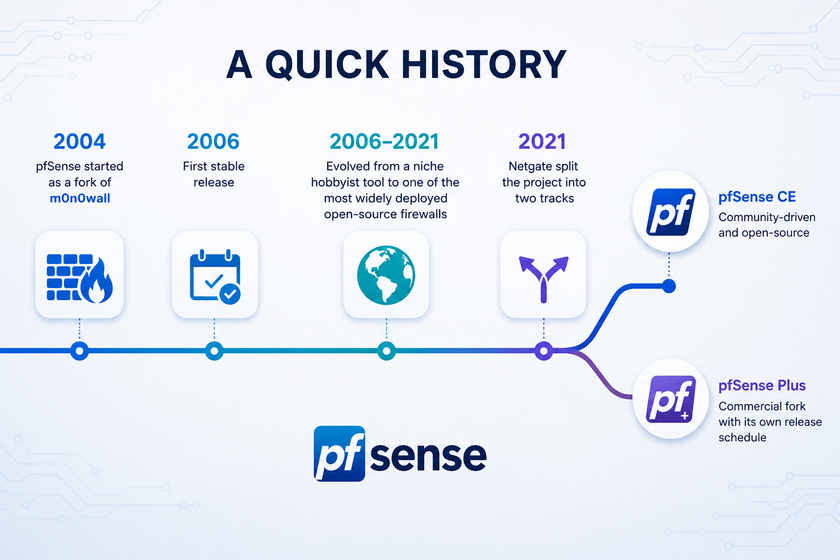
pfSense started in 2004 as a fork of m0n0wall, an earlier embedded firewall project, created by Chris Buechler and Scott Ullrich. The first stable release shipped in 2006. Since then, the project has evolved from a niche hobbyist tool into one of the most widely deployed open-source firewalls in the world, now maintained under Netgate’s stewardship with contributions from a large community of network engineers.
In 2021, Netgate split the project into two tracks: pfSense CE, which stayed community-driven and open-source, and pfSense Plus, a commercial fork with its own release schedule. Understanding that split is the key to understanding pfSense today.
pfSense CE vs pfSense Plus: What’s the Real Difference?
This is the question nearly every newcomer asks, so let’s settle it clearly.
pfSense CE (Community Edition) is the original, fully open-source branch, released under the Apache 2.0 license. Anyone can download it, install it on their own hardware, inspect the source code, and modify it. Netgate continues to fund its development, but the release cadence follows no fixed schedule and new features often land here later than on Plus.
pfSense Plus is Netgate’s productized, closed-source version. It ships pre-installed on Netgate’s own appliances and is also available as a free download for home labs and small deployments. Plus ships on Netgate hardware and is available as a software subscription, and it typically receives new features first, while CE receives them later, sometimes significantly later. Plus also follows a predictable “year.month” release format, with new versions arriving a few times a year, while CE keeps the traditional major.minor.patch numbering.
A few practical distinctions worth knowing:
| Aspect | pfSense CE | pfSense Plus |
|---|---|---|
| License | Open-source (Apache 2.0) | Closed-source, Netgate-managed |
| Cost | Free | Free for home use; licensed for commercial hardware |
| Feature updates | Later, community-paced | First, faster release cycle |
| Hardware | Any x86-64 hardware or VM | Netgate appliances (also ARM), or your own hardware with a license |
| Support | Community forums, docs | Optional paid TAC support tiers |
| Best for | Tinkerers, homelabs, full control seekers | Businesses wanting vendor support and warranty |
pfSense CE is the free, open-source firewall, while pfSense Plus is the premium, enterprise-ready edition designed for businesses and network professionals who want more advanced capabilities.If you like knowing exactly what code is running on your firewall, CE keeps that transparency. If you’d rather have a vendor on the other end of a support ticket, Plus is built for that.
pfSense Pricing: What Will It Actually Cost You?
Pricing depends entirely on the path you choose.
Running pfSense CE on your own hardware costs nothing beyond the hardware itself. You could repurpose an old desktop, buy a small fanless mini PC, or spin up a virtual machine on Proxmox or ESXi. This is the route most home labs and budget-conscious small offices take.
Buying a Netgate appliance bundles pfSense Plus, the hardware, and a year of basic support into one purchase. Approximate list pricing, in US dollars, looks like this:
| Netgate model | Typical use case | Starting price |
|---|---|---|
| Netgate 1100 | Home / small office | ~$269 |
| Netgate 2100 (BASE/MAX) | Small office, light VPN use | ~$369–$412 |
| Netgate 4200 MAX | SMB, moderate VPN and multi-WAN | ~$599 |
| Netgate 6100 (BASE/MAX) | SMB / edge with 10GbE needs | ~$899–$999 |
| Netgate 8200 MAX | Larger offices, high throughput | ~$1,749 |
| Netgate 8300 BASE | Data center / ISP-grade deployments | ~$4,899 |
Prices shift over time and by region, so treat these as ballpark figures rather than a quote. Netgate also offers a free home and lab tier for pfSense Plus, alongside paid pricing tiers for appliances, cloud deployments, and virtual machines.
Support costs extra, if you want it. TAC Lite (basic) support is often bundled with hardware purchases for a limited time, while TAC Professional and TAC Enterprise tiers add faster response times and deeper assistance for businesses that can’t afford downtime.
The bottom line: a solo consultant or student can run pfSense for the price of a used mini PC, while a growing company can scale into a fully supported, vendor-backed appliance without switching platforms.
Core Features That Make pfSense Stand Out
pfSense packs a surprising amount of enterprise-grade functionality into free software:
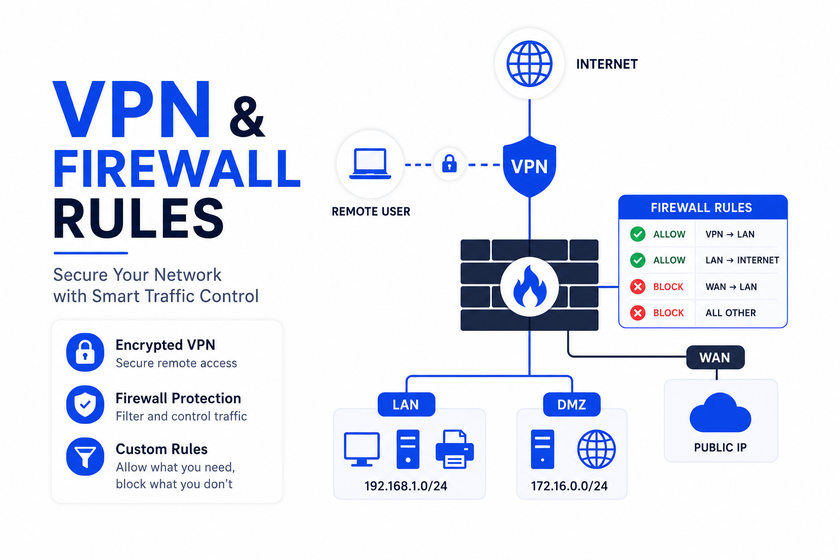
- Stateful firewall with granular rule sets per interface, VLAN, or alias group
- NAT and port forwarding, including 1:1 NAT for multi-IP setups
- Multi-WAN and failover, so a second internet connection kicks in automatically if the first drops
- VPN support for IPsec, OpenVPN, and WireGuard, covering both site-to-site and remote-access use cases
- Traffic shaping and QoS, useful for prioritizing VoIP or video calls over bulk downloads
- VLAN support, letting you segment guest, staff, and IoT devices on one physical network
- Captive portal, handy for guest Wi-Fi login pages
- High availability (CARP), allowing two firewalls to fail over to each other with almost no downtime
- Detailed logging and reporting, so you can actually see what’s crossing your network
pfSense Packages: Extending the Firewall
One of pfSense’s biggest strengths is its package system, which adds capabilities without needing separate hardware. Some of the most widely used packages include:
- pfBlockerNG — DNS and IP-based blocklisting, effectively an ad blocker and threat-feed filter for your whole network
- Snort / Suricata — intrusion detection and prevention (IDS/IPS), turning pfSense into more of a next-generation firewall
- HAProxy — load balancing and reverse proxying for internal services
- ntopng — deep traffic visibility and bandwidth monitoring per host
- Zabbix agent — feeds firewall metrics into a centralized monitoring stack
- OpenVPN Client Export — simplifies generating client configs for road warriors
Packages install with a couple of clicks from System > Package Manager, but each one adds CPU and RAM overhead, so hardware sizing matters more once you start layering IDS/IPS and heavy logging on top of routing.
pfSense vs Other Firewalls
pfSense doesn’t exist in a vacuum. Here’s how it stacks up against common alternatives.
pfSense vs OPNsense
OPNsense forked from pfSense back in 2015 and has since built its own identity. OPNsense follows a version scheme based on the year, with two major releases per year and weekly security and bug-fix updates in between.Unlike pfSense,OPNsense has a single edition with no CE-versus-Plus split — all features are available in the open-source version.If a single, fully open edition matters more to you than a mature package ecosystem, OPNsense is worth a look. If you want the widest range of third-party packages and documentation, pfSense still has the edge.
pfSense vs pfSense Plus on Netgate hardware
This isn’t really “pfSense vs a competitor” so much as choosing your support model, as covered above — self-managed and free versus vendor-backed and paid.
pfSense vs commercial UTM appliances (Sophos, Fortinet, SonicWall, Kerio)
Commercial unified threat management (UTM) boxes typically bundle antivirus scanning, web filtering, and centralized cloud management out of the box, backed by a vendor support contract. They tend to cost more, often through recurring subscription licenses, and lock you into their ecosystem. pfSense can match much of that functionality through packages, but you’re assembling the stack yourself. Community feedback based on user review platforms generally rates pfSense highly on ease of setup, quality of support (when purchased), and product direction compared with smaller commercial competitors, though larger enterprise UTM vendors still lead in bundled threat-intelligence services.
pfSense vs consumer routers (UniFi, ASUS, TP-Link)
Consumer routers win on simplicity and price for a basic home network. They lose badly on visibility, rule granularity, and VPN flexibility. pfSense requires more setup time but gives you an entirely different level of control — the kind of control an IT consultant or small business actually needs.
Who Should Use pfSense (and Who Shouldn’t)
Good fits:
- Small and medium businesses that need a real firewall without enterprise licensing costs
- IT consulting firms managing multiple client networks
- Branch offices needing site-to-site VPN back to a headquarters
- Home labs and students building networking or cybersecurity skills
- Organizations that want full visibility into the code running their security stack
Less ideal fits:
- Companies with no in-house or contracted networking expertise and zero appetite for hands-on configuration
- Environments demanding a single-vendor, fully cloud-managed dashboard across dozens of sites (a UniFi- or Fortinet-style cloud console may fit better)
- Teams that need guaranteed SLA-backed support without paying for it — CE’s community support won’t cut it for mission-critical uptime
Is pfSense Good for Beginners?
Yes, with a caveat. The web interface is genuinely approachable — most day-to-day tasks like adding firewall rules, setting up VLANs, or configuring a VPN don’t require touching the FreeBSD command line at all. That’s a big part of why pfSense is often a student’s or junior sysadmin’s first real firewall.
The caveat: pfSense assumes you already understand basic networking concepts — subnets, NAT, routing, and how firewall rules evaluate top to bottom. It won’t hide bad decisions from you the way a locked-down consumer router might. Beginners who pair pfSense with structured learning (documentation, training courses, or a mentor) tend to get the most value fastest.
Basic Setup: Installing pfSense CE
Here’s a simplified walkthrough for a first install on a spare PC or VM.
1. Download the installer image
Get the current CE image from the official pfSense download page and write it to a USB drive:
# On Linux/macOS, replace /dev/sdX with your USB device
sudo dd if=pfSense-CE-memstick-*.img of=/dev/sdX bs=1M status=progress
2. Boot and install
Boot the target machine from the USB drive, follow the installer prompts, and select ZFS or UFS as the filesystem (ZFS is recommended for snapshot support if your hardware has enough RAM).
3. Assign interfaces
At first boot, the console menu asks you to assign WAN and LAN interfaces:
Enter the WAN interface name: em0
Enter the LAN interface name: em1
4. Access the web GUI
Connect a laptop to the LAN port and browse to the default address:
https://192.168.1.1Default login is admin / pfsense — change this immediately under System > User Manager.
5. Run the setup wizard
The built-in wizard walks through hostname, DNS, time zone, WAN configuration, and a new admin password. Once finished, your firewall is routing traffic.
6. Lock down access
At minimum:
System > Advanced > Admin Access > Disable WebGUI redirect over HTTP (force HTTPS only)
System > User Manager > change default admin password
Firewall > Rules > WAN > confirm no unnecessary inbound rules exist
Common Mistakes to Avoid
- Skipping hardware sizing. Adding Suricata or heavy logging on underpowered hardware causes dropped packets and high CPU load.
- Leaving default credentials in place, even temporarily, on a device facing the internet.
- Ignoring firmware and package updates. Security patches matter more on a firewall than almost anywhere else in the network.
- Overcomplicating firewall rules early on. Start simple, document every rule’s purpose, and expand gradually.
- Not backing up the configuration. pfSense makes this a one-click export under Diagnostics > Backup & Restore — use it before every major change.
FAQ
Is pfSense really free? Yes. pfSense CE is fully free and open-source. pfSense Plus is also free for home and lab use; commercial and Netgate-hardware deployments involve a license tied to the appliance or subscription.
Can pfSense replace a commercial firewall for a small business? For most small and medium businesses, yes — especially when paired with packages like Snort/Suricata for intrusion detection and pfBlockerNG for filtering. Larger enterprises with complex compliance needs may still prefer a fully managed commercial UTM.
What hardware do I need to run pfSense? A device with at least two network interfaces, a modest CPU, and 4–8 GB of RAM is enough for most small networks. Heavier VPN or IDS/IPS use benefits from more CPU cores and RAM.
Does pfSense support WireGuard? Yes, WireGuard is supported alongside IPsec and OpenVPN, giving you a modern, fast VPN option.
How is pfSense different from OPNsense? Both share FreeBSD roots and a similar interface philosophy. <cite index=”17-1″>OPNsense uses a single, fully open edition with no CE/Plus split, while pfSense splits into a community edition and a commercial Plus edition</cite> with different release cadences and feature timing.
Do I need networking experience to use pfSense? Basic knowledge of subnets, NAT, and firewall rule logic goes a long way. Beginners can get started safely, but pfSense won’t hold your hand the way a consumer router does.
Conclusion
pfSense earns its reputation honestly: it gives individuals and businesses enterprise-grade firewall capability without an enterprise price tag. The CE vs Plus decision really comes down to whether you value full transparency and control (CE) or vendor-backed hardware and support (Plus). Pricing scales from “free on spare hardware” to a few thousand dollars for data-center-grade appliances, and the package ecosystem lets you grow the firewall’s capabilities as your network grows. For beginners building networking skills, IT consultants managing client sites, and small businesses that want real control over their security posture, pfSense remains one of the smartest starting points in the firewall world.
Want more articles and tutorials like this?
Get new tutorials, security alerts, and IT tips straight to your inbox.