The Anatomy of a Claude Prompt: (With Templates & Code Examples You Can Use Today)
Most people treat AI prompts like text messages — short, vague, and hoping the other side fills in the gaps. That approach wastes time. After months of testing Claude across content creation, coding, and strategy work, I landed on a six-block framework that consistently delivers better results. This post breaks down each block, shows you real templates, and gives you code you can copy and adapt immediately.
Table of Contents
- Why Most Prompts Fail Before They Start
- Block 1: Role — Who Should Claude Become?
- Block 2: Task — What Exactly Needs Doing?
- Block 3: Context — What Background Does Claude Need?
- Block 4: Reasoning — What Logic Should Drive the Answer?
- Block 5: Stop Conditions — When Is the Job Done?
- Block 6: Output — How Should the Final Result Look?
- Putting It All Together: Three Complete Templates
- Common Mistakes That Break the Framework
- Conclusion
Why Most Prompts Fail Before They Start
You open Claude, type “write a blog post about productivity,” and wait. The result? A generic, surface-level article that sounds like every other piece on the internet. You spend the next twenty minutes rewriting it.
The problem is not Claude. The problem is the prompt.
Think of Claude as a brilliant new hire who just walked through your door. This person knows a lot, but they do not know your company, your audience, your deadlines, or your standards. If you hand them a vague task and no context, they will produce something safe and average. That is exactly what happens when you skip structure.
Anthropic’s own documentation puts it plainly: “Think of Claude as a brilliant but new employee who lacks context on your norms and workflows. The more precisely you explain what you want, the better the result.”
The six-block framework fixes this by giving Claude everything it needs upfront. No guessing. No back-and-forth. Just clear instructions and clean output.
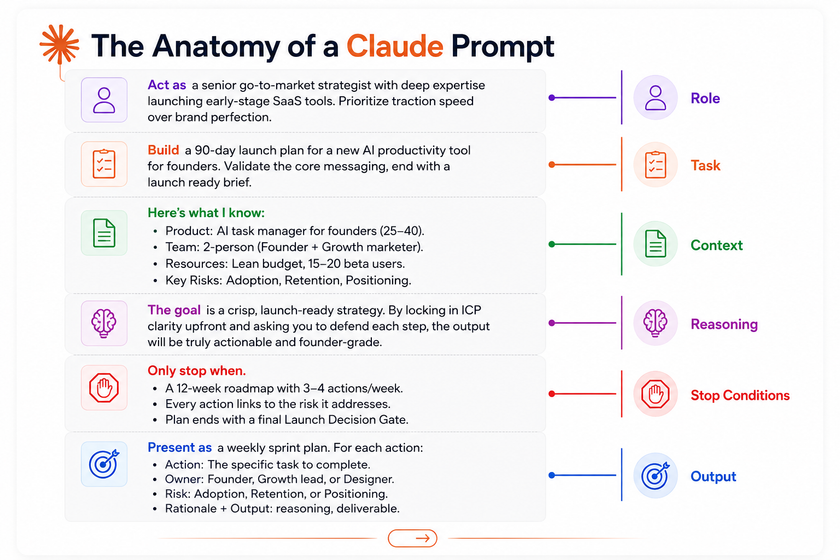
Suggested Image 1
- Title: “Vague Prompt vs. Structured Prompt Side-by-Side Comparison”
- Alt Tag: “Split-screen comparison showing a vague one-sentence AI prompt on the left and a detailed six-block structured prompt on the right, illustrating the difference in output quality”
Block 1: Role — Who Should Claude Become?
The first block defines the identity Claude adopts for your task. This shapes vocabulary, tone, depth, and perspective. Without a role, Claude defaults to “helpful generalist.” That works for simple questions. It fails for specialized work.
Why Role Assignment Matters
When you tell Claude to act as a “senior DevOps engineer with AWS certification,” the model pulls from a different knowledge cluster than when you ask it to act as a “marketing copywriter for luxury brands.” The role primes the model’s response patterns.
Research shows that role-based prompting can boost output accuracy by 25–40% compared with zero-shot prompting.
How to Write a Strong Role Block
A strong role block includes:
- Job title or expertise area
- Experience level (junior, senior, principal)
- Domain focus (healthcare SaaS, fintech, e-commerce)
- Working style or priority (speed over perfection, detail-oriented, collaborative)
Example: Weak vs. Strong Role
Weak: “You are a marketer.”
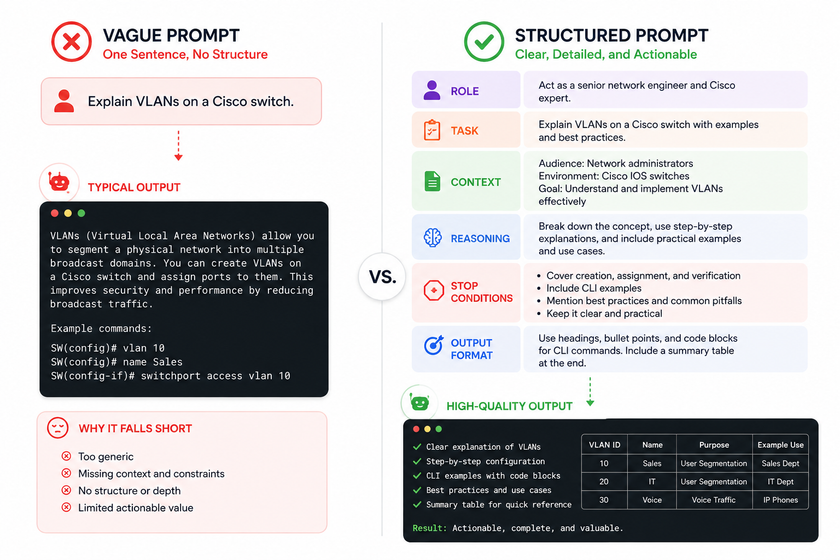
Strong: “Act as a senior go-to-market strategist with deep expertise launching early-stage SaaS tools. Prioritize traction speed over brand perfection.”
The second version tells Claude exactly which playbook to open. The first version leaves everything to chance.
Block 2: Task — What Exactly Needs Doing?
The task block is your action statement. It tells Claude what to build, write, analyze, or fix. A weak task block kills momentum. A strong one removes ambiguity.
The Power of Action Verbs
Start your task with a strong verb. “Build,” “design,” “analyze,” “refactor,” “draft,” “evaluate.” Avoid weak openings like “help me with” or “I need something about.” Those phrases force Claude to interpret your intent.
Example: Weak vs. Strong Task
Weak: “I need a plan for launching my product.”
Strong: “Build a 90-day launch plan for a new AI productivity tool for founders. Validate the core messaging, end with a launch-ready brief.”
The strong version gives Claude a clear deliverable, a timeline, and a success criteria. The weak version gives Claude nothing to anchor to.
Task Block Checklist
Before finalizing your task block, check these boxes:
- [ ] Uses a clear action verb at the start
- [ ] Defines the deliverable explicitly
- [ ] Includes scope boundaries (timeframe, depth, format)
- [ ] States what “done” looks like
Block 3: Context — What Background Does Claude Need?
Context is where most people underdeliver. They assume Claude knows their business, their constraints, or their audience. It does not. Context fills those gaps.
What to Include in Your Context Block
A rich context block covers:
- Product or project details — what you are building, for whom, and why
- Team and resources — headcount, budget, tools, existing assets
- Constraints — technical limits, budget caps, regulatory requirements
- Known risks — adoption challenges, competitive threats, timeline pressure
- Audience profile — demographics, pain points, behavior patterns
Example Context Block
Here's what I know:

- Product: AI task manager for founders (25-40).
- Team: 2-person (Founder + Growth marketer).
- Resources: Lean budget, 15-20 beta users.
- Key Risks: Adoption, Retention, Positioning.
This block takes thirty seconds to write and saves ten minutes of clarification later. Claude now knows the playing field. It will not suggest enterprise marketing channels for a two-person startup with no budget.
Pro Tip: Put Data Before Instructions
Claude processes structured input differently than other models. When you separate facts from instructions, Claude ingests the data first, then executes the task against it. This reduces drift and improves accuracy.
Block 4: Reasoning — What Logic Should Drive the Answer?
The reasoning block tells Claude how to think, not just what to produce. This is where you guide the model’s problem-solving approach. Without reasoning guidance, Claude jumps straight to answers. With it, Claude shows its work.
Why Reasoning Blocks Improve Quality
When you ask Claude to “think step by step” or “defend each recommendation,” you activate chain-of-thought reasoning. This technique reduces output variability by about 35% and makes errors easier to catch.
Example Reasoning Block
The goal is a crisp, launch-ready strategy. By locking in ICP clarity upfront
and asking you to defend each step, the output will be truly actionable
and founder-grade.
This block does two things. First, it sets the quality bar (“crisp, launch-ready”). Second, it tells Claude to justify its recommendations (“defend each step”). The result is output you can trust, not output you have to verify from scratch.
When to Use Extended Thinking
For complex strategy, coding, or multi-source synthesis, Claude’s Extended Thinking feature handles deep reasoning automatically. When that feature is unavailable, add manual chain-of-thought instructions like: “Think step by step before giving your final answer.”
Block 5: Stop Conditions — When Is the Job Done?
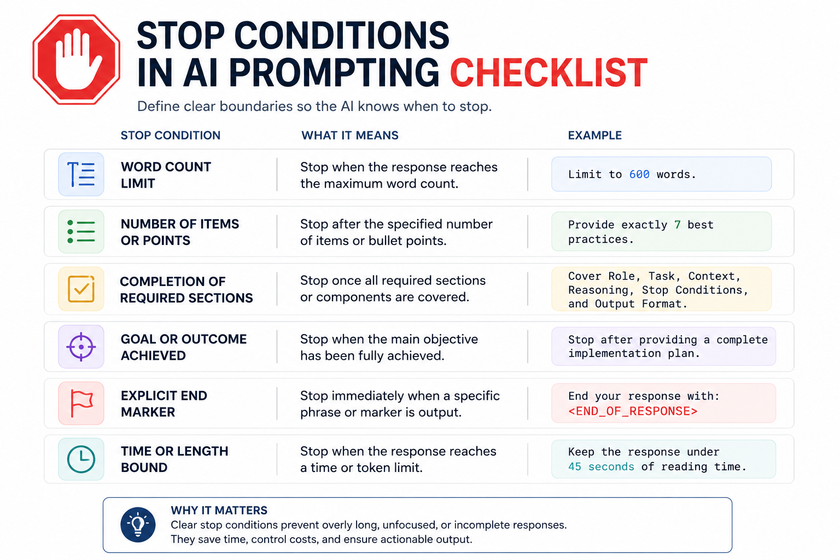
Stop conditions prevent Claude from over-delivering or under-delivering. They define the boundaries of the task. Without stop conditions, Claude might give you a fifty-item list when you needed five, or stop at a high-level summary when you needed depth.
What Good Stop Conditions Look Like
Strong stop conditions are specific and measurable:
- “A 12-week roadmap with 3-4 actions per week”
- “Every action links to the risk it addresses”
- “Plan ends with a final Launch Decision Gate”
- “Maximum 800 words”
- “Include exactly three code examples”
Example Stop Conditions Block
Only stop when:

- A 12-week roadmap with 3-4 actions/week.
- Every action links to the risk it addresses.
- Plan ends with a final Launch Decision Gate.
These conditions give Claude a clear finish line. The model knows exactly when the task is complete and what completeness looks like.
Block 6: Output — How Should the Final Result Look?
The output block defines format, structure, and presentation. This is where you turn raw content into something usable. A developer needs JSON. A marketer needs Markdown. A founder needs a slide-ready summary. Tell Claude which one you need.
Output Format Options
Claude handles many formats well:
- Markdown — blog posts, documentation, reports
- JSON — API responses, data structures, configurations
- Tables — comparisons, schedules, feature matrices
- Bullet lists — action items, requirements, summaries
- Code blocks — scripts, functions, queries
- Sprint plans — weekly actions with owners and deadlines
Example Output Block
Present as a weekly sprint plan. For each action:

- Action: The specific task to complete.
- Owner: Founder, Growth lead, or Designer.
- Risk: Adoption, Retention, or Positioning.
- Rationale + Output: reasoning, deliverable.
This block gives Claude a template to follow. Every action follows the same structure. The result is scannable, consistent, and ready to share with a team.
Pro Tip: Use XML Tags for Complex Outputs
For prompts that mix instructions, context, and examples, wrap each section in XML tags. Claude parses these unambiguously.
Example:
ROLE:
  You are a senior Python developer specializing in data pipelines.

TASK:
  Refactor the following ETL script to use asyncio for concurrent processing.

CONTEXT:
  The current script processes 10,000 CSV records sequentially.
  Average processing time: 45 minutes.
  Target: under 5 minutes.

OUTPUY
  Return the full refactored script in a Python code block.
  Include comments explaining each async change.
Putting It All Together: Three Complete Templates
Here are three ready-to-use templates built with the six-block framework. Copy them, adjust the details, and start getting better output today.
Template 1: Marketing Launch Plan
plain
ROLE:
Act as a senior go-to-market strategist with deep expertise launching
early-stage SaaS tools. Prioritize traction speed over brand perfection.

TASK:
Build a 90-day launch plan for a new AI productivity tool for founders.
Validate the core messaging, end with a launch-ready brief.

CONTEXT:
Here's what I know:
- Product: AI task manager for founders (25-40).
- Team: 2-person (Founder + Growth marketer).
- Resources: Lean budget, 15-20 beta users.
- Key Risks: Adoption, Retention, Positioning.

REASONING:
The goal is a crisp, launch-ready strategy. By locking in ICP clarity upfront
and asking you to defend each step, the output will be truly actionable
and founder-grade.

STOP CONDITIONS:
Only stop when:
- A 12-week roadmap with 3-4 actions/week.
- Every action links to the risk it addresses.
- Plan ends with a final Launch Decision Gate.

OUTPUT:
Present as a weekly sprint plan. For each action:
- Action: The specific task to complete.
- Owner: Founder, Growth lead, or Designer.
- Risk: Adoption, Retention, or Positioning.
- Rationale + Output: reasoning, deliverable.
Template 2: Code Review and Refactoring
ROLE:
  You are a senior Python engineer with 8+ years building production
  data pipelines. You value readability, type safety, and performance.

TASK:
  Review the following FastAPI endpoint for security vulnerabilities,
  performance bottlenecks, and code smell. Then refactor it.

CONTEXT:
  This endpoint handles user authentication for a fintech app with
  50,000 daily active users. Database: PostgreSQL 15. Framework: FastAPI 0.110.
  Known issue: occasional timeout errors under load.

REASONING
  First identify all security risks (SQL injection, auth bypass,
  timing attacks). Then flag performance issues (N+1 queries,
  missing indexes, blocking I/O). Finally, refactor with async
  patterns and defend each change.

STOP_CONDITIONS
  - Maximum 3 security findings with severity ratings.
  - Maximum 3 performance issues with impact estimates.
  - Full refactored code in a single Python block.
  - Each change explained in a comment.

OUTPUT
  Return your response in this exact structure:

  ## Security Review
  [Findings table: Issue | Severity | Fix]

  ## Performance Review
  [Findings table: Issue | Impact | Fix]

  ## Refactored Code
  [Python code block]

  ## Change Log
  [Bullet list: what changed and why]

CODE_TO_REVIEW
  [Paste your code here]
Template 3: Technical Documentation
plain
ROLE:
You are a technical writer who specializes in developer documentation
for cloud infrastructure tools. You write clear, scannable guides that
developers can follow without asking follow-up questions.

TASK:
Write a setup guide for deploying a Next.js 15 app to AWS Lambda
using the OpenNext framework. Cover local testing, deployment,
and common troubleshooting.

CONTEXT:
- Target reader: Full-stack developers familiar with Next.js but
  new to AWS Lambda deployments.
- Environment: Node.js 20, AWS CDK v2, OpenNext 3.x.
- Constraints: Must use infrastructure-as-code. No manual console clicks.
- Known pain point: Developers struggle with the `serverFunction`
  configuration in `open-next.config.ts`.

REASONING:
Structure the guide so a developer can go from zero to deployed
in under 30 minutes. Prioritize copy-paste commands over long
explanations. Anticipate the three most common errors and include
fixes inline.

STOP CONDITIONS:
- Guide must include prerequisites, step-by-step instructions,
  and a verification section.
- Maximum 2,000 words.
- Include exactly one architecture diagram description.
- Include exactly one `open-next.config.ts` code example.

OUTPUT:
Format in Markdown with:
- H2 sections for each major phase (Prerequisites, Setup, Deploy, Verify, Troubleshoot).
- H3 subsections for each step.
- Code blocks for all commands and config files.
- Callout boxes (using blockquotes) for warnings and tips.
Common Mistakes That Break the Framework
Even with a solid framework, people make predictable errors. Here are the ones I see most often and how to fix them.
Mistake 1: Vague Adjectives Without Examples
Words like “creative,” “engaging,” or “professional” mean different things to different people. Claude has no way to know your definition.
Fix: Show, do not tell. Give Claude an example of the tone or style you want. This is called few-shot prompting, and it is one of the most reliable techniques for getting consistent output.
Mistake 2: Cramming Multiple Tasks Into One Prompt
“Write a blog post, create social snippets, draft an email, and build a landing page” sounds efficient. It is not. Claude splits focus and every output suffers.
Fix: One prompt, one task. Chain them in a conversation instead.
Mistake 3: Using Only Negative Instructions
“Do not be too formal” tells Claude what to avoid, not what to do. Claude follows positive instructions more reliably.
Fix: Flip it. Say “use a conversational, friendly tone” instead of “do not be formal.”
Mistake 4: Forgetting Stop Conditions
Without stop conditions, Claude keeps going. You get 2,000 words when you needed 200, or a ten-step plan when you needed three.
Fix: Always define at least one measurable boundary: word count, item count, time limit, or completion criteria.
Mistake 5: Skipping the Reasoning Block
When you skip reasoning, Claude jumps to conclusions. You get answers without understanding how the model reached them.
Fix: Add a sentence like “defend each recommendation” or “show your work before the final answer.”
Conclusion
The six-block framework — Role, Task, Context, Reasoning, Stop Conditions, and Output — turns prompt writing from guesswork into a repeatable skill. Each block serves a specific purpose. Together, they give Claude the clarity it needs to deliver professional-grade work on the first try.
Start with one block at a time. Pick a task you do regularly. Write out the six blocks. Run the prompt. Compare the output to what you got before. The difference will surprise you.
Better prompts mean less editing, less frustration, and more time spent on work that actually matters. The framework is free. The templates are ready. The only thing left is to use them.
Want more articles and tutorials like this?
Get new tutorials, security alerts, and IT tips straight to your inbox.