NAS vs SAN: A Practical Guide to Choosing the Right Storage for Your Business
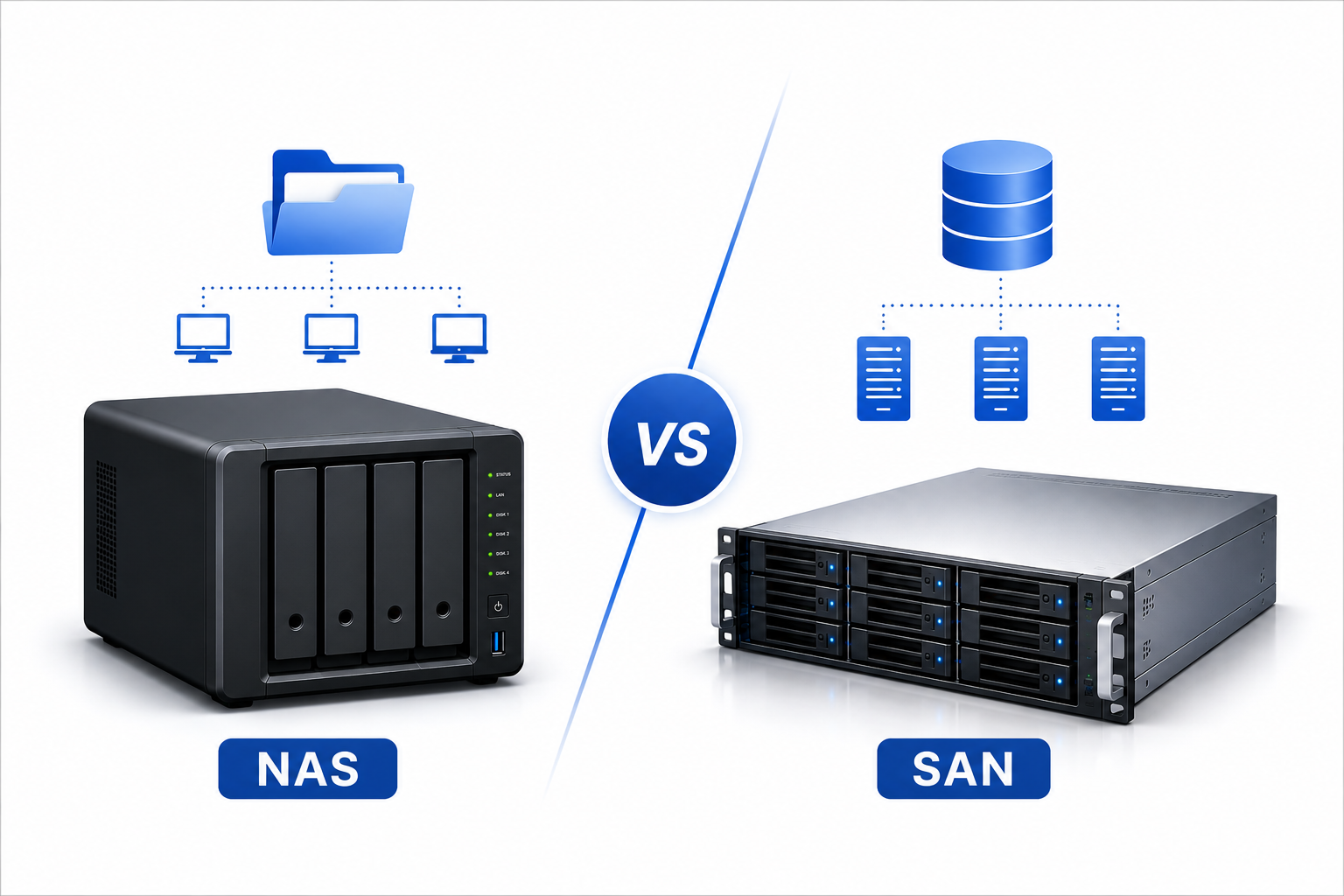
Picking the right storage architecture can make or break your IT infrastructure. Whether you run a small creative studio or manage a Fortune 500 data center, understanding how Network Attached Storage (NAS) and Storage Area Networks (SAN) differ will save you money, time, and countless headaches. This post breaks down both technologies using real brand examples so you can make a confident decision.
Table of Contents
- What Is NAS and How Does It Work?
- What Is SAN and How Does It Work?
- Head-to-Head: Key Differences
- Real-World Use Cases
- Brand Showdown: Real Examples
- How to Choose the Right Solution
- Conclusion
What Is NAS and How Does It Work?
The Basics of Network Attached Storage
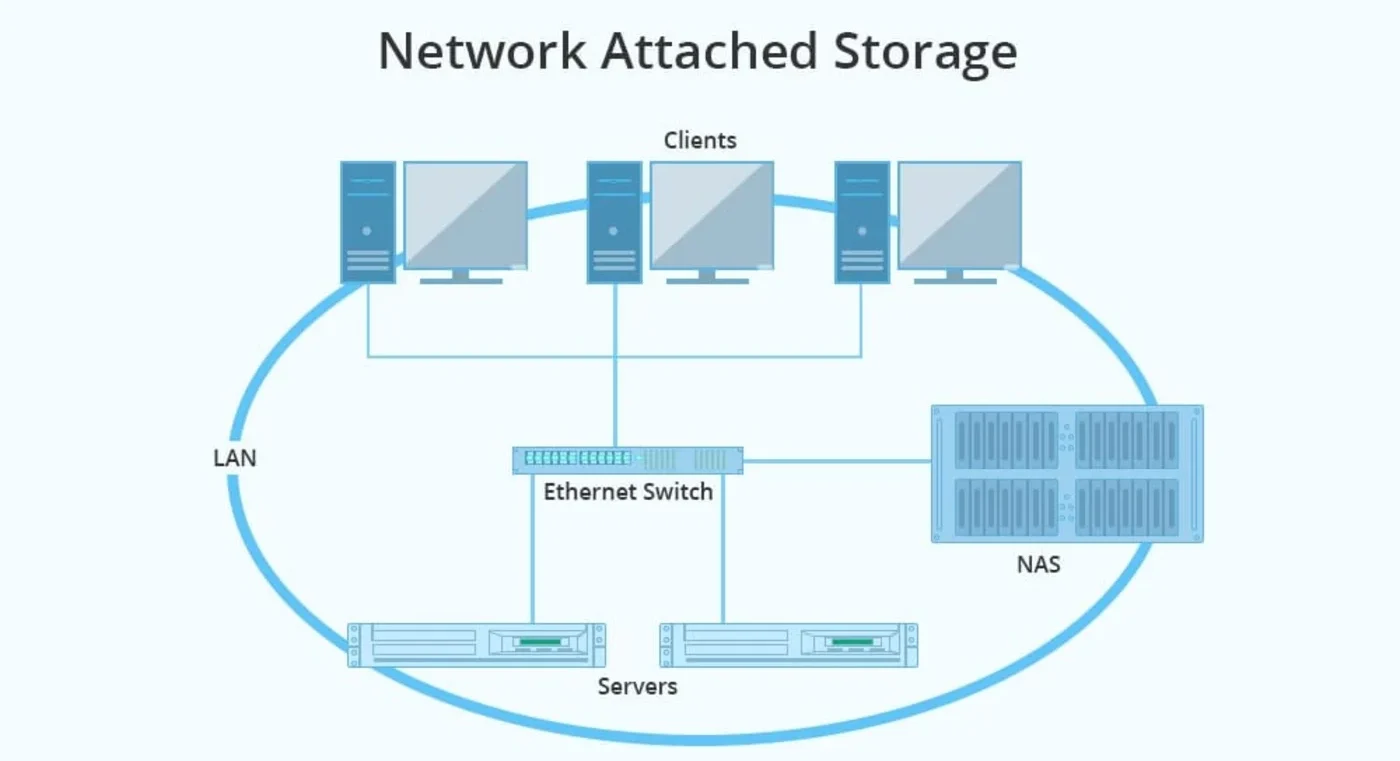
A NAS device is essentially a specialized computer built to store and share files across a network. It connects to your existing Ethernet infrastructure and uses standard protocols like NFS and SMB/CIFS to serve data. Think of it as a hard drive that lives on your network instead of inside a single PC.
When a user requests a file, the NAS locates it within its own file system and sends it over the network. The server’s operating system never sees raw storage blocks. Instead, it sees folders and files, exactly like a shared network drive. This simplicity makes NAS incredibly attractive for teams that need centralized storage without hiring dedicated storage administrators.
Most NAS units ship as pre-configured appliances. You plug them in, assign an IP address, and start sharing files within minutes. Many modern systems also support media streaming, surveillance recording, and even lightweight virtualization. Vendors have turned these boxes into all-in-one servers that handle far more than simple file dumps.
Common NAS Brands and Their Strengths
Synology dominates the SMB and prosumer market with its DiskStation and RackStation lines. Their DSM operating system earns praise for intuitive management, robust backup tools, and an extensive app ecosystem. A Synology NAS works beautifully for creative teams sharing large video files or law firms archiving decades of documents.
QNAP competes aggressively with feature-rich hardware and flexible virtualization support. Their QuTS hero operating system includes ZFS support, giving businesses advanced data protection without enterprise pricing. QNAP appeals to power users who want VMware compatibility and container hosting on the same box that stores their files.
TrueNAS (formerly FreeNAS) from iXsystems brings open-source ZFS storage to organizations that prefer avoiding vendor lock-in. TrueNAS Scale adds Linux containers and Kubernetes support, making it a hybrid platform for tech-savvy teams. Companies with in-house Linux expertise often choose TrueNAS for its transparency and zero licensing costs.
Western Digital and ASUSTOR round out the consumer and small-business segments. WD focuses on simplicity and reliability, while ASUSTOR packs surprising features like HDMI outputs and direct multimedia playback into affordable hardware.
What Is SAN and How Does It Work?
The Basics of Storage Area Networks
A SAN creates an entirely separate network dedicated solely to storage traffic. Instead of files, it moves raw data blocks between storage arrays and servers. The host operating system treats SAN-connected storage exactly like a local hard drive, which allows databases and applications to interact directly with the storage hardware.
SANs traditionally rely on Fibre Channel networks, though iSCSI over Ethernet and newer NVMe-oF protocols have broadened deployment options. Fibre Channel offers incredible speed and reliability but requires specialized switches, Host Bus Adapters (HBAs), and cabling. This dedicated infrastructure isolates storage traffic from general network congestion, ensuring predictable performance even during peak loads.
When a database server writes data, it sends block-level requests through the SAN fabric directly to the storage array. The array handles RAID protection, snapshots, and replication without involving the server’s file system. This architecture eliminates the overhead of file system management and delivers the low latency that transactional applications demand.
Common SAN Brands and Their Strengths
Dell EMC leads the enterprise SAN market with PowerMax and PowerStore arrays. PowerMax targets mission-critical workloads with extreme IOPS and sub-millisecond latency. PowerStore introduces a modern, container-based architecture that simplifies management while delivering consistent block storage performance. Financial institutions and large retailers frequently standardize on Dell EMC for their Oracle and SQL Server environments.
NetApp pioneered unified storage with their FAS and AFF lines. While NetApp supports both NAS and SAN protocols, their SAN implementations excel in virtualized data centers. Their ONTAP operating system offers industry-leading data reduction, seamless cloud tiering, and rock-solid disaster recovery. Organizations running heavy VMware or Hyper-V clusters often choose NetApp for its storage efficiency and snapshot capabilities.
Pure Storage disrupted the SAN market with all-flash arrays that eliminate mechanical disk complexity entirely. Their FlashArray products deliver consistent sub-millisecond latency with dramatically simpler management than traditional Fibre Channel SANs. Pure’s Evergreen subscription model also removes the painful forklift upgrades that plague legacy storage. Startups and cloud-native enterprises gravitate toward Pure for its API-first approach and consumption-based pricing.
IBM and HPE maintain strong enterprise presences with IBM Storage FlashSystem and HPE Alletra. IBM focuses on AI-driven data management and ransomware protection, while HPE pushes cloud-operated infrastructure that reduces administrative overhead. Both vendors serve heavily regulated industries like healthcare and government that cannot afford storage downtime.
Huawei offers compelling SAN alternatives through their OceanStor Dorado all-flash series. These systems compete aggressively on price-performance and have gained significant traction in regions seeking alternatives to American storage vendors. Their intelligent tiering and built-in AI optimization appeal to organizations managing explosive data growth.
Head-to-Head: Key Differences
| Aspect | NAS (Network Attached Storage) | SAN (Storage Area Network) |
|---|---|---|
| Data Level | File-level (folders, files) | Block-level (raw data blocks / LUNs) |
| Network | Standard Ethernet (shares LAN bandwidth) | Dedicated network (Fibre Channel or isolated iSCSI) |
| Protocols | NFS, SMB/CIFS, AFP | Fibre Channel, iSCSI, FCoE, NVMe-oF |
| How OS Sees It | Network share / mapped drive | Local hard disk (appears as internal storage) |
| Performance | Good for file sharing; limited by LAN congestion | Excellent; dedicated bandwidth, very low latency |
| Speed | 1GbE to 25GbE typical | 8 Gbps to 128 Gbps Fibre Channel typical |
| Setup Complexity | Plug-and-play; minimal IT skills needed | Complex; requires zoning, LUN masking, specialized admins |
| Cost | $300 – $10,000+ (affordable entry point) | $20,000+ (enterprise-grade investment) |
| Scalability | Vertical (add drives) or limited horizontal clustering | Horizontal (add shelves, arrays, entire fabrics) |
| Best For | File sharing, backups, media storage, small VMs | Databases, virtualization, VDI, mission-critical apps |
| Management | Simple web GUI (DSM, QuTS, TrueNAS UI) | Requires storage architects (CLI + GUI tools) |
| Maintenance | Low; generalist admins can handle it | High; dedicated storage team + 15-20% annual support |
| Brand Examples | Synology, QNAP, TrueNAS, WD, ASUSTOR | Dell EMC, NetApp, Pure Storage, IBM, HPE, Huawei |
| Overhead | File system managed by NAS device | File system managed by each host server |
| Redundancy | RAID within the NAS unit | RAID + multipathing + fabric redundancy |
| Cloud Integration | Backup-to-cloud, remote access | Hybrid cloud tiering, cloud-native storage |
| Typical Users | SMBs, creative studios, home labs, remote workers | Enterprises, hospitals, banks, SaaS providers |
Real-World Use Cases
When NAS Makes Perfect Sense
Creative agencies and media studios rely on NAS for centralized project storage. A Synology RackStation sitting on a 10GbE network lets video editors, graphic designers, and copywriters access the same assets without emailing files back and forth. The built-in media indexing and preview generation save hours of hunting through folders.
Law firms and medical practices use NAS for document archiving and backup targets. Compliance requirements demand long retention periods, and NAS provides cost-effective storage with snapshot protection. QNAP’s QuDedup technology reduces storage consumption for redundant files like standard contract templates or repeated medical forms.
Small virtualization environments increasingly run on NAS. TrueNAS Scale supports VMware and Proxmox datastores through NFS or iSCSI, giving startups enterprise features without enterprise budgets. A single TrueNAS box can host a dozen virtual machines while simultaneously serving SMB shares to the office.
Home labs and remote workers represent the grassroots NAS market. A simple two-bay Synology at home backs up family photos, hosts a Plex library, and provides VPN access to remote files. During the work-from-home shift, many professionals added NAS devices to replace office file servers.
When SAN Becomes Essential
Database clusters represent the classic SAN use case. A Dell EMC PowerMax array backing a SQL Server failover cluster delivers the IOPS and latency that transaction processing requires. When milliseconds translate directly to revenue, SANs pay for themselves through application performance.
Virtual desktop infrastructure (VDI) strains storage with hundreds or thousands of simultaneous boot storms. Pure Storage FlashArray handles these spikes without the performance degradation that would plague NAS-based VDI. Users experience consistent login times whether ten or ten thousand desktops are active.
Video production and broadcast workflows need guaranteed bandwidth for real-time editing. SANs connect directly to editing workstations, bypassing file server layers entirely. A NetApp SAN serving Avid Media Composer or Adobe Premiere Pro teams eliminates dropped frames and rendering delays.
Disaster recovery and business continuity depend on SAN replication features. IBM FlashSystem arrays can synchronously mirror data between sites hundreds of miles apart. When hurricanes, fires, or cyberattacks strike one location, the secondary site takes over with zero data loss.
Brand Showdown: Real Examples
Synology vs Dell EMC: Opposite Ends of the Spectrum
Synology built its reputation on accessibility. A marketing agency with twenty employees can unbox a Synology DS1821+, install drives, and start sharing files within an hour. The web interface guides users through RAID setup, user creation, and backup scheduling without command-line interaction. Total hardware investment stays under two thousand dollars.
Dell EMC targets a completely different customer. A hospital deploying PowerMax for its Epic electronic medical records system spends six figures on hardware, professional services, and training. The implementation spans weeks, involving storage architects, network engineers, and application specialists. The result supports thousands of concurrent users and meets strict HIPAA availability requirements.
These brands rarely compete directly because they serve different markets. However, understanding their positioning clarifies the NAS versus SAN decision. If your needs align with Synology’s simplicity, a SAN probably over-engineers your solution. If your requirements demand Dell EMC’s reliability, a NAS will disappoint you quickly.
QNAP vs NetApp: Feature Richness Meets Enterprise Polish
QNAP packs remarkable capability into affordable hardware. Their enterprise rack units support 25GbE networking, NVMe caching, and virtual machine hosting at prices that undercut traditional SAN vendors significantly. A mid-sized manufacturer might use QNAP for both file sharing and lightweight ERP hosting.
NetApp delivers a more refined but expensive experience. Their ONTAP software has evolved over decades to handle the quirkiest enterprise requirements. Where QNAP offers features, NetApp offers guarantees. Service level agreements, predictive support, and certified interoperability matrices matter enormously when storage underpins a billion-dollar supply chain.
The choice here often comes down to risk tolerance. QNAP gives you powerful tools and expects you to manage them. NetApp wraps similar capabilities in enterprise support structures that absorb responsibility when problems arise.
TrueNAS vs Pure Storage: Open Source vs All-Flash Innovation
TrueNAS represents the do-it-yourself ethos of modern infrastructure. Download the software, install it on commodity hardware, and build a storage system that rivals commercial offerings. The ZFS file system provides data integrity, compression, and snapshots that enterprises pay premiums for elsewhere. A university research lab might deploy TrueNAS to store terabytes of experimental data without draining grant funding.
Pure Storage eliminated mechanical disks entirely and built management software that automates tasks that once required storage experts. Their Purity operating system handles performance tuning, capacity planning, and hardware health monitoring proactively. A SaaS company experiencing rapid growth might choose Pure because its storage administrators can focus on application development instead of LUN management.
Both approaches challenge traditional storage economics. TrueNAS minimizes upfront costs through open source. Pure Storage minimizes operational costs through automation and evergreen hardware upgrades.
How to Choose the Right Solution
Start by honestly assessing your current and future needs. Count your concurrent users, identify your critical applications, and measure your data growth rate over the past two years. These numbers reveal more than any vendor datasheet.
If you primarily share documents, store backups, and host media, NAS almost certainly satisfies your requirements. Brands like Synology and QNAP offer room to grow without forcing you into SAN complexity prematurely. You can always migrate to a SAN later if your database workloads expand.
If you run transactional databases, large-scale virtualization, or real-time analytics, start evaluating SAN options immediately. The performance and reliability advantages justify the investment when application downtime costs thousands per minute. Dell EMC, NetApp, and Pure Storage all offer entry points that scale as your needs mature.
Consider your team’s expertise honestly. A SAN without qualified administrators becomes an expensive liability. If you cannot hire or train Fibre Channel specialists, look toward iSCSI SANs or high-end NAS units with iSCSI support. Many organizations successfully bridge this gap with unified storage that handles both file and block protocols.
Finally, evaluate your cloud strategy. Modern NAS and SAN vendors both offer hybrid cloud tiering, but their approaches differ. NetApp and Pure Storage integrate particularly well with AWS, Azure, and Google Cloud. Synology and QNAP focus more on backup-to-cloud and remote access scenarios. Make sure your on-premises storage choice aligns with your broader infrastructure roadmap.
Conclusion
NAS and SAN solve fundamentally different problems, though both deliver centralized storage to organizations that have outgrown direct-attached disks. NAS prioritizes simplicity, affordability, and file-level access through familiar Ethernet networks. SAN prioritizes performance, reliability, and block-level access through dedicated high-speed fabrics.
Synology and QNAP have democratized NAS for millions of small businesses and home users. Dell EMC, NetApp, and Pure Storage continue pushing SAN technology forward for enterprises that cannot compromise on availability or speed. TrueNAS bridges both worlds by bringing enterprise features to budget-conscious buyers willing to handle their own support.
Neither technology is inherently superior. The right choice depends on your workload characteristics, budget constraints, team capabilities, and growth projections. Many organizations eventually deploy both: NAS for file services and user home directories, SAN for databases and virtualization backends. Understanding these distinctions empowers you to architect storage infrastructure that supports your business rather than constraining it.
Take time to test solutions before committing. Most vendors offer evaluation programs or virtual demos that let you experience management interfaces firsthand. Your storage decision will influence your IT operations for years, so invest the research effort now to avoid expensive migrations later.
Want more articles and tutorials like this?
Get new tutorials, security alerts, and IT tips straight to your inbox.