DFIR in Cybersecurity: What It Is and How It Works
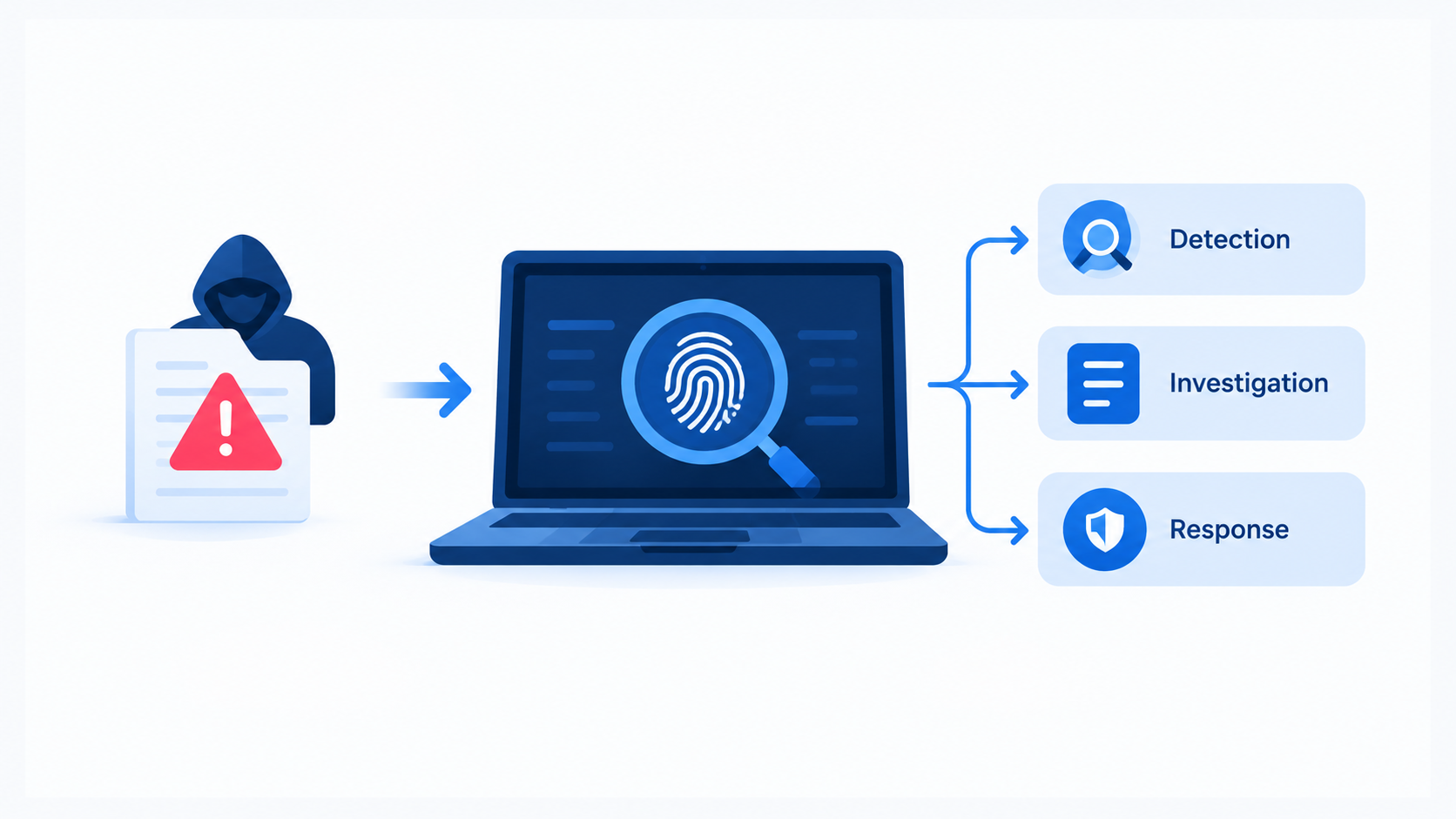
A ransomware note appears on a file server at 2 a.m. Someone must stop the spread. Someone else must find out how the attacker got in and what they took. These two jobs make up DFIR.
This guide explains what DFIR means, how digital forensics and incident response fit together, and which phases teams follow. You will also get practical Linux and Windows commands you can practice in a lab.
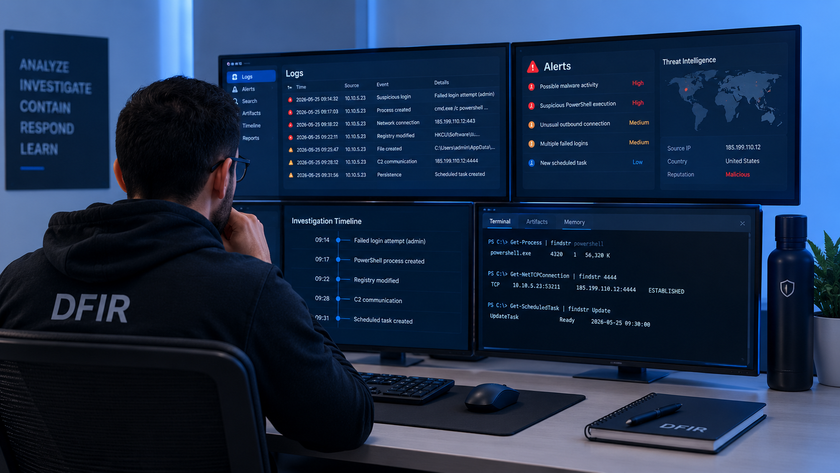
Quick answer: DFIR stands for Digital Forensics and Incident Response. Incident response contains and fixes a security incident while it happens. Digital forensics collects and studies the evidence to prove what happened, how, and who or what caused it. Teams combine both to stop attacks fast, recover safely, and learn enough to prevent a repeat.
Table of Contents
- What Is DFIR?
- Why DFIR Matters
- DFIR vs. Incident Response vs. SOC
- The DFIR Lifecycle
- Core Forensic Principles
- Types of Digital Forensics
- Hands-On: Basic DFIR Commands
- Popular DFIR Tools
- Common DFIR Mistakes
- How to Start a DFIR Career
- Conclusion
- FAQ
What Is DFIR?
DFIR combines two disciplines that used to work apart. Forensics people dug through evidence after the damage. Response people fought the fire in real time. Modern security teams need both skills in the same room, because every response decision affects the evidence, and every piece of evidence shapes the next response step.
Digital Forensics
Digital forensics is the science of collecting, preserving, and analyzing data from computers, servers, phones, networks, and cloud services. The goal is to rebuild a timeline of events and support the findings with evidence that holds up in an audit, an insurance claim, or a courtroom.
A forensic analyst asks questions like these: Which account logged in first? Which file did the attacker open? When did the malware start running?
Incident Response
Incident response (IR) is the organized effort to handle a security incident. The team detects the problem, limits the damage, removes the attacker, and restores normal service. Speed matters here, but so does discipline. A rushed reboot can wipe the very memory that holds the attacker’s tools.
Why DFIR Matters
Attackers rarely announce themselves. Many breaches go unnoticed for weeks, and the victim often learns about them from a customer, a partner, or a ransom note. DFIR gives you the ability to answer the questions leadership asks first: How bad is it? Is it still happening? What did we lose?
DFIR also helps you meet legal duties. Many regulations and contracts require you to report breaches and describe what data the attacker touched. Without forensic evidence, you can only guess, and guessing leads to over-reporting, under-reporting, or both.
Finally, DFIR turns a bad day into lasting improvement. Every investigation shows which control failed, so you can fix the real gap instead of buying another tool.
DFIR vs. Incident Response vs. SOC
People mix these terms up, so here is a simple comparison.
| Area | Main focus | Typical timing | Key question |
|---|---|---|---|
| SOC (Security Operations Center) | Monitor alerts and triage | Continuous, 24/7 | “Is this alert real?” |
| Incident Response | Contain and recover | During an incident | “How do we stop it?” |
| Digital Forensics | Collect and analyze evidence | During and after | “What exactly happened?” |
| DFIR | Both, working together | Whole incident | “Stop it, prove it, fix it.” |
In small companies, one or two people often cover all of these roles. In large ones, separate teams hand work to each other through tickets and playbooks.
The DFIR Lifecycle
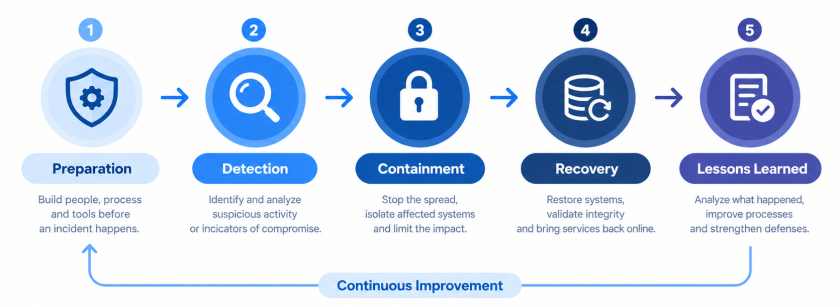
Most teams follow a repeatable cycle. The older NIST guide (SP 800-61 Rev. 2) described four phases: preparation, detection and analysis, containment/eradication/recovery, and post-incident activity. In April 2025, NIST published Revision 3, which replaces that guide. The new version ties incident response to the Cybersecurity Framework (CSF) 2.0 and treats it as part of everyday risk management, not a separate project.
The phases below still describe how real investigations flow, so they remain a useful mental model.
1. Preparation
Preparation decides how well you perform on the worst day. You write playbooks, define who calls whom, deploy logging, and train the team. You also build a “jump kit”: a laptop, write blockers, external drives, and clean tools ready to go.
Turn on useful logs before you need them. Authentication logs, DNS logs, firewall logs, and endpoint telemetry answer most investigation questions. Send them to a central server so an attacker cannot erase them from the compromised host.
2. Detection and Analysis
Alerts from your SIEM, IDS, antivirus, or a user report start the process. Analysts confirm whether the event is a real incident, set a severity level, and scope it: which hosts, accounts, and data are involved.
Start a case file immediately. Record every action with a timestamp, including who did it and why.
3. Containment
Containment stops the spread. Short-term steps include isolating a host from the network, disabling a compromised account, or blocking a malicious IP. Long-term steps include rebuilding segments and rotating credentials.
Think before you act. Pulling the power cable ends the attack on that machine, but it also destroys live memory. Isolate the network first, capture volatile data, then shut down if needed.
4. Eradication and Recovery
Eradication removes the attacker’s foothold: malware, backdoor accounts, scheduled tasks, and stolen keys. Recovery restores systems from clean backups, patches the entry point, and watches closely for signs of return.
Never trust a “cleaned” machine if you do not know how the attacker got in. Rebuild from known-good media when in doubt.
5. Post-Incident Review
Hold a lessons-learned meeting within a week or two. Write down the timeline, the root cause, what worked, and what failed. Then assign owners and deadlines for fixes. A report that nobody acts on wastes the whole investigation.
Core Forensic Principles
Four ideas separate a forensic investigation from random poking around.
Follow the Order of Volatility
Some data disappears in seconds, and other data lasts for years. Collect the fragile items first:
- CPU registers and cache
- Memory (RAM)
- Network connections and running processes
- Disk contents
- Remote logs and backups
- Archived media
Keep the Chain of Custody
The chain of custody records who handled each piece of evidence, when, and why. Label every drive, note every transfer, and store evidence in a locked place. A gap in this record gives opponents a reason to challenge your findings.
Prove Integrity with Hashes
Calculate a cryptographic hash (SHA-256 is a good choice) of each image right after collection. Calculate it again before analysis. If the values match, nobody changed the data.
Work on Copies
Never analyze the original disk. Create a bit-for-bit image, verify it, and analyze the copy. Use a hardware or software write blocker when you connect a suspect drive to your workstation.
Types of Digital Forensics
DFIR covers many evidence sources. Each one needs different skills and tools.
- Disk forensics: File systems, deleted files, and hidden data on hard drives and SSDs.
- Memory forensics: Running processes, injected code, network sockets, and encryption keys inside RAM.
- Network forensics: Packet captures, NetFlow records, and DNS logs that show how data moved.
- Log analysis: Authentication, web server, firewall, and application logs.
- Cloud forensics: API audit trails and snapshots from AWS, Azure, or Google Cloud, where you do not own the hardware.
- Mobile and email forensics: Messages, app data, and message headers.
Memory forensics deserves special attention. Modern attackers often run “fileless” attacks that never write a malicious file to disk. RAM may hold the only trace.
Hands-On: Basic DFIR Commands
Practice these commands in a lab, not on production systems you do not own. Run response tools from a trusted USB drive or a mounted share, and write your output there, not onto the suspect disk.
Step 1: Quick Linux Live Triage
This script captures volatile data in a sensible order and hashes the results. Adjust OUT to your evidence drive.
bash
#!/bin/bash
# live-triage.sh - collect volatile data from a Linux host
OUT="/mnt/evidence/$(hostname)_$(date +%Y%m%d_%H%M%S)"
mkdir -p "$OUT"

date -u                         > "$OUT/01_date_utc.txt"
uptime                          > "$OUT/02_uptime.txt"
who -a                          > "$OUT/03_logged_in.txt"
ss -tulpna                      > "$OUT/04_network_sockets.txt"
ps auxwwf                       > "$OUT/05_processes.txt"
lsof -nP                        > "$OUT/06_open_files.txt" 2>/dev/null
{ ip addr; ip route; }          > "$OUT/07_network_config.txt"
last -a -F                      > "$OUT/08_last_logins.txt"
crontab -l                      > "$OUT/09_root_cron.txt" 2>&1
ls -la /etc/cron.* /var/spool/cron  > "$OUT/10_cron_dirs.txt" 2>&1
systemctl list-unit-files --state=enabled > "$OUT/11_enabled_services.txt"
find / -xdev -perm -4000 -type f 2>/dev/null > "$OUT/12_suid_files.txt"

# Hash everything so you can prove nothing changed later
( cd "$OUT" && sha256sum * > SHA256SUMS.txt )
echo "Triage saved to $OUT"
Step 2: Hunt in Authentication Logs
Brute-force and suspicious logins leave clear marks in SSH logs.
# Top source IPs with failed SSH passwords (Debian/Ubuntu path)
grep "Failed password" /var/log/auth.log \
  | awk '{print $(NF-3)}' | sort | uniq -c | sort -nr | head

# Successful logins - look for unfamiliar users or IPs
grep "Accepted" /var/log/auth.log

# Files changed in the last 3 days (possible attacker activity)
find / -xdev -type f -mtime -3 2>/dev/null | head -50
On RHEL-based systems, use /var/log/secure instead of /var/log/auth.log. On systemd-only systems, journalctl -u sshd --since "2 days ago" works well.
Step 3: Capture Memory
Capture RAM before you power anything off. Two common choices on Linux are AVML and LiME.
# Option A: AVML (single static binary, no kernel module build needed)
sudo ./avml /mnt/evidence/memory.lime

# Option B: LiME (kernel module must match the running kernel)
sudo insmod ./lime-$(uname -r).ko "path=/mnt/evidence/memory.lime format=lime"

# Hash the capture
sha256sum /mnt/evidence/memory.lime | tee /mnt/evidence/memory.lime.sha256
Step 4: Analyze Memory with Volatility 3
Volatility 3 reads the image and lists processes, connections, and injected code. For Windows memory images:
vol -f memory.raw windows.info
vol -f memory.raw windows.pslist
vol -f memory.raw windows.pstree
vol -f memory.raw windows.cmdline
vol -f memory.raw windows.netscan
vol -f memory.raw windows.malfind
Look for odd parent-child pairs (for example, a Word process spawning PowerShell), processes running from temporary folders, and memory regions marked executable and writable at the same time.
Step 5: Image a Disk Safely
Connect the suspect drive through a write blocker. Then create a verified image.
# Identify the device first - double-check before you run dc3dd!
lsblk

# Image with built-in hashing and a log file
sudo dc3dd if=/dev/sdb of=/mnt/evidence/case001_disk.dd \
  hash=sha256 log=/mnt/evidence/case001_dc3dd.log

# Verify the image matches the source hash in the log
sha256sum /mnt/evidence/case001_disk.dd
Triple-check if= and of=. Swapping them overwrites the evidence.
Step 6: Review Windows Event Logs
On Windows, export the logs first, then query them.
# Export logs for offline analysis
wevtutil epl Security C:\IR\Security.evtx
wevtutil epl System   C:\IR\System.evtx

# Failed (4625) and successful (4624) logons in the last 24 hours
Get-WinEvent -FilterHashtable @{
  LogName='Security'; Id=4624,4625; StartTime=(Get-Date).AddDays(-1)
} | Select-Object TimeCreated, Id, Message | Format-List

# New service installed (7045) - common persistence trick
Get-WinEvent -FilterHashtable @{LogName='System'; Id=7045} |
  Select-Object TimeCreated, Message
A few event IDs deserve a quick check in every case: 4688 (process creation, if enabled), 4720 (new user account), 1102 (Security log cleared), and 7045 (new service). A cleared log is a strong sign that someone tried to hide their tracks.
Step 7: Build a Timeline
A timeline merges file times, logs, and browser history into one sorted list. Plaso does this well.
# Build a super timeline from an image
log2timeline.py --storage-file case001.plaso /mnt/evidence/case001_disk.dd

# Export a CSV for the window you care about
psort.py -o l2tcsv -w case001_timeline.csv case001.plaso \
  "date > '2026-10-01 00:00:00' AND date < '2026-10-03 00:00:00'"
Open the CSV in a spreadsheet or a timeline viewer. Look for bursts of activity around the time of the first alert, then work backward to find the initial entry point.
Popular DFIR Tools
You do not need every tool. Pick one for each job and learn it well.
| Job | Tool | Notes |
|---|---|---|
| Disk imaging | FTK Imager, dc3dd, ewfacquire | Create verified forensic images |
| Disk analysis | Autopsy, The Sleuth Kit | Free, graphical, good for beginners |
| Memory analysis | Volatility 3 | The standard open-source framework |
| Memory capture | AVML, LiME, WinPmem | Platform-specific |
| Triage at scale | Velociraptor, KAPE | Collect key artifacts from many hosts fast |
| Timelines | Plaso (log2timeline) | Merges many sources |
| Network analysis | Wireshark, Zeek | Packets and rich connection logs |
| Case management | TheHive, DFIR-IRIS | Track tasks and evidence |
Many of these tools are free, so a home lab costs very little. Download a sample memory image or a public forensic challenge and practice the steps above.
Common DFIR Mistakes
Teams repeat the same errors, so learn from them early.
- Rebooting or powering off first. This destroys volatile evidence.
- Logging in to the suspect machine as an administrator. Your own activity changes timestamps and may alert the attacker. Use read-only access or dedicated tools when you can.
- Skipping documentation. If you did not write it down, you cannot prove you did it.
- Fixing before scoping. Resetting one password while three other accounts remain compromised just tips off the attacker.
- Trusting tools on the infected host. Malware can replace commands such as
psorls. Use known-good binaries from external media. - Ignoring the legal side. Involve legal counsel and follow local data-protection and reporting rules before you share evidence or notify customers.
How to Start a DFIR Career
You can build the foundation at home. Start with Linux and Windows internals, because you cannot investigate a system you do not understand. Add networking basics, then practice with free labs and sample evidence sets.
A sensible path looks like this:
- Learn Linux administration and the Windows event system.
- Understand common attacker techniques through the MITRE ATT&CK framework.
- Practice with Autopsy, Volatility, and Wireshark on sample cases.
- Write short reports on each practice case. Clear writing sets strong analysts apart.
- Consider recognized certifications once you have hands-on skills.
Employers value curiosity and calm under pressure as much as tool knowledge.
Conclusion
DFIR joins two jobs: stopping an attack and proving what happened. Incident response protects the business in the moment, while digital forensics supplies the facts that guide recovery, reporting, and long-term fixes.
Remember the key habits: prepare before an incident, collect volatile data first, hash and document everything, work on copies, and review each case honestly afterward. NIST’s 2025 update to its incident response guidance reinforces the same idea: treat incident response as part of regular risk management, not a last-minute scramble.
Start small. Build a lab, run the commands in this guide, and write up what you find. Skill in DFIR grows with practice.
FAQ
What does DFIR stand for?
DFIR stands for Digital Forensics and Incident Response. It covers both the fast actions that contain a security incident and the detailed analysis that explains what happened.
Is DFIR the same as incident response?
Not exactly. Incident response focuses on handling and recovering from an incident. DFIR adds digital forensics, which preserves and studies evidence. Most real investigations need both.
What are the main phases of DFIR?
The common phases are preparation, detection and analysis, containment, eradication and recovery, and post-incident review. NIST’s 2025 revision (SP 800-61 Rev. 3) aligns these activities with the CSF 2.0 functions instead of one fixed cycle.
What is the order of volatility?
It ranks data by how quickly it disappears. You collect registers and cache first, then RAM, network state and processes, disk data, remote logs, and finally archives.
Which tools do beginners use for DFIR?
Autopsy for disk analysis, Volatility 3 for memory, Wireshark for network traffic, and FTK Imager or dc3dd for imaging. All have free options.
Why is memory forensics important?
Attackers increasingly run code only in memory to avoid leaving files behind. A RAM capture can reveal running malware, network connections, and credentials that never touch the disk.
Do I need programming skills for DFIR?
You can start without them, but basic scripting in Bash, PowerShell, or Python saves a lot of time. It lets you automate collection and parse large log files.
Can I do DFIR on a cloud system?
Yes, but the method changes. You rely on audit logs, API records, and disk or VM snapshots because you usually cannot touch the physical hardware.
Want more articles and tutorials like this?
Get new tutorials, security alerts, and IT tips straight to your inbox.