The OSI Model Explained: A Practical Guide to the 7 Layers of Networking
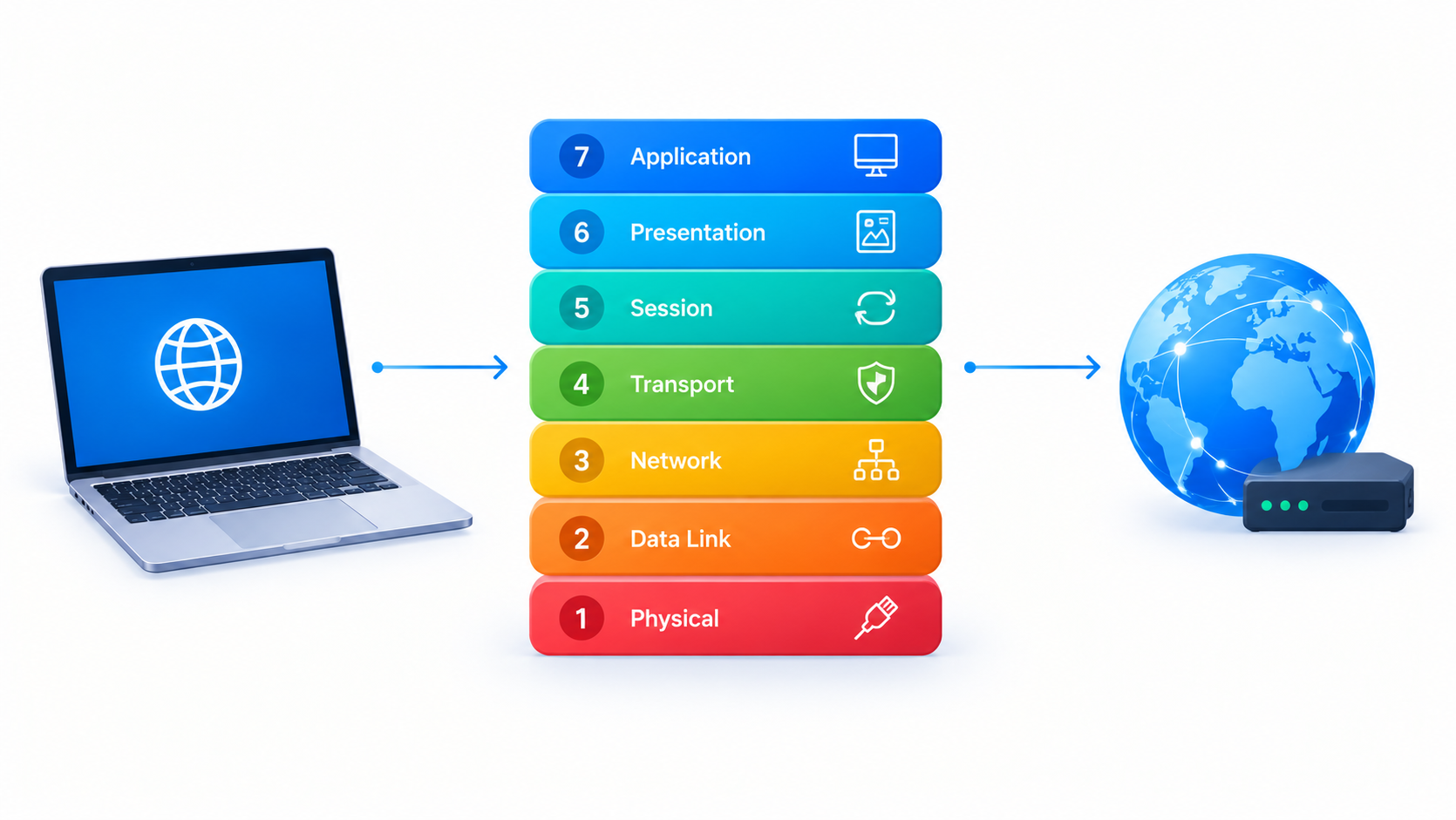
Every time you load a webpage or send a message, your data travels through a complex journey involving cables, routers, switches, and servers. The OSI model breaks that journey into seven clear stages, making one of tech’s most confusing topics surprisingly easy to grasp. This guide explains each layer in plain English, shows you how they work together, and gives you practical examples you can actually use.
Table of Contents
- What Is the OSI Model?
- The 7 Layers Explained
- Layer 1: Physical
- Layer 2: Data Link
- Layer 3: Network
- Layer 4: Transport
- Layer 5: Session
- Layer 6: Presentation
- Layer 7: Application
- How Data Flows Through the Layers
- OSI vs. TCP/IP: What Actually Runs the Internet
- Why the OSI Model Still Matters
- Conclusion
1. What Is the OSI Model?
The OSI (Open Systems Interconnection) model is a framework created by the International Organization for Standardization (ISO) in the 1980s. It describes how data moves from one device to another across a network.
Think of it like sending a physical letter. You write the message (your content), put it in an envelope (packaging), add an address (routing), and hand it to a postal service that drives it to the destination. Each step has its own job — and the OSI model does the same thing for digital data.
The model divides communication into seven layers, each with a distinct responsibility. Devices on both ends work through the same layers, which lets completely different hardware and software talk to each other without confusion.
Why should you care? Because almost every networking concept, protocol, and troubleshooting technique references the OSI model. Once you understand it, technical documentation suddenly makes sense.
2. The 7 Layers Explained
Layer 1: Physical — The Cables and Signals
The Physical layer deals with raw hardware: cables, fiber optics, radio waves, connectors, and electrical signals. It answers one simple question — how do we physically move bits from point A to point B?
Everything here is tangible. Ethernet cables, Wi-Fi radio frequencies, USB ports, and voltage levels all live at this layer. When your network cable snaps or your Wi-Fi signal drops, the problem lives at Layer 1.
Real-world example: Upgrading from Cat5e to Cat6 cable to support faster speeds is a Physical layer decision. Nothing about your software changes — you’re just improving the medium that carries the bits.
Layer 2: Data Link — Reliable Local Delivery
The Data Link layer handles communication between devices on the same network segment. It packages raw bits into units called frames and uses MAC addresses (the hardware address burned into your network card) to identify devices.
This layer also detects errors. If a frame arrives corrupted, Layer 2 protocols like Ethernet discard it and request a resend.
Real-world example: Your home router uses Layer 2 switching to send data from your laptop to your smart TV. Both devices sit on the same local network, so MAC addresses handle the addressing.
Layer 3: Network — Routing Across the World
The Network layer moves data between different networks. This is where IP addresses come in — the unique identifiers that let your laptop in London reach a server in Tokyo.
Routers operate at this layer. When you visit a website, routers examine the destination IP address and choose the best path for your data, hopping from network to network until it arrives.
Real-world example: The ping command tests Layer 3 connectivity. If you can ping a server, your packets successfully navigate across networks:
bash
ping google.com
# Reply from 142.250.x.x: bytes=32 time=12ms TTL=117
Layer 4: Transport — Reliable End-to-End Delivery
The Transport layer manages delivery between applications on two devices. It offers two famous protocols:
- TCP (Transmission Control Protocol): Guarantees delivery. It numbers every piece of data, checks nothing got lost, and reassembles everything in order. Slower but trustworthy — used for web browsing, email, and file transfers.
- UDP (User Datagram Protocol): Sends data without guarantees. Faster but unreliable — perfect for video calls and online gaming where speed beats perfection.
TCP also uses port numbers to direct data to the right application. Port 80 means web traffic; port 443 means secure web traffic.
Real-world example: When you check a website, your browser uses TCP on port 443. Every packet gets acknowledged, which is why you see complete pages instead of scrambled fragments.
Layer 5: Session — Managing the Conversation
The Session layer opens, maintains, and closes conversations between two applications. Think of it as the moderator of a meeting — it makes sure both sides stay connected, handles interruptions gracefully, and ends things properly when done.
Real-world example: When a video call drops and your app reconnects you automatically, that’s session management at work. The session layer logic restores the conversation state without starting from zero.
Layer 6: Presentation — Translation and Encryption
The Presentation layer acts as a translator. It converts data between formats, handles character encoding (like ASCII or Unicode), compresses files to save bandwidth, and encrypts data for security.
Without this layer, a Windows PC couldn’t interpret data formatted for a Mac, and your passwords would travel across the internet in plain text.
Real-world example: HTTPS encryption happens at this layer. When you see the padlock icon in your browser, the Presentation layer’s TLS protocol scrambles your data so attackers can’t read it.
Layer 7: Application — What You Actually See
The Application layer is the closest to you, the user. It defines how applications access network services. Web browsers, email clients, and messaging apps all interact with protocols at this layer, including HTTP, SMTP, FTP, and DNS.
This layer doesn’t mean the apps themselves — it means the network services those apps use. Your browser doesn’t “live” at Layer 7; it uses HTTP, which does.
Real-world example: Typing a URL into your browser triggers an HTTP request at Layer 7. From there, the request travels down through every other layer before crossing the network.
3. How Data Flows Through the Layers
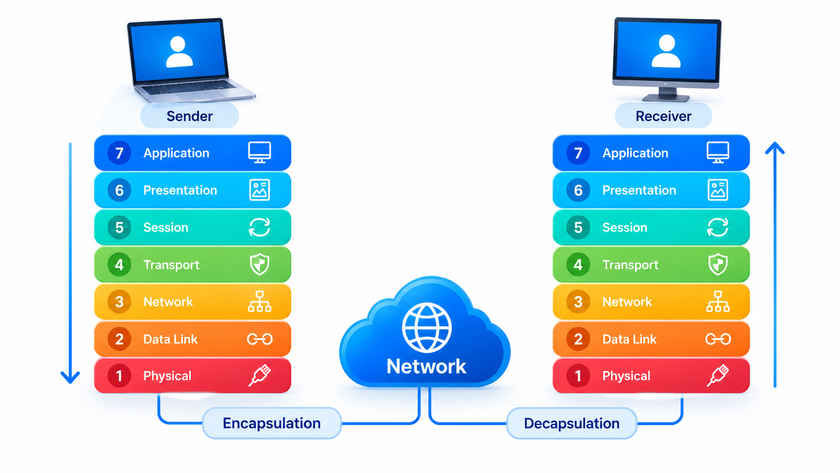
Here’s the elegant part: data doesn’t just sit at one layer — it descends through all seven on the sender’s side, crosses the network, then climbs back up on the receiver’s side.
Each layer adds its own header (and sometimes a footer) to the data. This process is called encapsulation:
- Layer 7 creates your request (an HTTP message)
- Layer 6 encrypts and formats it
- Layer 5 establishes the session
- Layer 4 adds TCP ports and sequence numbers → now called a segment
- Layer 3 adds IP addresses → now called a packet
- Layer 2 adds MAC addresses → now called a frame
- Layer 1 converts everything into electrical signals, light pulses, or radio waves
The receiver reverses this process, stripping each header as data climbs back up.
You can actually watch this in action. The traceroute command shows your packets hopping between routers at Layer 3:
bash
traceroute google.com
# 1  192.168.1.1     (your router)
# 2  10.20.0.1       (your ISP)
# 3  72.14.x.x       (Google's network)
A handy mnemonic to remember the order (top to bottom): “All People Seem To Need Data Processing” — Application, Presentation, Session, Transport, Network, Data Link, Physical.
4. OSI vs. TCP/IP: What Actually Runs the Internet
Here’s a secret: the internet doesn’t actually use the OSI model day-to-day. It uses the TCP/IP model, which has only four layers:
| OSI Model | TCP/IP Model |
|---|---|
| Application, Presentation, Session | Application |
| Transport | Transport |
| Network | Internet |
| Data Link, Physical | Network Access |
So why learn OSI at all? Because OSI offers finer detail. When you troubleshoot, OSI helps you pinpoint exactly where a problem lives. TCP/IP groups too much together to be precise.
Think of it this way: TCP/IP is what the internet runs on, but OSI is the map technicians use to debug it.
5. Why the OSI Model Still Matters
You might wonder if a 40-year-old framework still deserves your attention. It absolutely does — here’s why:
Faster troubleshooting. Network professionals troubleshoot from the bottom up. Is the cable plugged in? (Layer 1). Can I ping the router? (Layer 3). Can I load the website? (Layer 7). Skipping steps wastes hours.
Better security. Firewalls filter at specific layers. Stateless firewalls inspect Layer 3 and 4, while modern application-layer firewalls examine Layer 7 traffic. Knowing the difference helps you choose the right protection.
Smarter conversations. Certifications like CompTIA Network+ and CCNA lean heavily on OSI. Job interviews for network roles almost always include “explain the OSI model” as a question.
Deeper understanding. Once you see the layered structure, technologies that seemed random — VPNs, proxies, load balancers — suddenly fit into a coherent picture. Each tool operates at a specific layer, solving a specific problem.
6. Conclusion
The OSI model turns a tangled mess of cables, protocols, and signals into a logical, layered system anyone can understand. Seven layers, each with one job: Physical moves bits, Data Link connects local devices, Network routes across the globe, Transport delivers reliably, Sessions manage conversations, Presentation translates and encrypts, and Application serves you directly.
You don’t need to memorize every protocol to benefit. Simply remembering that data flows down through the layers on the way out and up on the way in — with each layer adding its own information — gives you a mental framework that makes every other networking topic easier to learn.
Want more articles and tutorials like this?
Get new tutorials, security alerts, and IT tips straight to your inbox.