Linux Threads Explained: A Step-by-Step Guide for Beginners with Practical Examples
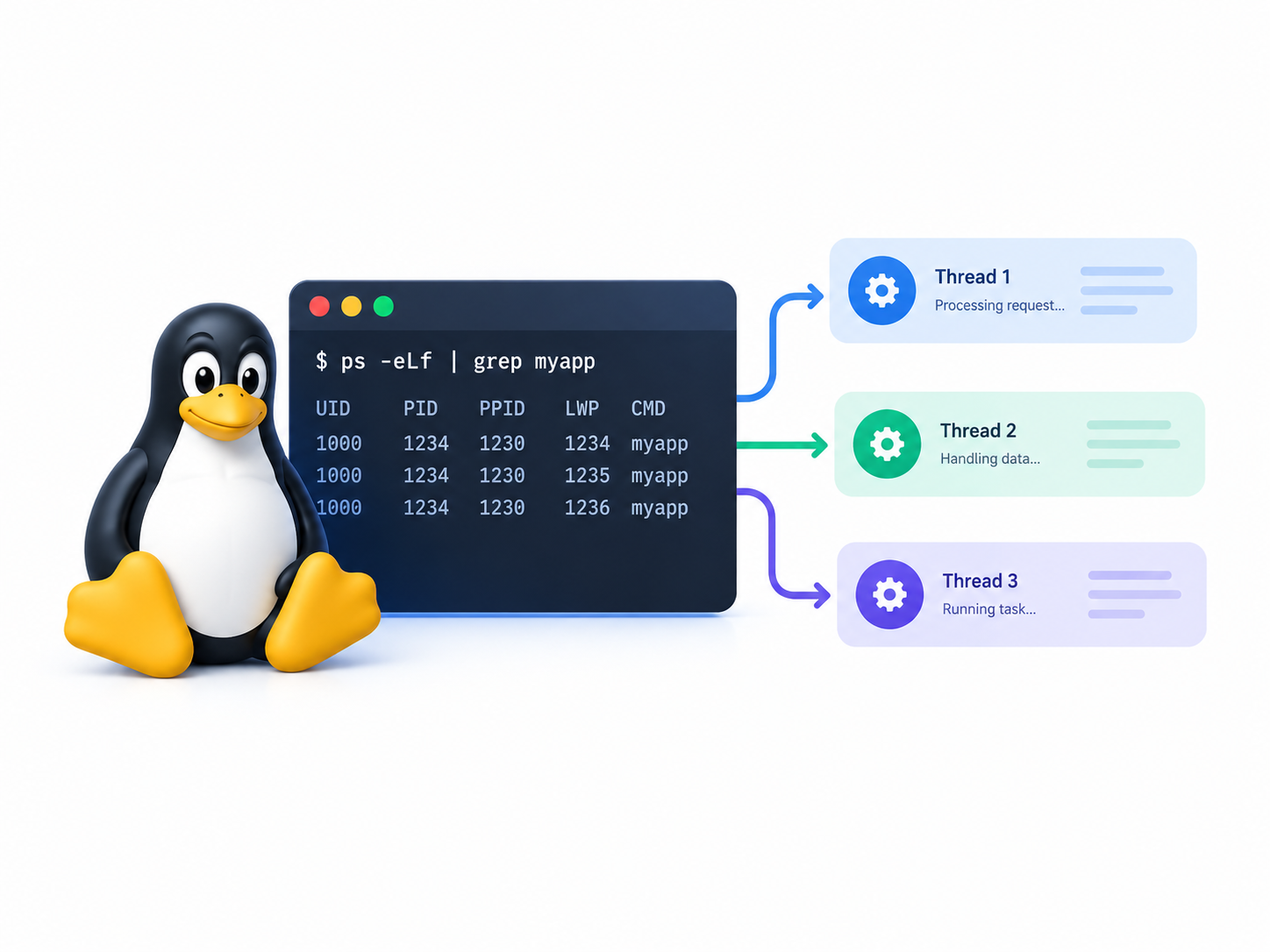
Linux threads help applications perform multiple tasks within a single process. Web servers, databases, desktop applications, and system services use threads to handle concurrent operations, improve responsiveness, and make better use of CPU resources. Understanding how threads work is an important step toward learning Linux process management, system programming, and performance troubleshooting. In this guide, you will learn the difference between processes and threads, explore Linux commands for inspecting threads, and create your own multithreaded program using C and POSIX threads (Pthreads).
Quick Summary
A thread is an execution path inside a process. Linux threads share resources such as memory and open file descriptors, but each thread has its own execution state and stack. You can inspect threads using commands such as ps, top, and ps -T, while developers can create and manage threads in C using the Pthreads API. Threads improve concurrency, but shared memory requires proper synchronization to avoid race conditions.
Table of Contents
- What Is a Thread in Linux?
- Processes vs. Threads
- How Linux Manages Threads
- Thread IDs and Process IDs
- Inspecting Threads with Linux Commands
- Creating Your First Thread in C
- Creating Multiple Threads
- Understanding Race Conditions and Mutexes
- Monitoring Thread Activity
- Common Threading Problems
- Best Practices for Linux Thread Management
- Conclusion
- Frequently Asked Questions
What Is a Thread in Linux?
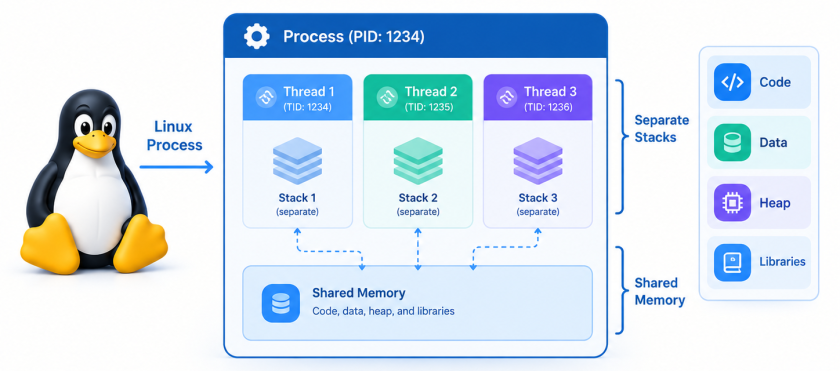
A thread is the smallest independently schedulable execution unit exposed by the Linux kernel. A process can contain one thread or multiple threads, depending on how the application was designed.
Consider a web server receiving several requests at the same time. One thread might process a request, another might handle a different client, and a third might perform background work. The application can manage these activities without creating a completely separate process for every task.
Threads are especially useful when an application needs to:
- Handle multiple operations concurrently.
- Keep a graphical interface responsive while performing background work.
- Process multiple client connections.
- Run background tasks alongside its main operation.
- Use multiple CPU cores for suitable workloads.
However, threads do not automatically make an application faster. Poor synchronization, excessive thread creation, and CPU contention can reduce performance.
How a Thread Works
Every thread has its own execution context, including its stack and CPU register state. Threads within the same process normally share:
- The process’s virtual address space.
- Global and static variables.
- Dynamically allocated memory.
- Open file descriptors.
- Other process-level resources.
Because threads share memory, one thread can modify data that another thread reads. This makes communication efficient, but it also introduces risks when multiple threads access the same data without proper synchronization.
Processes vs. Threads
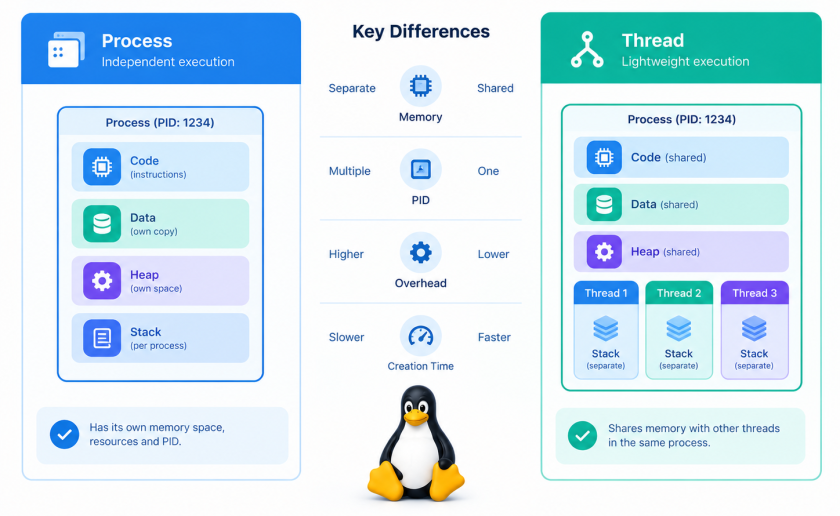
Before working with threads, you need to understand the difference between a process and a thread.
A process is a running program with its own process-level resources and virtual address space. A thread is an execution path within a process.
For example, when you launch a text editor, Linux creates a process. That process might contain several threads responsible for the interface, background operations, and other tasks.
| Feature | Process | Thread |
|---|---|---|
| Address space | Normally separate from other processes | Shared with threads in the same process |
| Memory | Has its own virtual address space | Shares process memory |
| Stack | Each thread has its own stack | Each thread has its own stack |
| File descriptors | Has its own descriptor table | Normally shares the process descriptor table |
| Communication | Often uses IPC mechanisms | Can communicate through shared memory |
| Failure isolation | Usually stronger | A fatal process-level failure can affect every thread |
| Creation overhead | Often higher | Often lower, but not free |
Example: A Process with Three Threads
simple computer science diagram one process containing three threads shared memory separate stacks
Imagine an application with one process and three threads:
- Thread 1: Handles the main application logic.
- Thread 2: Performs background calculations.
- Thread 3: Processes incoming data.
All three threads can access the same global data and heap allocations. However, each thread has its own stack for function calls and local variables.
This architecture is useful when the tasks need to cooperate and exchange data frequently.
How Linux Manages Threads
Linux uses kernel scheduling mechanisms to decide which runnable tasks receive CPU time. On modern Linux systems, POSIX threads commonly use the Native POSIX Thread Library (NPTL), which maps each userspace thread to a kernel scheduling entity.
The kernel represents tasks using internal task structures. Threads in the same process share selected resources, while maintaining separate execution states. The kernel can schedule runnable threads independently.
What Happens When You Create a Thread?
A typical thread-creation sequence looks like this:
- An application calls a threading API such as
pthread_create(). - The threading library requests the required kernel resources.
- Linux creates a new task that shares selected resources with the existing process.
- The new thread begins executing its assigned function.
- The scheduler allocates CPU time to runnable threads.
- The thread finishes, and the application collects its result or releases its resources.
The actual scheduling order is not guaranteed. A newly created thread might run before the calling thread continues, or it might run later.
Concurrency vs. Parallelism
These two terms describe different concepts.
Concurrency means that multiple tasks make progress during overlapping periods. The system may switch between tasks on one CPU core.
Parallelism means that multiple tasks execute at the same time on different CPU cores.
For example, two CPU-intensive threads can run in parallel on a multicore processor if the scheduler has suitable CPU resources available. On a single core, those threads can still execute concurrently through scheduling and context switches.
Threads waiting for network responses or disk operations can also improve application responsiveness, even when they do not perform much CPU work.
Thread IDs and Process IDs
Linux exposes several identifiers that help you distinguish processes from threads.
The most important distinction is between a thread’s TID (Thread ID) and the process’s PID (Process ID).
In a typical modern Linux process:
getpid()returns the process ID shared by all its threads.gettid()returns the kernel thread ID of the calling thread.pthread_self()returns the calling thread’s Pthreads identifier, which is not necessarily the same numeric value as its Linux TID.
The Linux kernel assigns a distinct TID to each thread. The main thread normally has a TID equal to the process PID.
Example: Displaying Process and Thread IDs
Create a file named thread_ids.c:
#define _GNU_SOURCE
#include <stdio.h>
#include <unistd.h>
#include <pthread.h>
#include <sys/syscall.h>

static void *show_ids(void *arg)
{
    (void)arg;

    printf("Worker: PID=%ld, TID=%ld\n",
           (long)getpid(),
           (long)syscall(SYS_gettid));

    return NULL;
}

int main(void)
{
    pthread_t thread;

    printf("Main: PID=%ld, TID=%ld\n",
           (long)getpid(),
           (long)syscall(SYS_gettid));

    int rc = pthread_create(&thread, NULL, show_ids, NULL);

    if (rc != 0) {
        fprintf(stderr, "pthread_create failed: %d\n", rc);
        return 1;
    }

    rc = pthread_join(thread, NULL);

    if (rc != 0) {
        fprintf(stderr, "pthread_join failed: %d\n", rc);
        return 1;
    }

    return 0;
}
Compile and run the program:
gcc -Wall -Wextra -pthread thread_ids.c -o thread_ids
./thread_ids
Example output:
Main: PID=4200, TID=4200
Worker: PID=4200, TID=4201
These values are illustrative; your system will assign different IDs.
Notice that both threads report the same PID, but each has a different TID.
Inspecting Threads with Linux Commands
You do not need to write a C program to inspect threads. Linux provides several commands and the /proc filesystem for examining thread activity.
Step 1: Find a Running Process
Use pgrep to find the PID of a process. For example:
pgrep -a firefoxThis lists matching Firefox processes when Firefox is running. If it is not running, the command may return no results.
You can also inspect running processes with:
ps auxIdentify the PID of the application you want to investigate.
Step 2: Display Threads with ps -T
Use the following command:
ps -T -p 4200Replace 4200 with the actual PID.
The command lists the threads associated with that process. Typical columns include the process ID, thread ID (shown as SPID on common procps implementations), terminal information, CPU usage, and command name.
You can request a more focused view:
ps -T -p 4200 -o pid,spid,stat,commThis helps you see the process PID and individual thread IDs together.
Step 3: Use top to Monitor Threads
The top utility provides live process monitoring. To display threads, start it with:
top -H -p 4200The -H option enables thread-level display, while -p filters the view to the selected process.
This is useful for identifying threads that consume significant CPU resources.
To exit top, press q.
Step 4: Inspect Threads Through /proc
Linux exposes process and thread information under /proc.
For example:
ls /proc/4200/task/Each numeric directory under task/ corresponds to a thread ID belonging to that process.
To inspect the status of a particular thread:
cat /proc/4200/task/4201/statusReplace the IDs with values from your system.
Useful fields in the status file include:
Name: the task’s name.Pid: the task ID shown in the status interface.Tgid: the thread group ID, generally corresponding to the process PID.State: the task’s current state.
The /proc filesystem provides a practical way to investigate threads without installing additional tools.
Creating Your First Thread in C
Now that you understand the Linux concepts, let’s create a thread.
For this exercise, you need:
- A Linux system or Linux virtual machine.
- GCC or another compatible C compiler.
- Basic knowledge of C functions and variables.
On Debian or Ubuntu, install the compiler if necessary:
sudo apt update
sudo apt install build-essential
Step 1: Write the Program
Create a file called hello_thread.c:
#include <stdio.h>
#include <pthread.h>

void *worker(void *arg)
{
    (void)arg;

    printf("Hello from the worker thread!\n");
    return NULL;
}

int main(void)
{
    pthread_t thread;

    int rc = pthread_create(&thread, NULL, worker, NULL);

    if (rc != 0) {
        fprintf(stderr, "Unable to create thread: %d\n", rc);
        return 1;
    }

    rc = pthread_join(thread, NULL);

    if (rc != 0) {
        fprintf(stderr, "Unable to join thread: %d\n", rc);
        return 1;
    }

    printf("Main thread finished.\n");
    return 0;
}
Step 2: Understand the Important Functions
The program uses two essential Pthreads functions.
pthread_create()
This function creates a thread and starts the specified worker function.
Its main arguments are:
- A pointer to a
pthread_tvariable that receives the thread identifier. - Thread attributes, or
NULLto use the defaults. - The function the thread should execute.
- An argument passed to that function.
pthread_join()
This function waits for the specified joinable thread to terminate. In this example, it ensures that the worker finishes before the main thread prints its final message.
The Pthreads functions return error numbers directly. They do not generally report errors through errno in the same way that many system calls do.
Step 3: Compile the Program
Run:
gcc -Wall -Wextra -pthread hello_thread.c -o hello_threadThe -pthread option tells GCC to use the appropriate threading compilation and linking settings.
Step 4: Execute the Program
Run:
./hello_threadExpected output:
Hello from the worker thread!
Main thread finished.
The exact order of messages from multiple threads is not generally guaranteed, but pthread_join() guarantees that the worker has terminated before the main thread prints its final message.
What Happens If You Remove pthread_join()?
If the main function returns while a worker thread is still running, the process terminates and its remaining threads stop executing.
That means the worker may not finish its task. Always choose an appropriate thread lifecycle strategy, such as joining a worker or deliberately detaching it when its result is not needed.
Creating Multiple Threads
A single thread is useful for learning, but real applications often need several workers.
Let’s create a program that starts three threads. Each worker prints a message and its iteration number.
Step 1: Create the Source File
Save the following as multiple_threads.c:
#include <stdio.h>
#include <pthread.h>

#define THREAD_COUNT 3

struct worker_data {
    int id;
};

static void *worker(void *arg)
{
    struct worker_data *data = arg;

    for (int i = 1; i <= 3; i++) {
        printf("Thread %d: iteration %d\n", data->id, i);
    }

    return NULL;
}

int main(void)
{
    pthread_t threads[THREAD_COUNT];
    struct worker_data data[THREAD_COUNT];

    for (int i = 0; i < THREAD_COUNT; i++) {
        data[i].id = i + 1;

        int rc = pthread_create(
            &threads[i], NULL, worker, &data[i]
        );

        if (rc != 0) {
            fprintf(stderr, "Failed to create thread %d: %d\n",
                    i + 1, rc);

            /* Join every thread created successfully. */
            for (int j = 0; j < i; j++) {
                pthread_join(threads[j], NULL);
            }

            return 1;
        }
    }

    for (int i = 0; i < THREAD_COUNT; i++) {
        int rc = pthread_join(threads[i], NULL);

        if (rc != 0) {
            fprintf(stderr, "Failed to join thread %d: %d\n",
                    i + 1, rc);
            return 1;
        }
    }

    printf("All workers have finished.\n");
    return 0;
}
Step 2: Compile and Run
gcc -Wall -Wextra -pthread multiple_threads.c -o multiple_threads
./multiple_threads
The program creates three workers. Each worker prints three lines.
The order of the output may change between executions because Linux schedules the threads independently.
Step 3: Understand the Data Passed to Each Thread
Each worker receives a pointer to a struct worker_data object containing its ID.
The data array belongs to main(), which keeps it alive until every worker has terminated. Each worker receives a pointer to a separate array element, so workers do not overwrite each other’s IDs.
This is safer than passing the address of a single loop variable that changes on every iteration.
In production code, also check the return value of every pthread_join() and design cleanup paths carefully. Thread-creation failure is possible when system resources or configured limits are exhausted.
Understanding Race Conditions and Mutexes
One of the most important concepts in multithreaded programming is the race condition.
A race condition occurs when the result of a program depends on the timing or ordering of concurrent operations. When threads access shared data without appropriate synchronization, the program may produce incorrect results.
Example: Two Threads Updating a Counter
Consider this shared variable:
int counter = 0;Suppose two threads each increment it 100,000 times.
It is tempting to expect a final value of 200,000. However, the operation counter++ is not an atomic operation in ordinary C. Multiple threads can interfere with each other’s updates.
In C, an unsynchronized conflicting access to an ordinary shared variable can also create a data race, which results in undefined behavior.
Solution: Use a Mutex
A mutex is a synchronization object that allows one thread at a time to enter a protected section of code.
Create a file called mutex_example.c:
#include <stdio.h>
#include <pthread.h>

#define ITERATIONS 100000

static int counter = 0;
static pthread_mutex_t lock = PTHREAD_MUTEX_INITIALIZER;

static void *increment(void *arg)
{
    (void)arg;

    for (int i = 0; i < ITERATIONS; i++) {
        pthread_mutex_lock(&lock);
        counter++;
        pthread_mutex_unlock(&lock);
    }

    return NULL;
}

int main(void)
{
    pthread_t t1, t2;

    int rc = pthread_create(&t1, NULL, increment, NULL);
    if (rc != 0) {
        fprintf(stderr, "Failed to create t1: %d\n", rc);
        return 1;
    }

    rc = pthread_create(&t2, NULL, increment, NULL);
    if (rc != 0) {
        fprintf(stderr, "Failed to create t2: %d\n", rc);
        pthread_join(t1, NULL);
        return 1;
    }

    pthread_join(t1, NULL);
    pthread_join(t2, NULL);

    printf("Final counter: %d\n", counter);

    pthread_mutex_destroy(&lock);
    return 0;
}
Compile and execute it:
gcc -Wall -Wextra -pthread mutex_example.c -o mutex_example
./mutex_example
Expected output:
Final counter: 200000The mutex ensures that only one thread updates counter at a time.
Why Should You Keep the Critical Section Small?
A critical section is the portion of code that accesses shared data while holding a lock.
Keeping it short reduces the time other threads must wait. Avoid unnecessary network requests, disk operations, or long calculations while holding a mutex.
Also, ensure that every successful lock operation has a corresponding unlock operation. More advanced programs should use a cleanup strategy that handles errors and early returns correctly.
Mutexes are not the only synchronization mechanism. Depending on the problem, condition variables, semaphores, read-write locks, and atomic operations may be more appropriate.
Monitoring Thread Activity
Once you have created a multithreaded application, you can inspect its runtime behavior using standard Linux tools.
Check Thread Counts
To count the thread directories for a process:
ls /proc/4200/task | wc -lReplace 4200 with your application’s PID.
Alternatively, inspect the thread count field:
grep '^Threads:' /proc/4200/statusThese commands provide a snapshot of the thread count. Threads may start or stop while you are inspecting the process.
Monitor CPU Usage Per Thread
Run:
top -H -p 4200If one thread consistently consumes significant CPU time, it may be performing a CPU-intensive calculation or running an inefficient loop.
However, high CPU usage does not automatically indicate a problem. The thread may be doing useful work.
Inspect Thread Details with ps
Use:
ps -T -p 4200 -o pid,spid,stat,pcpu,commThis command displays thread-related information, including the task ID, state, and CPU usage.
The STAT field helps identify states such as running, sleeping, or stopped. Interpret these values in context rather than assuming every sleeping thread is stuck.
Investigate Thread-Related Resource Limits
If a program cannot create more threads, inspect relevant system limits:
ulimit -u
ulimit -s
cat /proc/sys/kernel/threads-max
cat /proc/sys/kernel/pid_max
These values represent different limits and resources. The maximum number of threads an application can create depends on more than one setting, including per-user process limits, memory availability, and cgroup restrictions.
Do not change kernel-wide limits blindly. First identify the actual failure and its cause.
Common Threading Problems
Thread-related bugs can be difficult to reproduce because they often depend on scheduling and timing.
1. Race Conditions
Symptom: Counters, shared data, or application results sometimes contain unexpected values.
Cause: Multiple threads access shared mutable data without appropriate synchronization.
Solution: Use mutexes, suitable atomic operations, or a design that avoids shared mutable state.
2. Deadlocks
Symptom: Threads stop making progress while the application remains alive.
Cause: Two or more threads wait indefinitely for locks or resources held by one another.
Solution: Establish a consistent lock acquisition order, avoid unnecessary nested locks, and use appropriate timeout or recovery strategies where needed.
3. Excessive Thread Creation
Symptom: Memory usage increases, the application slows down, or thread creation starts failing.
Cause: The application creates too many threads or allocates more per-thread resources than the system can support.
Solution: Use a bounded worker pool, limit concurrency, and monitor memory and thread counts.
4. Incorrect Thread Argument Handling
Symptom: Multiple workers print the same ID or process unexpected values.
Cause: The application passes pointers to variables whose values change before the worker reads them, or whose lifetime ends too early.
Solution: Give each worker valid, independently managed argument data that remains alive until the worker finishes.
5. Missing Thread Cleanup
Symptom: Long-running applications gradually consume resources and eventually struggle to create more threads.
Cause: The application fails to join joinable threads or otherwise manage their lifecycle correctly.
Solution: Join threads when the application needs to collect their completion or results. Use detached threads only when their lifecycle does not require joining.
Best Practices for Linux Thread Management
Follow these guidelines when developing or troubleshooting multithreaded Linux applications.
- Create threads for a clear reason. Threads introduce scheduling and synchronization overhead. Use them when concurrency provides a practical benefit.
- Protect shared mutable data. Identify which variables multiple threads can access and select an appropriate synchronization mechanism.
- Avoid global state when possible. Passing data explicitly to worker functions often makes programs easier to understand and test.
- Keep lock ownership clear. Establish consistent rules for acquiring and releasing locks.
- Manage thread lifecycles. Join joinable workers or deliberately detach them when appropriate.
- Handle errors. Check the return values of thread creation, joining, locking, and other important operations.
- Use bounded concurrency. A thread pool can prevent a program from creating an uncontrolled number of workers.
- Measure before optimizing. Use tools such as
top,ps, and performance profilers to identify actual bottlenecks. - Test under load. Concurrent bugs may not appear during a single short test.
- Use appropriate debugging tools. Thread sanitizers can help detect data races in supported programs, while debuggers can help investigate deadlocks and thread states.
For a beginner, the most important lesson is simple: creating threads is straightforward, but coordinating them safely requires careful design.
Conclusion
Linux threads allow a process to perform multiple activities concurrently while sharing memory and other process resources. They are widely used in server applications, databases, desktop software, and system services.
You have learned how threads differ from processes, how Linux assigns thread IDs, and how to inspect thread activity using ps, top, and /proc. You have also created single-threaded and multithreaded C programs using pthread_create() and pthread_join(), then protected shared data with a mutex.
To continue learning, experiment with the examples on a Linux virtual machine. Create more workers, inspect their TIDs, observe their CPU usage, and introduce synchronization mechanisms to understand how concurrent execution behaves in practice.
Frequently Asked Questions (FAQ)
1. What is a thread in Linux?
A thread is an execution unit within a process. Threads in the same process share memory and many process-level resources, but each has its own stack and execution state.
2. What is the difference between a process and a thread?
A process has its own virtual address space, while threads in the same process share that address space. Threads can communicate through shared memory, but they require synchronization when accessing shared mutable data.
3. How can I list threads in Linux?
Use ps -T -p PID to display the threads of a specific process. You can also run top -H -p PID for live monitoring or inspect /proc/PID/task/.
4. How do I create a thread in C on Linux?
Include pthread.h and call pthread_create(). Compile the program with gcc -pthread and use pthread_join() when you need to wait for the worker to finish.
5. What is the difference between a PID and a TID?
A PID identifies the process, while a TID identifies an individual kernel task or thread. Threads in the same modern Linux process share the process ID but have distinct thread IDs.
6. Do Linux threads share memory?
Yes. Threads in the same process share the process’s global variables, heap allocations, and virtual address space. Each thread maintains its own stack and execution context.
7. Can multiple Linux threads run at the same time?
Yes, when the system has suitable CPU resources. Threads can run in parallel on multiple CPU cores. On a single core, the scheduler can switch between runnable threads to provide concurrency.
8. What is a mutex in Linux?
A mutex is a synchronization mechanism that protects shared data by allowing one thread at a time to hold a particular lock. It helps prevent race conditions when multiple threads access the same data.
9. Why might Linux fail to create a new thread?
Thread creation can fail because of resource exhaustion, memory constraints, or configured process and thread limits. Inspect the error returned by pthread_create(), along with relevant resource limits and application behavior.
10. Are more threads always better?
No. Too many threads can increase memory consumption, context switching, and lock contention. Choose a suitable level of concurrency based on the workload and actual performance measurements.
Want more articles and tutorials like this?
Get new tutorials, security alerts, and IT tips straight to your inbox.
My old setup struggled with thread management. I noticed that resource contention increases significantly when the number of cores drops below eight. This behavior changes depending on the specific kernel configuration.