Windows 11 Is Finally Getting Serious About 8GB RAM — Here’s Why That Matters Right Now
If you’ve shopped for a laptop in the last few months, you’ve probably noticed something strange: machines that used to ship with 16GB of RAM are quietly slipping back down to 8GB. That’s not a coincidence, and it’s not really about penny-pinching either — it’s the fallout of a global memory shortage that’s been squeezing PC makers since late 2025. Microsoft has now publicly acknowledged that Windows 11 itself needs to get leaner to survive on these lower-memory machines, and that admission is a bigger deal than it might first appear. This post breaks down what Microsoft actually committed to, why the industry got here in the first place, and — most usefully — what you can do today if you’re stuck running Windows 11 on an 8GB system.
Why 8GB RAM Suddenly Became a Big Deal Again
For years, 8GB was treated as the bare-minimum tier — fine for a budget Chromebook, not something you’d want on a “real” Windows machine. That assumption held largely because RAM was cheap and getting cheaper every year. That trend reversed hard in 2025.
The AI Boom Broke the Memory Supply Chain
The root cause isn’t really about laptops at all. It’s about data centers. Hyperscalers like Microsoft, Google, and Meta are pouring hundreds of billions of dollars into AI infrastructure, and that infrastructure eats memory chips at a scale consumer electronics never approached — <cite index=”29-1″>a single AI server can consume as much high-grade memory as dozens or even hundreds of standard laptops combined</cite>. Chipmakers responded rationally: they redirected production capacity toward the higher-margin memory products AI companies were desperate to buy, leaving less capacity for the DRAM that goes into everyday consumer PCs.
The price impact has been brutal. Industry tracking firm TrendForce has reported <cite index=”27-1″>global DRAM contract prices climbing an estimated 90 to 95 percent quarter-over-quarter in the first quarter of 2026 alone</cite>, with steep increases continuing into the following quarters. Memory that once made up a modest slice of a laptop’s bill of materials now accounts for roughly a third of it, according to figures cited by HP.
Manufacturers Are Choosing to Cut RAM, Not Just Raise Prices
Faced with that cost spike, PC makers had two levers to pull: raise prices, or quietly reduce specs. They’re doing both. Analysts at TrendForce and elsewhere expect mid-range laptops that used to default to 16GB to ship with 8GB again, even as sticker prices climb. Framework, the modular PC maker known for its transparency, has been unusually blunt about this — the company has raised its own component pricing multiple times in recent months, with 8GB memory modules roughly doubling in price in a matter of weeks.
Apple has actually moved in the opposite direction on some product lines, having recently shifted its MacBook Air away from 8GB base configurations toward 16GB as the new floor. That divergence is part of what’s putting pressure on Microsoft: a well-optimized competing operating system running comfortably on 8GB makes Windows’ relative memory hunger look worse by comparison.
What Microsoft Actually Announced
The news itself is a short but pointed update from Pavan Davuluri, Microsoft’s President of Windows and Devices, posted as a follow-up to the broader “Windows quality” commitments the company made back in March 2026. Davuluri laid out four focus areas Microsoft intends to work on through the end of the year: a faster out-of-box setup experience, improvements to Family Safety controls, updates to Voice features, and — the one generating the most attention — memory optimization.
The wording Microsoft used was deliberately narrow: the goal is reducing Windows’ own memory footprint so 8GB-and-above machines feel fast and responsive, not lowering the operating system’s official minimum requirement. Windows 11’s stated floor remains 4GB, and Copilot+ PCs — Microsoft’s AI-accelerated hardware tier — still assume 16GB as a practical baseline. In other words, this isn’t Microsoft saying 8GB is now the ideal amount of memory; it’s Microsoft admitting that a huge chunk of the market is about to be stuck with 8GB whether it likes it or not, and the OS needs to stop making that worse than it has to be.
Where the Memory Savings Are Supposed to Come From
Microsoft hasn’t published a detailed technical roadmap, but the areas it has pointed to give a decent picture of where the fat is expected to be trimmed:
- A more efficient memory allocator to cut overhead across apps and system components
- Continued tuning of WinUI 3, the framework several built-in Windows apps are built on, so those apps use less memory by design
- Efficiency work on Chromium and WebView2 components, which show up throughout the OS in things like widgets, parts of Settings, and certain Store apps
That last point is worth pausing on. WebView2 is essentially a mini Chromium browser engine that Windows and third-party apps use to render web-based interfaces instead of building native ones. It’s convenient for developers, but every WebView2 instance behaves like its own browser tab under the hood, and those add up fast on a system already short on headroom. Analysts covering the announcement have specifically flagged WebView2 and background telemetry services as contributors to the memory pressure Microsoft is now trying to address.
How Bad Is the Problem Right Now, Realistically?
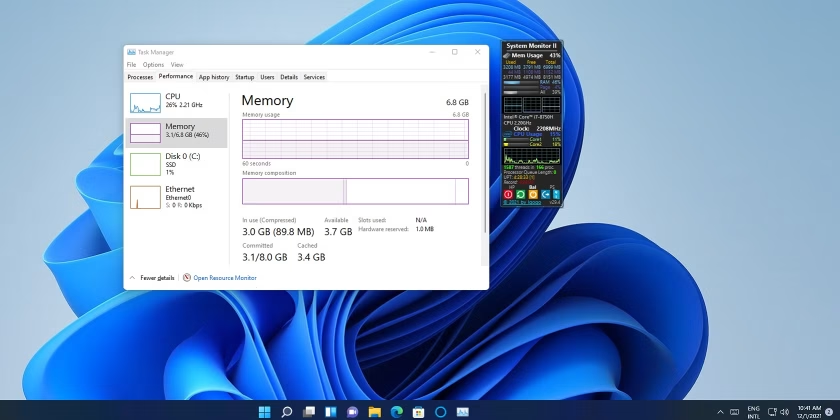
Pretty bad, if recent testing is anything to go by. Reviewers testing budget 8GB Windows 11 laptops against Apple’s newer 8GB machines have found Windows systems eating up the majority of available memory before a single application is opened — figures in the neighborhood of 70 percent RAM usage at idle have been reported on some configurations. That leaves almost nothing for a browser with more than a handful of tabs, let alone office software or a video call running at the same time.
It’s a fair criticism that Windows 11 has grown heavier than Windows 10 over successive updates, layering in background services, search indexing, telemetry, and OS-level AI features that all draw on the same limited pool of memory. None of that was a huge problem when 16GB was the assumed default. It becomes a real problem the moment 8GB is what most buyers can actually afford.
Practical Steps to Free Up RAM on an 8GB Windows 11 PC Today
Microsoft’s fixes will roll out gradually through Windows Insider builds before reaching everyone, so if you’re running 8GB right now, you don’t have to just wait it out. A few concrete things actually help:
1. Trim your startup programs. Open Task Manager, go to the Startup Apps tab, and disable anything you don’t need running the moment you log in. Cloud sync clients, chat apps, and OEM bloatware are the usual offenders.
2. Check for and disable unnecessary background services. Many OEM laptops ship with vendor utilities (driver updaters, “optimization” suites, promotional apps) that idle in the background consuming memory for no real benefit. Uninstall what you don’t use.
3. Limit browser tab sprawl or switch to a lighter browser. Chrome in particular is memory-hungry by design, since each tab and extension runs as a semi-isolated process. Tab-suspension extensions, or switching to a leaner Chromium-based browser with built-in tab freezing, can noticeably reduce pressure.
4. Turn off visual effects you don’t need. Under Settings > System > About > Advanced system settings > Performance, switching to “Adjust for best performance” removes some animation overhead — modest, but it adds up on constrained hardware.
5. Keep Windows fully updated. Some of the memory efficiency work Microsoft has already shipped since March 2026 is live in current builds. Staying current means you’re already benefiting from incremental fixes rather than missing them.
6. Consider whether 8GB is enough for your actual workload. If your day-to-day involves heavy multitasking, virtual machines, or resource-intensive creative software, no amount of OS-level tuning will fully compensate for insufficient physical memory. In that case, prioritizing 16GB when you next buy hardware is still the more reliable fix.
What This Means If You’re Buying a Laptop Soon
If you’re in the market for a new machine over the next year, treat “8GB is the new normal” with healthy skepticism rather than as settled fact. The memory shortage is expected to persist well into 2027 by some industry estimates, and manufacturers have strong financial incentive to keep 8GB configurations around even after Microsoft’s optimizations land, simply because it lets them hit familiar price points without eating margin. Whether Windows 11’s tuning closes the usability gap enough to make 8GB genuinely comfortable — rather than just less painful — is still an open question, and one that will only be answered once these changes actually ship to mainstream users rather than just Insider builds.
Frequently Asked Questions
Does this mean Windows 11’s minimum RAM requirement is changing? No. Microsoft’s official minimum remains 4GB. The 8GB optimization work is about improving the experience for a common real-world configuration, not lowering the system requirements floor.
When will these memory improvements actually reach my PC? Microsoft hasn’t given a firm release date. Expect the changes to appear first in Windows Insider preview builds, with a gradual rollout to general availability builds afterward, likely spread across the rest of 2026.
Is 8GB of RAM actually usable for everyday Windows 11 use? It’s workable for light tasks — web browsing, email, document editing — but multitasking headroom is thin, especially with a memory-heavy browser like Chrome open alongside other apps. Whether it’s “enough” really depends on your workload.
Why did RAM get so expensive in the first place? In short: AI data centers are consuming an enormous share of global memory chip production, chipmakers shifted capacity toward higher-margin AI-related memory products, and consumer DRAM supply tightened as a result, driving contract prices sharply upward through 2026.
Conclusion
Microsoft’s admission here is notable less for the technical details — which are still thin — and more for what it signals: the company recognizes that the economics of the memory market have permanently shifted the ground under Windows 11, at least for the next several years. Whether the promised optimizations actually close the gap with a well-tuned 8GB machine remains to be seen, but it’s a rare case of an OS vendor publicly owning a performance problem rather than pushing the blame entirely onto hardware makers or users.
If you’re running 8GB right now, the practical steps above will buy you real breathing room while you wait for Microsoft’s fixes to arrive. And if you’re shopping for new hardware, don’t assume 8GB and 16GB configurations cost roughly the same going forward — budget accordingly.
Want more articles and tutorials like this?
Get new tutorials, security alerts, and IT tips straight to your inbox.