NTLM vs Kerberos: The Active Directory Authentication Guide Every Admin Needs
Active Directory powers identity across nearly every enterprise network, yet most admins only skim the surface of how authentication actually works. NTLM and Kerberos sit at the heart of this process, and understanding both protocols is not optional anymore. In 2026, Microsoft is deprecating RC4 encryption, patching critical Kerberos vulnerabilities, and pushing harder than ever to eliminate NTLM. This post breaks down how each protocol works, where the real security risks hide, and exactly how to audit and harden your domain before the next Patch Tuesday forces your hand.
Table of Contents
- What Is NTLM Authentication?
- What Is Kerberos Authentication?
- NTLM vs Kerberos: A Side-by-Side Comparison
- Why NTLM Still Lingers in Your Network
- The 2026 Security Landscape: RC4 Deprecation and New Vulnerabilities
- How to Audit Authentication in Your Domain
- How to Harden Authentication: Step-by-Step
- When NTLM Still Makes Sense
- Conclusion
What Is NTLM Authentication?
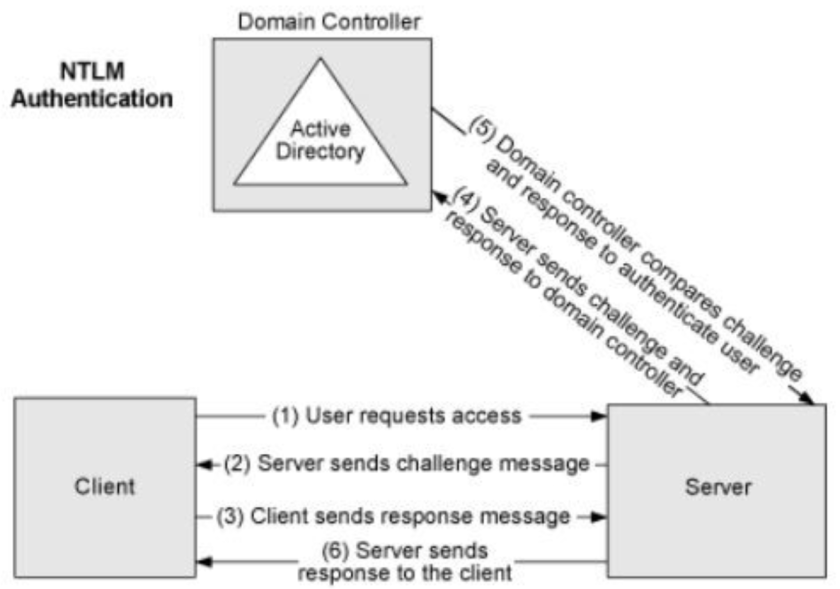
NTLM stands for NT LAN Manager. Microsoft introduced it decades ago as a way for Windows systems to prove identity without sending passwords across the network in plain text. It relies on a challenge-response mechanism that still operates in nearly every Windows domain today, often without admins realizing it.
How NTLM Works
The NTLM flow follows six clear steps. First, the client asks a server for access. Second, the server replies with a random challenge string. Third, the client encrypts that challenge using a hash of the user’s password and sends the result back. Fourth, the server forwards both the original challenge and the client’s response to a Domain Controller. Fifth, the Domain Controller checks Active Directory, hashes the user’s stored password with the same challenge, and compares the results. Sixth, the server sends the final result back to the client and either grants or denies access.
This process never sends the actual password across the wire, which was a big improvement when NTLM first appeared. However, the protocol does send password-derived material, and attackers can capture and abuse that material in several ways.
NTLM Security Weaknesses
NTLM carries real baggage. The protocol lacks mutual authentication, meaning the client never verifies that the server is legitimate. Attackers exploit this gap through NTLM relay attacks, where they position themselves between the client and server, capture the authentication handshake, and forward it to a target of their choice. If SMB signing or LDAP channel binding is not enforced, the attacker gains a fully authenticated session as the victim.
Pass-the-hash attacks present another threat. NTLM stores password equivalents as NT hashes in memory. Tools like Mimikatz can extract these hashes from compromised systems, and attackers can reuse them directly without ever cracking the password. NTLMv1 makes this even worse because it uses weaker cryptography that modern GPUs can crack in minutes. Microsoft deprecated NTLMv1 in June 2024, but it still shows up in legacy environments.
What Is Kerberos Authentication?
Kerberos replaces the password-exchange model with a ticket system. MIT developed the protocol in the 1980s, and Microsoft adopted it as the default authentication method for Windows 2000 and every domain since. When Kerberos works correctly, no password material ever leaves the client machine after the initial logon.
How Kerberos Works
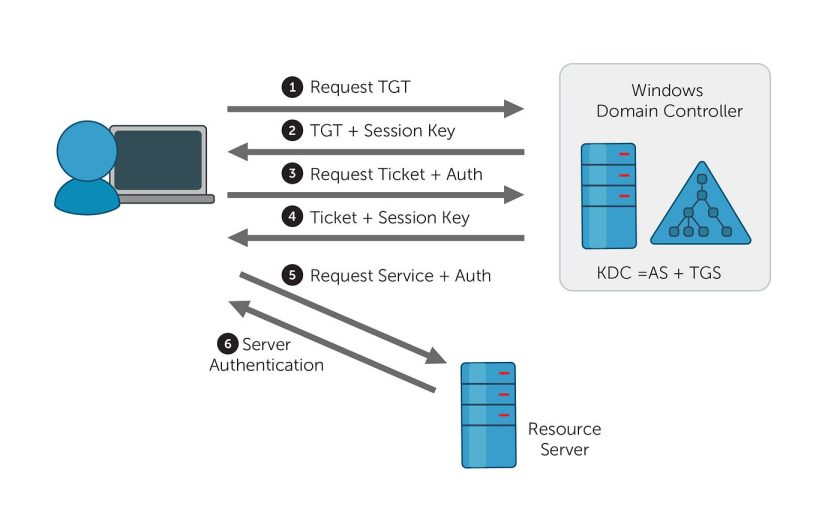
Kerberos authentication involves three main exchanges between the client and the Key Distribution Center, which lives on your Domain Controller.
First, the user logs on and sends a KRB_AS_REQ message to the KDC. This request includes the user’s identity and a pre-authentication value encrypted with the user’s password hash. Second, the KDC validates the request and replies with KRB_AS_REP, which contains a Ticket Granting Ticket encrypted with the KDC’s own key. The client can decrypt part of this reply using its password hash, but the TGT itself remains encrypted with the KDC key.
Third, when the user wants to access a service, the client sends the TGT back to the KDC inside a KRB_TGS_REQ message. The KDC verifies the TGT, checks service permissions, and issues a Ticket Granting Service ticket in its KRB_TGS_REP response. Fourth, the client presents this service ticket to the application server through KRB_AP_REQ. The server verifies the ticket using its own key, checks the Privilege Attribute Certificate for authorization details, and grants access.
The entire flow keeps password material off the network after the first step. Tickets carry time limits and are bound to specific services, which makes replay attacks far harder than with NTLM.
Kerberos Advantages
Kerberos offers mutual authentication by default. Both the client and the server prove their identities to each other during the exchange. The protocol also supports delegation, which lets services act on behalf of users to access downstream resources. This feature powers many multi-tier applications without requiring service accounts to hold permanent credentials.
Performance improves too. Once a client holds a TGT, it can request multiple service tickets without re-authenticating to the KDC each time. In busy environments, this reduces load on Domain Controllers compared to NTLM, which must validate every authentication against a DC.
NTLM vs Kerberos: A Side-by-Side Comparison
| Feature | NTLM | Kerberos |
|---|---|---|
| Authentication model | Challenge-response | Ticket-based |
| Mutual authentication | No | Yes |
| Password on network | Hash-derived material | Never after initial TGT |
| DC load per auth | High (every auth hits DC) | Lower (TGT caches tickets) |
| Default in Windows | Fallback only | Primary protocol |
| Relay attack risk | High without signing | Lower, but not zero |
| Encryption support | RC4, NTLMv2 | AES128, AES256, RC4 (deprecated) |
| Delegation support | No | Yes (constrained and unconstrained) |
Why NTLM Still Lingers in Your Network
If Kerberos is superior, why does NTLM still appear in event logs? Several common scenarios force Windows to fall back.
Missing or duplicate Service Principal Names break Kerberos. Every service that uses Kerberos needs a unique SPN registered in Active Directory. If an application connects by IP address instead of hostname, Kerberos typically fails because SPNs map to DNS names, not IPs. Clock skew also causes problems. Kerberos tickets carry timestamps, and if the client and Domain Controller differ by more than five minutes, ticket validation fails.
Some applications are hardcoded to use NTLM. Older line-of-business software, third-party appliances, and certain management tools explicitly call the NTLM authentication package instead of Negotiate, which would try Kerberos first. Local account authentication always uses NTLM because local accounts have no Kerberos principal in the domain.
The 2026 Security Landscape: RC4 Deprecation and New Vulnerabilities
2026 is not a normal year for Active Directory authentication. Microsoft has introduced several changes that make protocol knowledge more urgent than ever.
RC4 Deprecation and CVE-2026-20833
Microsoft is removing RC4 as the default Kerberos encryption type. RC4 has been cryptographically weak for years, and attackers use it to speed up Kerberoasting attacks. When a service ticket uses RC4 encryption, an attacker who captures that ticket can crack the service account password offline far faster than with AES.
The phased rollout began in January 2026 with audit events, moved to enforcement in April 2026, and will finalize in July 2026. After July, Domain Controllers will refuse to issue RC4 tickets unless an administrator explicitly allows it. Accounts that lack AES keys will simply fail to authenticate.
Microsoft released two PowerShell scripts to help admins prepare. List-AccountKeys.ps1 shows which encryption keys exist for each account, and Get-KerbEncryptionUsage.ps1 filters events to reveal RC4 usage patterns.
New Kerberos Vulnerabilities
Security researchers discovered multiple Kerberos flaws this year. CVE-2026-25177, called KerberLoss, and CVE-2026-27912, called ResetNightmare, both allow privilege escalation through identity confusion on Domain Controllers. ResetNightmare is especially severe because a low-privileged user can gain Domain Admin rights by manipulating User Principal Names.
CVE-2026-20929 enables Kerberos relay attacks through DNS CNAME abuse. Attackers can redirect Kerberos authentication to Active Directory Certificate Services and enroll certificates for victim accounts. These certificates provide persistent access that lasts months or years.
CVE-2026-42914, patched in June 2026, creates a denial-of-service condition in the Kerberos subsystem. An authenticated attacker can send malformed requests that crash the authentication service on Domain Controllers.
How to Audit Authentication in Your Domain
You cannot fix what you cannot see. Start your hardening journey with a thorough audit of current authentication patterns.
Audit NTLM Usage with PowerShell
The Get-NtlmLogonEvents module from the PowerShell Gallery simplifies NTLM auditing across your forest. Install it and run targeted queries to find direct NTLM usage versus Negotiate fallback.
# Install the module
Install-Module -Name Get-NtlmLogonEvents

# Find direct NTLM authentications (hardcoded apps)
Get-NtlmLogonEvents -NumEvents 500 |
    Where-Object AuthenticationPackageName -eq 'NTLM'

# Find Negotiate fallbacks (Kerberos tried but failed)
Get-NtlmLogonEvents -NumEvents 500 |
    Where-Object AuthenticationPackageName -eq 'Negotiate'

# Show failed logon attempts grouped by source IP
Get-NtlmLogonEvents -IncludeFailedLogons -NumEvents 1000 |
    Where-Object EventId -eq 4625 |
    Group-Object -Property IPAddress |
    Sort-Object -Property Count -Descending |
    Select-Object Count, Name
Key event IDs to monitor include 4624 for successful logons, 4625 for failures, 4776 for credential validation on Domain Controllers, and 8001 through 8006 in the NTLM Operational log for process-level detail.
Check for NTLMv1 Specifically
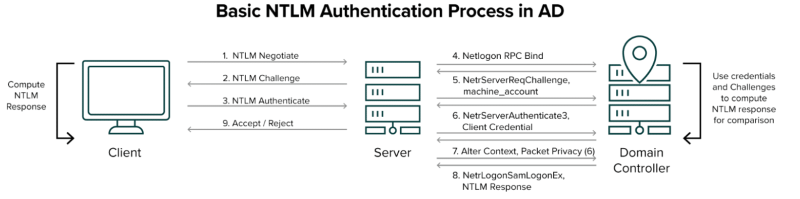
NTLMv1 is the most dangerous variant. Enable Logon Success Auditing on your Domain Controllers and watch for Event ID 4624 entries where the Package Name shows NTLM V1. Microsoft deprecated this protocol in 2024, so any remaining usage needs immediate attention.
# Quick check for NTLMv1 in Security logs
Get-WinEvent -LogName Security |
    Where-Object { $_.Id -eq 4624 } |
    Where-Object { $_.Message -like '*NTLM V1*' }
Audit Kerberos Encryption Types
Monitor Event IDs 4768 and 4769 on your Domain Controllers to see which encryption types your tickets use. After installing the January 2026 updates, also watch for the new KDCSVC events 201 through 209 in the System log. These events flag RC4 usage and predict which authentications will fail during enforcement.
# Check for RC4 usage in Kerberos tickets (Event 4769)
Get-WinEvent -LogName Security -FilterHashtable @{Id=4769} -MaxEvents 100 |
    Where-Object { $_.Message -like '*0x17*' -or $_.Message -like '*RC4*' }

# Review KDCSVC audit events for RC4 warnings
Get-WinEvent -LogName System -FilterHashtable @{Id=201..209; ProviderName='Microsoft-Windows-Security-Kerberos'} |
    Select-Object TimeCreated, Id, LevelDisplayName, Message
Verify SPN Health
Duplicate or missing SPNs are the leading cause of Kerberos fallback to NTLM. Run these checks regularly.
# Find duplicate SPNs across the domain
setspn -x

# Search for SPNs associated with a specific service account
setspn -L svc_app

# Find accounts with missing AES support
Get-ADUser -Filter * -Properties msDS-SupportedEncryptionTypes |
    Where-Object { $_.msDS-SupportedEncryptionTypes -notin @(8, 16, 24) }
How to Harden Authentication: Step-by-Step
Once you understand your exposure, take action in a controlled order. Do not flip switches domain-wide without testing.
Step 1: Eliminate NTLMv1
Set the LAN Manager authentication level to refuse LM and NTLM entirely, or at minimum enforce NTLMv2 only. Apply this through Group Policy at Computer Configuration, Windows Settings, Security Settings, Local Policies, Security Options.
# Set LMCompatibilityLevel to 5 (refuse LM and NTLM, accept NTLMv2 only)
Set-ItemProperty -Path 'HKLM:\SYSTEM\CurrentControlSet\Control\Lsa' -Name 'LMCompatibilityLevel' -Value 5
Step 2: Enforce SMB and LDAP Signing
SMB signing and LDAP signing stop NTLM relay attacks in their tracks. Enable both through Group Policy. For LDAP, also require channel binding on LDAPS connections.
# Enable SMB signing via registry (can also use GPO)
Set-ItemProperty -Path 'HKLM:\SYSTEM\CurrentControlSet\Services\LanmanServer\Parameters' -Name 'RequireSecuritySignature' -Value 1
Set-ItemProperty -Path 'HKLM:\SYSTEM\CurrentControlSet\Services\LanmanWorkstation\Parameters' -Name 'RequireSecuritySignature' -Value 1
Step 3: Move Service Accounts to AES
For every service account with an SPN, enable AES support and reset the password to generate AES key material. The old advice of checking boxes in Active Directory Users and Computers is not enough. Most accounts need a password reset before AES keys actually exist.
# Enable AES128 and AES256 for a service account
Set-ADUser svc_app -Replace @{'msDS-SupportedEncryptionTypes'=24}

# Reset the password to generate AES keys
Set-ADAccountPassword -Identity svc_app -Reset

# For group managed service accounts
Set-ADServiceAccount gmsa_app -KerberosEncryptionType AES128,AES256
Step 4: Pilot RC4 Enforcement
After remediation, test enforcement on a subset of Domain Controllers. Set the RC4DefaultDisablementPhase registry value to 2 on pilot DCs, restart them, and monitor for authentication failures.
# Apply pilot RC4 enforcement on a Domain Controller
New-ItemProperty -Path 'HKLM:\SOFTWARE\Microsoft\Windows\CurrentVersion\Policies\System\Kerberos\Parameters' -Name 'RC4DefaultDisablementPhase' -Value 2 -PropertyType DWord -Force

# Restart required
Restart-Computer
Step 5: Restrict NTLM with Audit-First Policy
Before blocking NTLM, enable audit policies to discover hidden dependencies. Use the Network Security Restrict NTLM settings in Group Policy to audit all NTLM traffic for thirty days. Review the NTLM Operational log, fix what breaks, then move to blocking mode.
Step 6: Enable Extended Protection for Authentication
For web applications and AD CS servers, EPA ties authentication requests to specific TLS channels. This prevents attackers from relaying captured credentials to different endpoints. Configure EPA as Required in IIS Manager for Certificate Authority Web Enrollment and Certificate Enrollment Web Service.
When NTLM Still Makes Sense
Despite all the risks, NTLM still serves a purpose in limited scenarios. Local account authentication on workgroup machines uses NTLM because no KDC exists. Some legacy industrial control systems and medical devices cannot speak Kerberos and require NTLMv2 as a compatibility bridge. External trusts between untrusted forests may also default to NTLM depending on configuration.
The goal is not to shame NTLM out of existence overnight. The goal is to know exactly where it lives, limit it to those specific scenarios, and monitor it closely. Microsoft plans to disable NTLM by default around 2028, so admins who start cataloging dependencies now will avoid emergency fire drills later.
Conclusion
NTLM and Kerberos are not just historical footnotes in Windows networking. They are the gatekeepers to every resource in your domain, and attackers know their weaknesses intimately. In 2026, the stakes have risen. RC4 is leaving, new Kerberos vulnerabilities are emerging, and Microsoft is accelerating NTLM deprecation.
Admins who take the time to audit their authentication patterns, eliminate NTLMv1, enforce AES encryption, and enable signing will sleep better at night. Those who wait for a Patch Tuesday to force their hand may find critical services failing at the worst possible moment.
Want more articles and tutorials like this?
Get new tutorials, security alerts, and IT tips straight to your inbox.