OWASP Top 10 2025: A Practical Guide for Developers and Security Teams
Web application security never stands still. Attackers refine their methods, development teams ship faster, and the tools we rely on grow more complex. The OWASP Top 10 gives everyone in tech a shared language for the most dangerous risks facing applications right now. This post walks through the 2025 edition, explains what changed since 2021, and offers practical steps you can take without drowning in technical jargon.
The OWASP Top 10 2025 ranks Broken Access Control first, adds Software Supply Chain Failures and Mishandling of Exceptional Conditions as new categories, and moves Security Misconfiguration up to second place. Every risk on this list is preventable with the right habits and checks.
Table of Contents
- A01: Broken Access Control
- A02: Security Misconfiguration
- A03: Software Supply Chain Failures
- A04: Cryptographic Failures
- A05: Injection
- A06: Insecure Design
- A07: Authentication Failures
- A08: Software or Data Integrity Failures
- A09: Security Logging and Alerting Failures
- A10: Mishandling of Exceptional Conditions
- Conclusion
A01: Broken Access Control
Broken Access Control holds the top spot again. OWASP found that nearly four percent of tested applications had at least one access control weakness. Server-Side Request Forgery (SSRF) now lives in this category too, after OWASP moved it from its previous standalone position.
What This Means in Practice
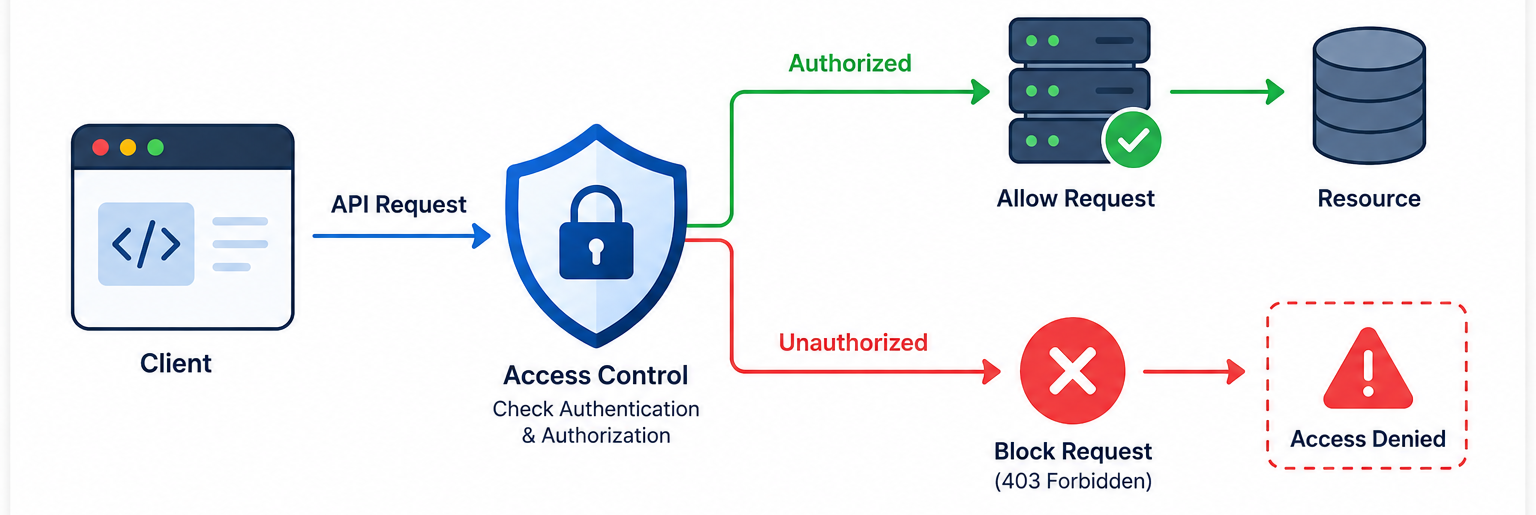
When access control breaks, users reach data or functions they should not touch. Two patterns dominate modern APIs: Broken Object Level Authorization (BOLA) and Broken Function Level Authorization (BFLA). BOLA lets attackers swap object IDs in API calls to access another user’s records. BFLA lets low-privilege users hit admin endpoints directly.
How to Prevent It
Move every access check to server-side code. Never trust the browser or client to enforce restrictions. Deny access by default, and open resources only when explicitly required. Build one reusable access control layer instead of scattering checks across your codebase.
Log every failed access attempt. Set up alerts when failures cluster around one account or endpoint. Rate-limit your APIs. Invalidate sessions on the server immediately after logout. For stateless tokens, keep lifetimes short.
A02: Security Misconfiguration
Security Misconfiguration jumped from fifth place in 2021 to second place in 2025. OWASP reports that three percent of tested applications showed one or more misconfiguration weaknesses. This category also covers leaked credentials, which remain the top misconfiguration finding.
What This Means in Practice
Modern applications rely heavily on configuration files, environment variables, and infrastructure templates. Every default password, every debug endpoint left open in production, and every unnecessary feature enabled creates an opening. Cloud environments amplify this because one misconfigured storage bucket or access policy can expose massive amounts of data.
How to Prevent It
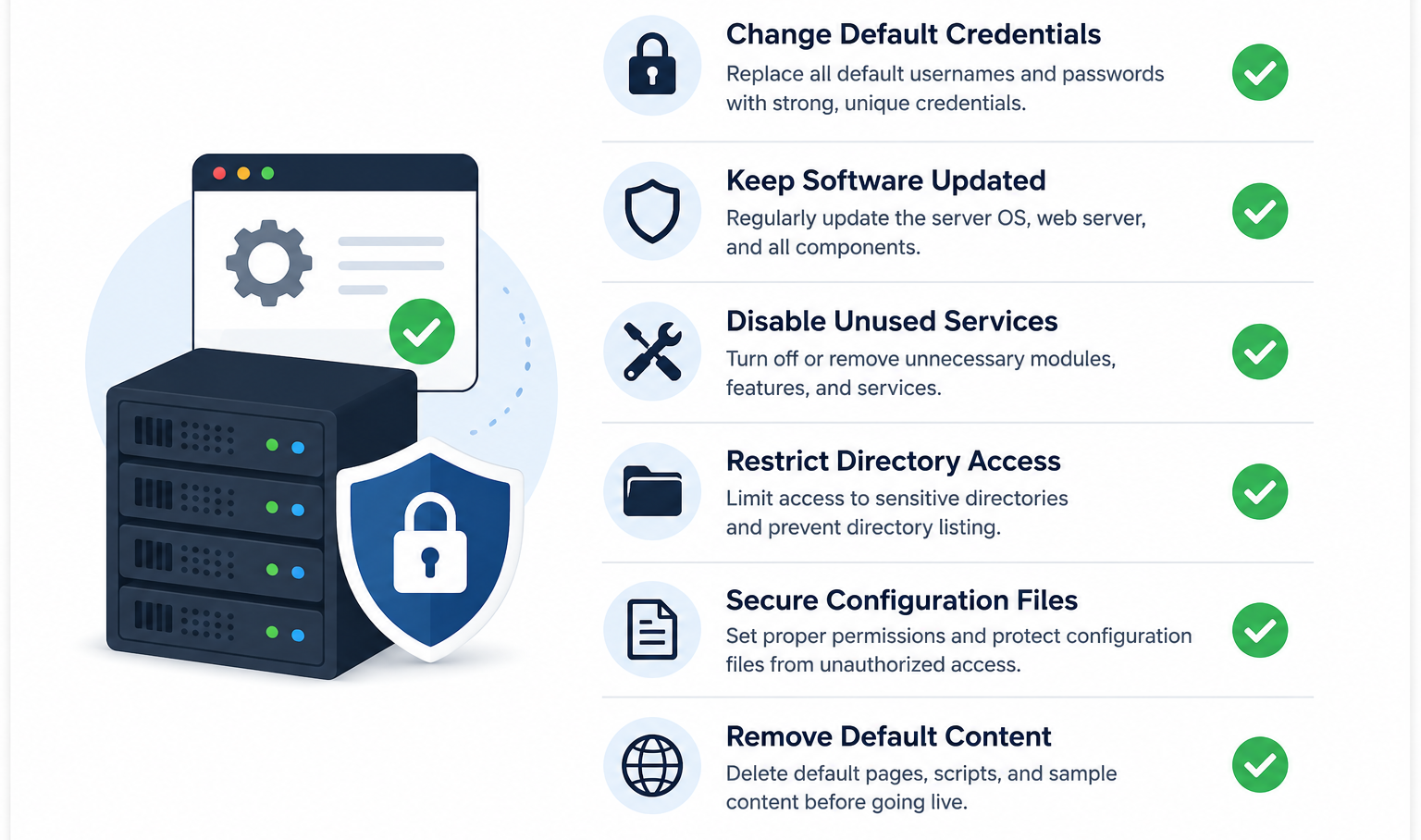
Harden every environment before deployment. Remove default accounts and credentials. Disable features you do not use. Keep your configuration consistent across development, staging, and production using templates.
Run vulnerability scanners against your configurations. Use credential scanners in your CI pipeline. Review cloud access policies regularly. Document every configuration change.
A03: Software Supply Chain Failures
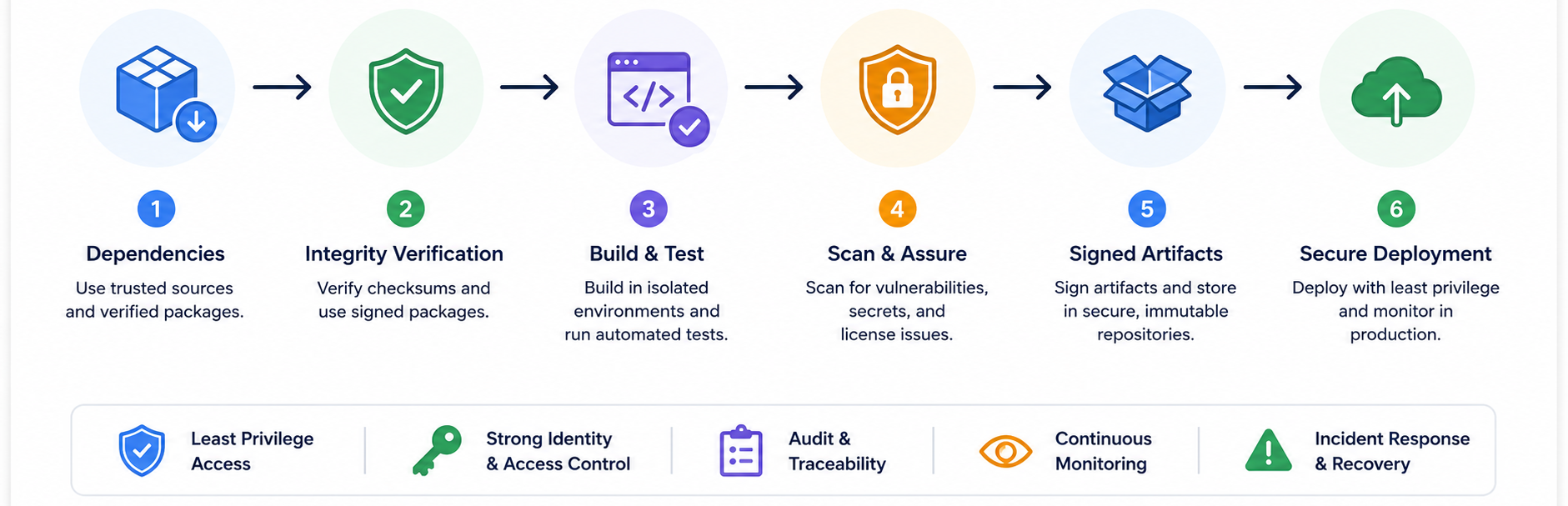
This is a new category for 2025, expanding on the old “Vulnerable and Outdated Components.” It covers your entire supply chain: dependencies, build servers, CI/CD pipelines, developer workstations, and artifact repositories. OWASP notes this category had the highest incidence rate at over five percent, yet the lowest CVE coverage, meaning attacks happen before scanners catch up.
What This Means in Practice
Supply chain attacks hit the tools and libraries you trust. SolarWinds, Log4j, and recent cryptocurrency exchange breaches all trace back to compromised dependencies or build processes. An attacker does not need to breach your application directly if they can poison a library you import or a build step you rely on.
How to Prevent It
Generate and maintain a Software Bill of Materials (SBOM) for every application. Track direct and transitive dependencies. Remove unused libraries. Monitor vulnerability feeds continuously.
Only pull packages from official, signed sources. Host an internal repository for high-risk environments. Enable multi-factor authentication on your code repositories and build servers. Sign your artifacts. Use canary deployments to limit damage if a bad update slips through.
A04: Cryptographic Failures
Cryptographic Failures dropped from second to fourth place. This does not mean the risk shrank; it means more teams now use baseline encryption. OWASP found nearly four percent of applications still had one or more cryptographic weaknesses. When these fail, sensitive data leaks.
What This Means in Practice
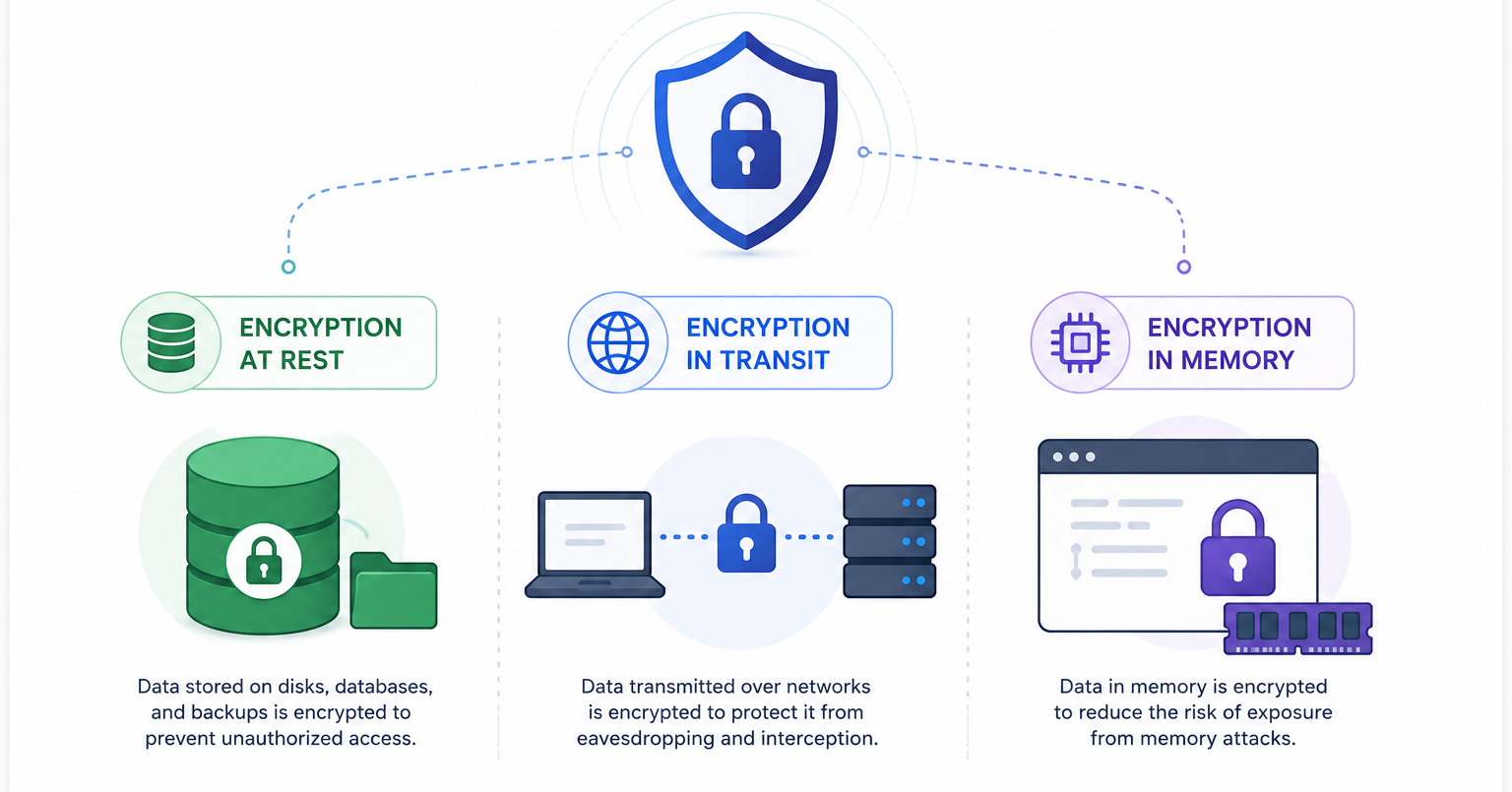
This category covers missing encryption, weak algorithms, poor key management, and unencrypted sensitive fields. Data must stay protected in transit, at rest, and in memory for high-sensitivity systems. Using outdated protocols like TLS 1.0 or hashing passwords with MD5 still happens in production.
How to Prevent It
Classify your data by sensitivity. Encrypt everything that matters. Protect your keys in a hardware security module or cloud key management service. Use modern algorithms and protocols.
Use TLS 1.2 or higher with forward secrecy. Enforce HSTS. Hash passwords with Argon2, scrypt, or PBKDF2. Avoid deprecated primitives like SHA1 for security purposes. Start planning for post-quantum cryptography now if you handle high-risk data.
A05: Injection
Injection fell from third to fifth place. SQL injection, NoSQL injection, XSS, and command injection remain actively exploited. The ranking drop reflects better front-end tooling, not reduced danger. API parameters often go untested, and that is where injection risk now lives.
What This Means in Practice
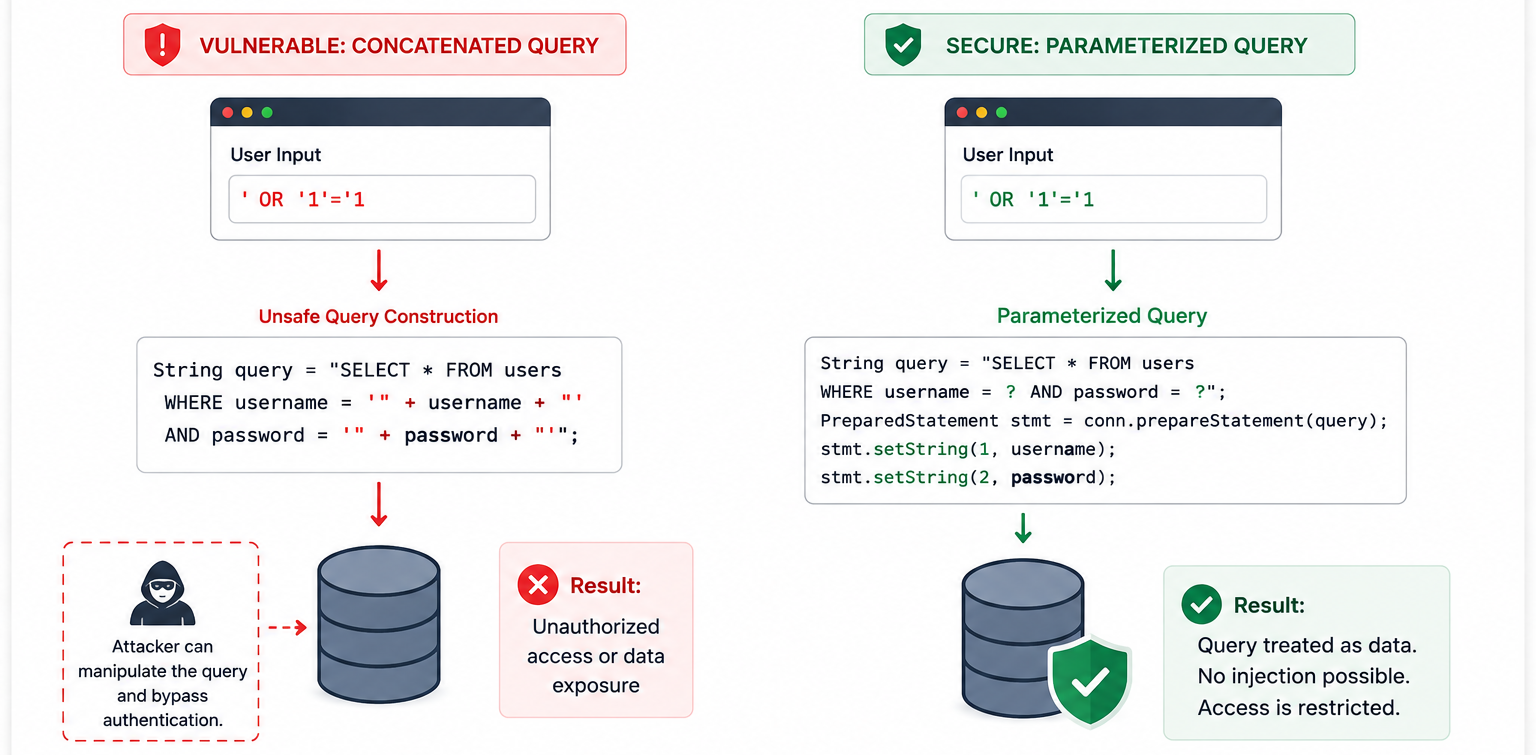
Injection tricks your application into running attacker-supplied code. A malicious input reaches an interpreter, SQL engine, or shell, and the system executes it. XSS injects scripts into web pages that other users view. The result ranges from data theft to full server compromise.
How to Prevent It
Never concatenate user input into queries. Use parameterized statements or ORMs. Validate and sanitize all input on the server side.
Escape special characters when you must use dynamic queries. Note that table and column names cannot be escaped, so never let users supply them. Review code regularly. Test with fuzzing tools. Use web application firewalls as an extra layer, but never as your only defense.
A06: Insecure Design
Insecure Design dropped from fourth to sixth place. This category covers missing threat modeling, weak security requirements, and systems built without secure defaults. Tools cannot fix bad architecture after the fact.
What This Means in Practice
When teams skip security during design, they bake weaknesses into the foundation. A payment flow without proper authorization checks, a chat system without message validation, or an API without rate limiting all reflect design failures. Fixing these later costs months. Catching them during design costs days.
How to Prevent It
Run threat modeling for every major feature. Focus on authentication, access control, business logic, and data flows. Build a library of secure, pre-approved components your teams can reuse. Write security requirements into user stories. Add validation at every tier. Test both normal use and misuse cases.
Use network and system segregation to enforce boundaries. Separate tenants. Review designs with security engineers before developers write code.
A07: Authentication Failures
Authentication Failures holds steady at seventh place. The name changed slightly from “Identification and Authentication Failures” to focus more directly on authentication weaknesses. Standardized frameworks have helped reduce occurrences, but this risk remains common.
What This Means in Practice
Credential stuffing, brute force, weak passwords, and session hijacking still work. Attackers often target API token validation endpoints or machine-to-machine paths rather than the login page itself. Missing multi-factor authentication and allowing default credentials open the door wide.
How to Prevent It
Enforce multi-factor authentication everywhere you can. Check new passwords against known breach databases. Align password policies with NIST 800-63b. Do not force rotation unless you suspect compromise.
Return identical responses for valid and invalid users on registration and password reset endpoints to prevent account enumeration. Use server-side sessions with high-entropy IDs. For JWTs, validate issuer, audience, and expiration claims. Keep token lifetimes short.
A08: Software or Data Integrity Failures
This category stays at eighth place. It covers failures to verify that code and data come from trusted sources and remain unaltered. This differs from A03, which focuses on supply chain dependencies. A08 focuses on runtime and delivery integrity.
What This Means in Practice
If your application accepts unsigned updates, deserializes untrusted data, or deploys artifacts without verification, attackers can modify your software in transit or at rest. Insecure deserialization and unsigned CI/CD artifacts fall here.
How to Prevent It
Sign your software and verify signatures before installation. Use digital signatures or checksums for all updates. Do not accept serialized data from untrusted sources without integrity checks.
Host an internal repository for approved libraries. Segregate your CI/CD pipeline with proper access controls. Review code and configuration changes before merging.
A09: Security Logging and Alerting Failures
This category stays at ninth place. OWASP renamed it from “Monitoring” to “Alerting” to emphasize that logs without alerts only help with post-mortems, not detection. The average time to detect a breach still sits around 197 days.
What This Means in Practice
Without proper logging, you cannot detect attacks. Without alerting, you cannot respond quickly. Many applications log errors but never trigger notifications. Others log so much noise that real signals drown.
How to Prevent It
Log every authentication failure, access control failure, and input validation failure. Include enough context to identify suspicious accounts. Use structured formats that your SIEM can parse.
Set up real-time alerts for suspicious patterns. Use honeytokens to catch unauthorized access with near-zero false positives. Maintain audit trails with integrity controls. Adopt an incident response plan like NIST 800-61r2.
A10: Mishandling of Exceptional Conditions
This is the second new category in 2025. It covers improper error handling, fail-open logic, and systems that expose sensitive data when things go wrong. The community voted this in because security engineers see these exploits in production before automated tools catch them.
What This Means in Practice
When a database connection drops, does your application deny access or grant it? When an authentication service times out, does it fail closed or open? Error messages that leak stack traces, database schemas, or internal IPs give attackers reconnaissance gold.
How to Prevent It
Plan for failure. Catch errors where they occur and handle them meaningfully. Roll back transactions completely if they fail partway through. Implement centralized error handling so one application does not use multiple inconsistent approaches.
Add rate limiting and resource quotas to prevent exceptional conditions from overwhelming your system. Perform stress testing and penetration testing to see how your application behaves under abnormal conditions.
Conclusion
The OWASP Top 10 2025 reflects where attackers actually strike today. Broken Access Control remains the biggest threat. Security Misconfiguration climbed because teams deploy faster than they scan. Supply chain attacks earned a dedicated category. Exceptional condition handling entered the list because failing open costs organizations dearly.
None of these risks require exotic tools to fix. They need discipline: server-side validation, proper encryption, dependency tracking, secure defaults, and logging with alerts. Review your applications against this list. Start with the highest risks. Fix one category at a time. Build security into design, not as an afterthought.
Want more articles and tutorials like this?
Get new tutorials, security alerts, and IT tips straight to your inbox.
That’s a really helpful overview. It’s great to see the focus on how these vulnerabilities evolve, and I’m definitely going to review the changes from 2021.