TACACS+ vs RADIUS: Choosing the Right AAA Protocol for Your Network
Network administrators face a critical decision when securing infrastructure: which AAA protocol best protects their environment? TACACS+ and RADIUS both deliver authentication, authorization, and accounting, yet they serve fundamentally different purposes. This guide cuts through the confusion and helps you pick the right tool for the job—whether you manage user Wi-Fi access or lock down privileged device administration.
Table of Contents
- What Does AAA Actually Mean?
- What Is RADIUS?
- What Is TACACS+?
- Head-to-Head: Key Differences
- Transport Layer: UDP vs TCP
- Encryption: Partial vs Full Payload
- Authentication and Authorization Architecture
- Command-Level Authorization
- Accounting and Audit Trails
- Real-World Use Cases
- Configuration Examples
- When to Use RADIUS
- When to Use TACACS+
- Can You Run Both Together?
- Security Best Practices
- Conclusion
What Does AAA Actually Mean?
AAA stands for Authentication, Authorization, and Accounting. These three pillars form the backbone of network access control.
Authentication verifies who you are. It checks your username, password, certificate, or token against a central database. Authorization decides what you can do after authentication succeeds. It defines your permissions, access levels, and resource limits. Accounting tracks what you actually did. It logs session duration, commands executed, and data consumed.
Both RADIUS and TACACS+ handle all three functions, but they approach them very differently. Understanding these differences saves you from security gaps and failed compliance audits later.
What Is RADIUS?
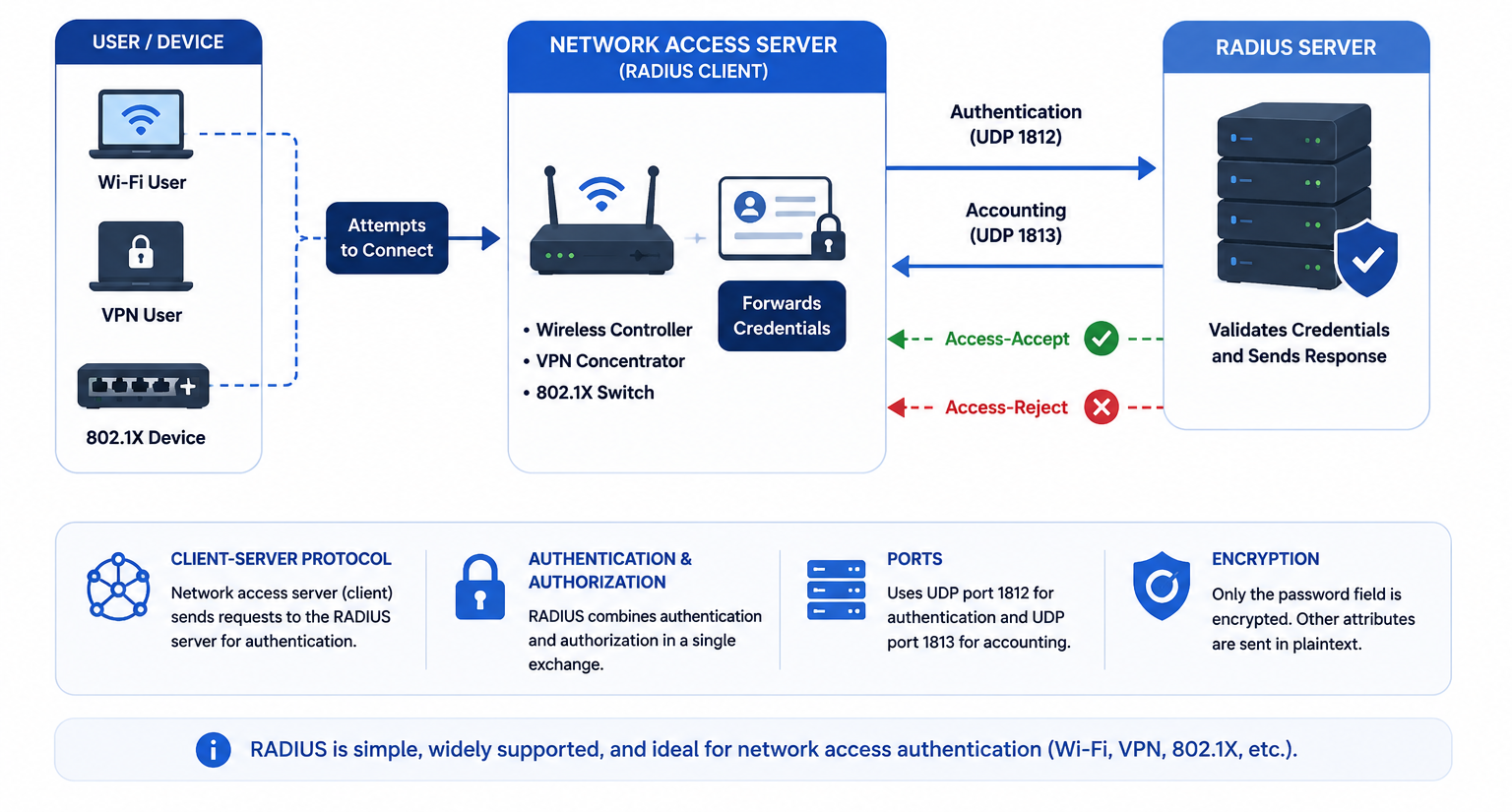
RADIUS stands for Remote Authentication Dial-In User Service. Despite its dial-up-era name, RADIUS remains the industry standard for modern network access. It authenticates users and devices that want to connect to your network.
RADIUS operates as a client-server protocol. Your network access server—whether a wireless controller, VPN concentrator, or 802.1X switch—acts as the client. When a user attempts to connect, the client forwards credentials to a central RADIUS server. The server validates them and returns either an Access-Accept or Access-Reject response.
RADIUS runs over UDP ports 1812 (authentication) and 1813 (accounting). The protocol encrypts only the password field in each packet, leaving usernames and other attributes in plaintext. RADIUS combines authentication and authorization into a single exchange, which keeps things simple but limits flexibility.
What Is TACACS+?
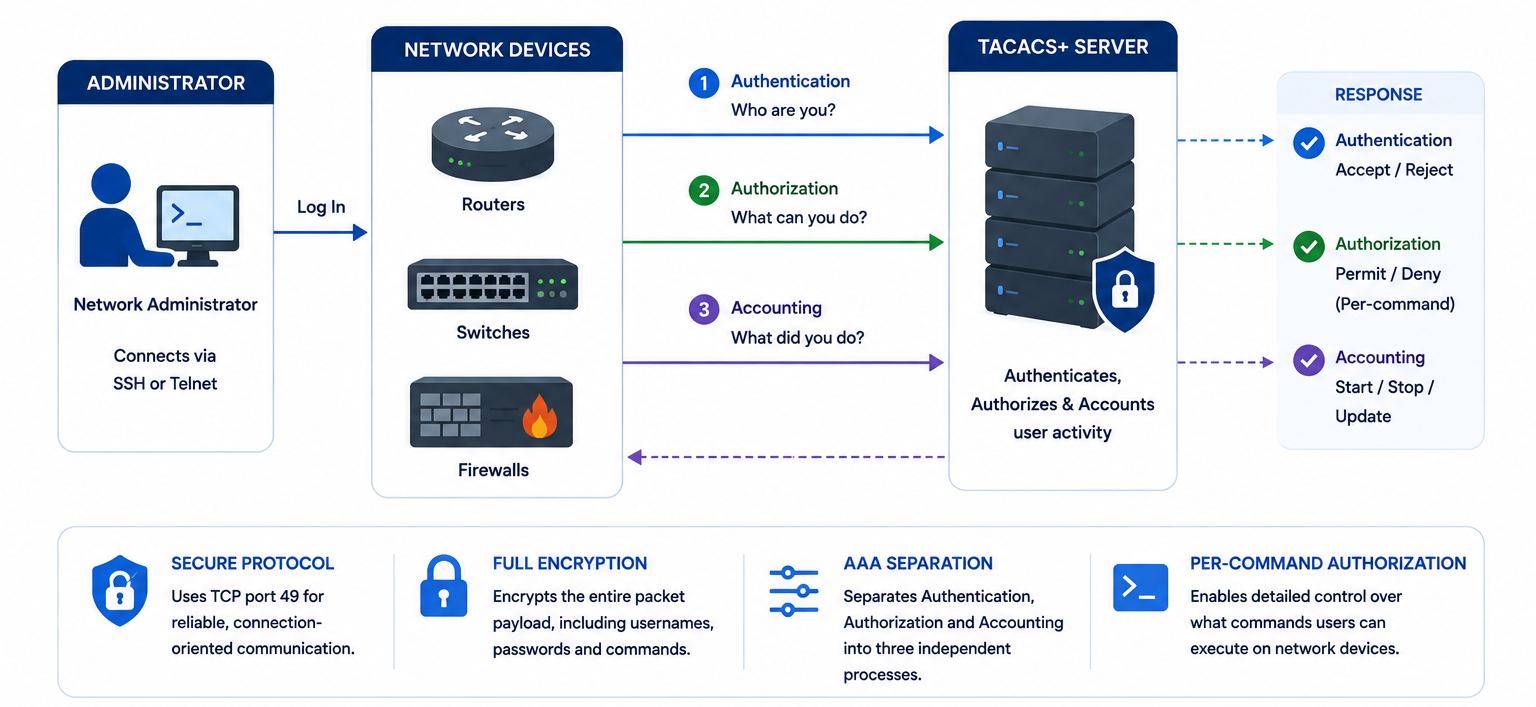
TACACS+ stands for Terminal Access Controller Access-Control System Plus. Cisco developed this protocol specifically for network device administration. It controls who can log into your routers, switches, and firewalls—and exactly what commands they can run once inside.
TACACS+ uses TCP port 49, providing reliable, connection-oriented communication. Unlike RADIUS, it encrypts the entire packet payload, not just the password. More importantly, TACACS+ separates authentication, authorization, and accounting into three independent processes. This separation enables per-command authorization, a feature RADIUS simply cannot match.
While TACACS+ originated as a Cisco proprietary protocol, many vendors now support it. However, Cisco environments still benefit from the deepest integration.
Head-to-Head: Key Differences
| Feature | RADIUS | TACACS+ |
|---|---|---|
| Full Name | Remote Authentication Dial-In User Service | Terminal Access Controller Access-Control System Plus |
| Transport Protocol | UDP | TCP |
| Port Numbers | 1812 (auth), 1813 (accounting) | 49 (all AAA services) |
| Encryption Scope | Password only | Entire packet payload |
| AAA Separation | Authentication + Authorization combined | All three functions separate |
| Command Authorization | Not supported | Full per-command control |
| Primary Use Case | User network access (Wi-Fi, VPN) | Device administration |
| Vendor Support | Open standard, universal | Cisco-centric, growing support |
| Scalability | Thousands of concurrent users | Smaller admin user groups |
Transport Layer: UDP vs TCP
RADIUS chooses UDP for a reason. UDP offers connectionless, lightweight communication with minimal overhead. When thousands of users authenticate simultaneously on a corporate Wi-Fi network, RADIUS handles the load efficiently without maintaining persistent connections.
TACACS+ chooses TCP because device administration demands reliability. When an engineer issues a configuration command on a production router, that packet must arrive. TCP guarantees delivery through acknowledgments, retransmissions, and flow control. The trade-off is slightly higher overhead, but for administrative sessions involving dozens of commands, reliability wins.
Think of it this way: RADIUS handles high-volume, one-time authentication requests. TACACS+ manages lower-volume, ongoing administrative conversations.
Encryption: Partial vs Full Payload
RADIUS encrypts only the password field within the Access-Request packet. The username, NAS IP address, called-station ID, and other attributes travel in plaintext. An attacker capturing RADIUS traffic can see who attempted to connect, from where, and when—just not their password.
TACACS+ encrypts the entire packet body. Every username, every command, every authorization response remains hidden. This full-packet encryption provides stronger protection against eavesdropping and man-in-the-middle attacks.
However, both protocols historically rely on MD5-based encryption that modern security standards consider weak. The current best practice wraps both protocols in TLS. RadSec (RFC 6614) secures RADIUS over TLS, while RFC 9887 defines TACACS+ over TLS 1.3. Any new deployment in 2026 should prioritize TLS protection.
Authentication and Authorization Architecture
RADIUS bundles authentication and authorization together. When a RADIUS server returns an Access-Accept packet, it simultaneously confirms the user is genuine and delivers authorization attributes like VLAN assignment, bandwidth limits, and session timeout. You cannot ask a RADIUS server “is this user valid?” without also receiving “what can this user do?”
TACACS+ keeps these functions separate. A network device can authenticate a user against one backend—say, a Kerberos domain—then query the TACACS+ server solely for authorization information. The device tells TACACS+, “This user already authenticated via Kerberos; now tell me what commands they may run.” This decoupling creates enormous flexibility for complex enterprise environments.
Command-Level Authorization
Here lies the biggest practical difference. TACACS+ supports per-command authorization. A router or switch can ask the TACACS+ server before executing every single command: “May this user run show running-config?” “May this user run interface gig0/1?” The server responds yes or no for each command individually.
RADIUS cannot do this. RADIUS delivers authorization attributes once at session establishment. After that, the device makes all access decisions locally based on those initial attributes. For network device administration, this limitation creates a significant security gap. You cannot prevent a junior engineer from running destructive commands without TACACS+-level granularity.
Accounting and Audit Trails
Both protocols log user activity, but their focus differs. RADIUS accounting tracks session-oriented data: connection time, bytes transferred, IP address assigned. ISPs and enterprises use this data for billing and usage monitoring.
TACACS+ accounting focuses on command-level auditing. It logs every command executed, who ran it, when they ran it, and whether the device permitted or denied it. For compliance frameworks like PCI-DSS, SOX, and HIPAA, this granular audit trail proves invaluable. Security teams can reconstruct exactly what happened during an incident.
Real-World Use Cases
RADIUS Shines Here
- Enterprise Wi-Fi with 802.1X: Thousands of employees authenticate daily through wireless controllers.
- VPN Remote Access: Users connect via SSL/IPsec VPNs and RADIUS validates their credentials against Active Directory.
- ISP Broadband Networks: BNGs and BRAS devices authenticate subscriber PPPoE sessions.
- Guest Network Portals: Captive portals authenticate visitors with time-limited access.
TACACS+ Shines Here
- Network Device Administration: Engineers log into routers, switches, and firewalls for configuration changes.
- Privileged Access Management: Senior admins receive full command access while junior staff get read-only or limited command sets.
- Compliance Environments: Organizations need detailed audit trails of every configuration command.
- Change Control: Each command gets logged with a timestamp and user identity for post-incident review.
Configuration Examples
Cisco IOS RADIUS Configuration
Below is a basic RADIUS configuration for user authentication on a Cisco switch. This example points the device at a RADIUS server for 802.1X port-based authentication.
! Define the RADIUS server
radius server ISE-PRIMARY
 address ipv4 10.1.1.10 auth-port 1812 acct-port 1813
 key YourSharedSecret123

! Enable AAA
aaa new-model

! Configure authentication for login
aaa authentication login default group radius local

! Configure authorization for exec mode
aaa authorization exec default group radius local

! Configure accounting
aaa accounting exec default start-stop group radius

! Enable 802.1X on the interface
interface GigabitEthernet0/1
 dot1x port-control auto
 authentication periodic
 authentication timer reauthenticate 3600
Cisco IOS TACACS+ Configuration
This example configures a Cisco router to use TACACS+ for administrative access with command authorization and accounting.
! Define the TACACS+ server
tacacs server TACACS-PRIMARY
 address ipv4 10.1.1.20
 key YourTacacsSecret456
 timeout 10

! Enable AAA
aaa new-model

! Authentication: Use TACACS+ first, fallback to local
aaa authentication login default group tacacs+ local

! Authorization: Use TACACS+ for exec and commands
aaa authorization exec default group tacacs+ local
aaa authorization commands 1 default group tacacs+ local
aaa authorization commands 15 default group tacacs+ local

! Accounting: Log all commands and connections
aaa accounting exec default start-stop group tacacs+
aaa accounting commands 1 default start-stop group tacacs+
aaa accounting commands 15 default start-stop group tacacs+

! Apply to console and VTY lines
line con 0
 login authentication default
line vty 0 15
 login authentication default
 authorization commands 15 default
 transport input ssh
TACACS+ Command Authorization with Cisco ISE
When using Cisco Identity Services Engine (ISE) as your TACACS+ server, you can create shell profiles that restrict commands. Here is a sample policy configuration:
! On the network device, enable command authorization for privilege level 15
aaa authorization commands 15 default group tacacs+ none

! ISE Shell Profile Example (configured via ISE GUI):
! Shell Profile Name: "Junior-Network-Admin"
! Custom Attributes:
!   cisco-av-pair = shell:priv-lvl=1
!   cisco-av-pair = cmd=show;permit
!   cisco-av-pair = cmd=ping;permit
!   cisco-av-pair = cmd=configure;deny
Linux FreeRADIUS Basic Configuration
For those running open-source RADIUS, here is a snippet from /etc/freeradius/3.0/clients.conf:
# Define a NAS client
client corporate_wifi {
    ipaddr = 10.1.1.0/24
    secret = YourSharedSecret123
    require_message_authenticator = yes
    limit {
        max_connections = 16
        lifetime = 0
        idle_timeout = 30
    }
}
And a sample user entry in /etc/freeradius/3.0/users:
# User with VLAN assignment
jdoe Cleartext-Password := "SecurePass123"
    Tunnel-Type = VLAN,
    Tunnel-Medium-Type = IEEE-802,
    Tunnel-Private-Group-Id = "20",
    Session-Timeout = 28800
Linux TACACS+ Server (tac_plus) Configuration
Here is a sample tac_plus.conf for the open-source TACACS+ daemon:
# Define the shared key
key = "YourTacacsSecret456"

# Define user groups
group = admin {
    default service = permit
    service = exec {
        priv-lvl = 15
    }
    cmd = show {
        permit .*
    }
    cmd = configure {
        permit .*
    }
}

group = readonly {
    default service = deny
    service = exec {
        priv-lvl = 1
    }
    cmd = show {
        permit .*
    }
    cmd = exit {
        permit .*
    }
}

# Define users
user = john.smith {
    member = admin
    login = cleartext "JohnPass123"
}

user = sarah.jones {
    member = readonly
    login = cleartext "SarahPass456"
}
When to Use RADIUS
Choose RADIUS when you need to authenticate end users or devices connecting to the network. It handles high transaction volumes with minimal resource consumption. Its open-standard nature means virtually every network device supports it out of the box.
RADIUS fits perfectly in multi-vendor environments. Whether you run Cisco, Aruba, Juniper, or HP equipment, RADIUS integrates seamlessly. It also supports Extensible Authentication Protocol (EAP), making it essential for 802.1X deployments.
If your primary concern involves Wi-Fi access, VPN connections, or broadband subscriber management, RADIUS delivers the scalability and compatibility you need.
When to Use TACACS+
Choose TACACS+ when you need to control administrative access to network infrastructure. If your engineers, contractors, or support staff log into routers, switches, or firewalls, TACACS+ provides the granular control that RADIUS lacks.
TACACS+ matters most in environments where command-level auditing and compliance tracking are non-negotiable. Financial institutions, healthcare organizations, and government agencies often mandate detailed logs of every administrative action. TACACS+ delivers these logs natively.
If your network runs predominantly Cisco gear, TACACS+ integrates more deeply than any alternative. The protocol was built for this exact purpose.
Can You Run Both Together?
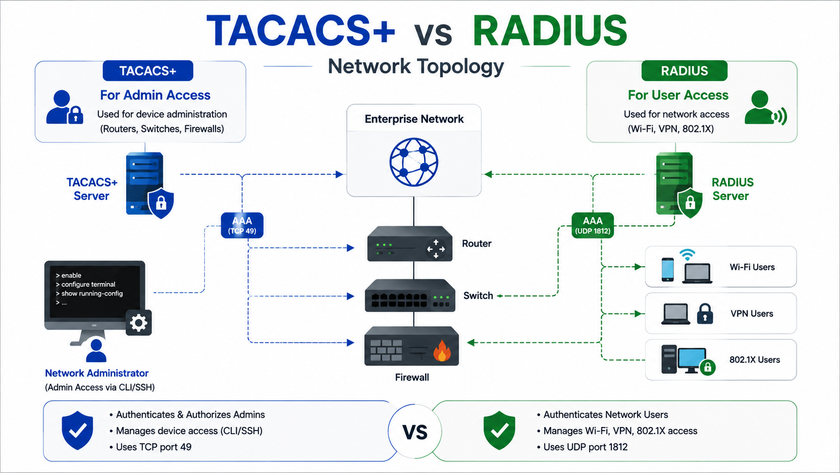
Absolutely. Many organizations deploy both protocols simultaneously because they solve different problems. RADIUS handles user network access while TACACS+ manages device administration.
In a typical enterprise setup, wireless controllers and VPN concentrators point to RADIUS servers for employee authentication. Meanwhile, all routers, switches, and firewalls point to TACACS+ servers for administrative access control. This hybrid approach leverages each protocol’s strengths without forcing compromises.
The key is maintaining clear boundaries. User access flows through RADIUS. Privileged access flows through TACACS+. Never use RADIUS for device administration when you have TACACS+ available, and never burden TACACS+ with high-volume user authentication when RADIUS handles it more efficiently.
Security Best Practices
Legacy encryption in both protocols has aged poorly. MD5-based obfuscation no longer meets modern security standards. Follow these practices to harden your deployment:
Deploy TLS Everywhere: Use RadSec (RFC 6614) to wrap RADIUS in TLS. Enable TACACS+ over TLS 1.3 per RFC 9887. Ask your vendor explicitly about support for these standards.
Segment Your AAA Servers: Place RADIUS and TACACS+ servers on dedicated management VLANs with strict ACLs. Never expose them directly to untrusted networks.
Use Strong Shared Secrets: Treat shared secrets like passwords. Generate cryptographically random strings at least 32 characters long. Rotate them quarterly.
Implement Redundancy: Deploy primary and secondary AAA servers. Configure your network devices to fail over automatically. Test failover regularly.
Monitor and Alert: Forward AAA logs to your SIEM. Create alerts for failed authentication spikes, off-hours administrative access, and privilege escalation attempts.
Enforce MFA: Integrate multi-factor authentication with both protocols. Modern identity platforms can proxy RADIUS and TACACS+ requests through MFA gateways before granting access.
Conclusion
TACACS+ and RADIUS both serve critical roles in network security, but they were never meant to compete. RADIUS dominates user access scenarios with its lightweight UDP transport, universal vendor support, and session-based accounting. TACACS+ rules device administration with its TCP reliability, full packet encryption, and unmatched command-level authorization.
Smart network architects deploy both. They let RADIUS handle the thousands of daily Wi-Fi and VPN authentications while TACACS+ watches over the privileged few who touch the core infrastructure. Understanding where each protocol fits ensures you build a security architecture that scales, complies, and protects.
Want more articles and tutorials like this?
Get new tutorials, security alerts, and IT tips straight to your inbox.