LiberNT: An Open-Source Alternative to Windows and Linux
What if you could run Windows applications without installing Windows, or use Linux applications without running a Linux distribution?
That’s the idea behind LiberNT, an emerging open-source operating system built around Microsoft’s Windows NT architecture. Unlike traditional Linux distributions, LiberNT doesn’t use the Linux kernel. Instead, it aims to provide a Windows-compatible environment while remaining free and open source.
The project is attracting attention because it targets modern hardware, Windows 11 compatibility and even Linux application support.
But what exactly is LiberNT, how does it work, and can it replace Windows or Linux?
Let’s take a closer look.
Quick Summary
LiberNT is a free, open-source operating system derived from ReactOS. It uses the Windows NT architecture rather than the Linux kernel and aims to run Windows-compatible applications and drivers. It also introduces support for modern 64-bit platforms and experimental Linux application compatibility. However, it remains under active development and is not yet ready to replace Windows or Linux on production computers.
Table of Contents
- What Is LiberNT?
- How Is LiberNT Different from Windows and Linux?
- LiberNT and ReactOS: What’s the Connection?
- Main Features of LiberNT
- Can LiberNT Run Windows and Linux Applications?
- What Does LiberNT Look Like?
- How to Download and Test LiberNT
- Is LiberNT Ready for Daily Use?
- Conclusion
- Frequently Asked Questions
1. What Is LiberNT?
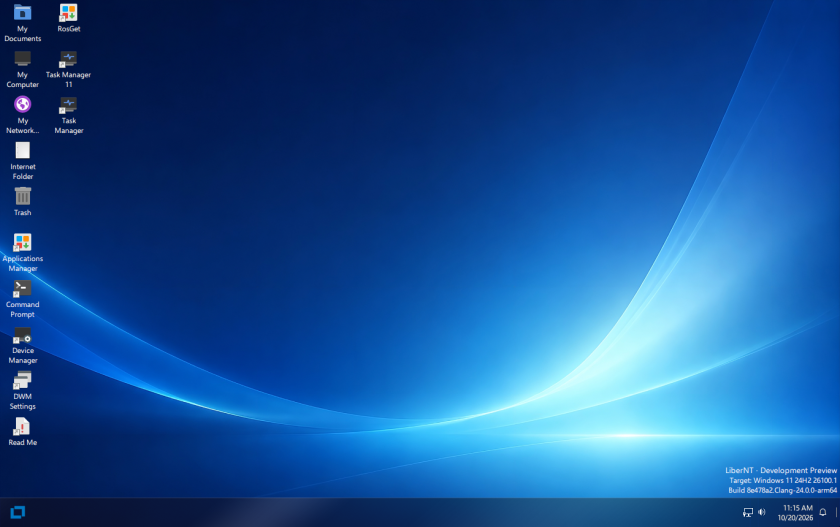
LiberNT is an open-source operating system designed to reproduce the Windows NT environment without relying on Microsoft’s proprietary Windows source code.
Its main objective is to offer compatibility with Windows applications and drivers while developing an independent operating system.
To understand why this is interesting, we need to look at the technology behind Windows.
Modern Windows versions, including Windows 10 and Windows 11, use the Windows NT architecture. This architecture includes several important components:
- NT Kernel: Manages processes, memory and system resources.
- Hardware Abstraction Layer (HAL): Provides an interface between the operating system and hardware.
- Device Drivers: Allow the operating system to communicate with hardware.
- Windows Subsystem: Provides the environment required to run Windows applications.
- System Services: Handle background operations and essential system functions.
LiberNT works toward implementing these components in an open-source environment.
In other words, instead of building another Linux distribution, its developers are working on an alternative operating system based on the NT architecture.
The project was started by Ahmed Arif and is maintained by a group of contributors.
Its source code is publicly available on GitHub under the GPL 3.0 license, while inherited components retain their respective licenses.
Official repository: LiberNT on GitHub
2. How Is LiberNT Different from Windows and Linux?
The most interesting aspect of LiberNT is its architecture. Although its desktop looks familiar to Windows users, its internal implementation is different.
Let’s compare the three operating systems.
| Feature | Windows 11 | Linux | LiberNT |
|---|---|---|---|
| Kernel architecture | Windows NT | Linux kernel | Windows NT-based |
| Source code | Proprietary | Open source | Open source |
| License | Proprietary | GPL and other licenses | GPL 3.0 and inherited licenses |
| Windows applications | Native support | Through Wine/compatibility tools | Compatibility is a development goal |
| Linux applications | Through WSL | Native | Experimental support |
| Hardware support | Extensive | Extensive | Still developing |
| Daily-use maturity | Production-ready | Production-ready | Experimental |
Why Doesn’t LiberNT Use the Linux Kernel?
Linux distributions such as Ubuntu, Debian and Fedora use the Linux kernel to manage hardware, memory, processes and system resources.
LiberNT takes another approach. It implements the Windows NT architecture, including its kernel, drivers and system services.
This means that LiberNT does not simply install Wine on top of Linux to run Windows applications. It aims to provide the underlying Windows-compatible environment itself.
That distinction is important: LiberNT is an operating system, not a Linux distribution or a Windows compatibility application.
3. LiberNT and ReactOS: What’s the Connection?
LiberNT did not start completely from scratch. It is derived from ReactOS, an open-source project that aims to recreate the Windows NT architecture.
ReactOS has been under development for decades, with the goal of running Windows applications and drivers without using Microsoft’s proprietary operating system.
However, LiberNT takes a different direction.
Its developers have introduced extensive changes to kernel components, memory management and hardware drivers, with Windows 11 serving as the main compatibility reference.
Some of its development priorities include:
- Modern 64-bit hardware support.
- Improved memory management.
- Better compatibility with Windows applications and drivers.
- Support for ARM64 devices.
- Modern storage and USB hardware.
- Linux application compatibility.
One important point: LiberNT still shares a substantial amount of code with ReactOS. It is therefore more accurate to describe it as a ReactOS-derived project rather than an entirely independent operating system developed from zero.
4. Main Features of LiberNT
Here are some of the technologies that make this project interesting.
4.1. Support for Multiple CPU Architectures
Traditional desktop operating systems mainly target x86-64 processors, but modern computing also relies heavily on ARM-based devices.
LiberNT targets several architectures:
- AMD64: Standard 64-bit Intel and AMD processors.
- ARM64: ARM-based systems, including supported Raspberry Pi hardware.
- RISC-V 64-bit: An open instruction-set architecture.
- i386: Available as a source-build target.
This architecture support could make LiberNT interesting for developers working with embedded systems and alternative hardware platforms.
4.2. Modern Hardware Support
An operating system needs more than a working kernel. It also needs drivers to communicate with hardware.
LiberNT is developing support for:
- PCI and PCI Express.
- USB 3.0 through xHCI.
- NVMe storage.
- SD and eMMC storage.
- UEFI boot.
- Modern display hardware.
- Raspberry Pi platforms.
These components are important because hardware compatibility remains one of the biggest challenges for alternative operating systems.
4.3. Windows 11 Compatibility
Windows 11 is the reference used by LiberNT developers when implementing and testing system behaviour.
The project uses public Windows SDK and WDK headers, Microsoft documentation and tests performed against Windows 11.
It follows a clean-room development approach, meaning that developers do not copy Microsoft’s proprietary source code.
The objective is to reproduce compatible behaviour through independent implementation.
However, targeting Windows 11 does not mean that every Windows 11 application or driver will work. Compatibility must be tested component by component.
4.4. Open-Source Development
LiberNT publishes its source code on GitHub, allowing developers to inspect the implementation, report bugs and contribute improvements.
Interestingly, the project also acknowledges the use of AI-assisted development.
According to its development documentation, AI can help write and review code, but contributors must review changes and validate them through actual tests.
This is particularly important when developing operating-system components, where a small mistake can cause crashes, memory corruption or boot failures.
5. Can LiberNT Run Windows and Linux Applications? {#windows-and-linux-applications}
This is probably the most interesting question.
LiberNT aims to support applications from both ecosystems, although the level of compatibility differs.
Running Windows Applications
Because LiberNT implements the Windows NT architecture, it aims to provide an environment compatible with Windows applications.
Its desktop already includes familiar Windows components, and recent builds offer installation options for applications such as Google Chrome, Mozilla Firefox and Steam.
However, don’t assume that every Windows application will install or work correctly.
Some programs depend on specific Windows APIs, kernel components, graphics drivers or proprietary services that LiberNT may not fully implement.
Running Linux Applications
Another interesting development is experimental Linux application support.
LiberNT has introduced a Linux Terminal that provides access to an Ubuntu-based environment.
Unlike traditional approaches that run a complete Linux virtual machine, this implementation aims to execute Linux applications directly through compatibility components.
The project also supports experimental graphical Linux applications.
This is particularly interesting because it brings together two application ecosystems within one NT-based operating system.
However, there are limitations. Graphics acceleration and audio support for Linux applications are not yet fully implemented.
Important: This is experimental functionality, not a replacement for a complete Linux environment.
6. What Does LiberNT Look Like?
One of the first things you notice when launching LiberNT is its familiar desktop environment.
Its interface includes several elements that Windows users will immediately recognize.
Here are some screenshots illustrating the current experience.
Screenshot 1: LiberNT Desktop
The desktop includes familiar elements such as the taskbar, desktop shortcuts, file access and quick settings.
Image placement: LiberNT desktop with the Quick Settings panel open.
Image title: LiberNT Desktop Interface and Quick Settings
Alt text: LiberNT operating system desktop showing the taskbar, application shortcuts and quick settings panel.
Screenshot 2: LiberNT Installation Assistant
During setup, LiberNT offers the option to install additional components and applications.
The available options include:
- Google Chrome.
- Mozilla Firefox.
- Steam.
- Microsoft Visual C++ Redistributables.
- Wine-related components.
This approach makes it easier to prepare an environment with commonly used software.
Image placement: LiberNT installation assistant showing available software components.
Image title: Installing Applications During LiberNT Setup
Alt text: LiberNT installation wizard displaying optional applications and software components.
Screenshot 3: File Explorer and System32
The file explorer follows a familiar Windows-style layout, including navigation panels, folders, tabs and the address bar.
The screenshot also shows the traditional Windows directory structure, including C:\Windows\System32.
This is a good demonstration of how LiberNT recreates the Windows environment.
Image placement: LiberNT File Explorer displaying the System32 directory.
Image title: LiberNT File Explorer and System32 Directory
Alt text: LiberNT file explorer showing the Windows System32 directory and system DLL files.
Screenshot 4: Running Linux Commands
This is where things become particularly interesting.
LiberNT provides a Linux Terminal that opens an Ubuntu-based shell.
For example, the following command displays network interfaces:
ip aThis is a familiar Linux networking command that administrators use to inspect network interfaces, IP addresses and interface states.
Image placement: Ubuntu Linux terminal running the ip a command inside LiberNT.
Image title: Running Ubuntu Linux Commands on LiberNT
Alt text: LiberNT desktop displaying an Ubuntu terminal executing the Linux ip a networking command.
These screenshots demonstrate that LiberNT is more than a Windows-inspired desktop. It is an attempt to combine different application environments within an open-source NT operating system.
7. How to Download and Test LiberNT
If you want to explore LiberNT, you don’t need to install it directly on your main computer.
The recommended approach is to test it inside a virtual machine.
Step 1: Download LiberNT
Visit the official GitHub repository and open the Releases section.
Choose the appropriate build for your architecture.
LiberNT currently provides several image formats:
| File | Purpose |
|---|---|
bootcd.iso | Boot LiberNT or start the installation process |
LiberNT.img | Preinstalled disk image |
LiberNT.vhd | Virtual disk for supported virtual machines |
LiberNT.vhdx | Virtual disk for Hyper-V Generation 2 |
For beginners, I recommend starting with a preinstalled virtual disk image.
Step 2: Create a Virtual Machine
You can use virtualization platforms such as:
- Hyper-V
- QEMU
- VirtualBox
For example, if you use Hyper-V:
- Open Hyper-V Manager.
- Create a new virtual machine.
- Select Generation 2.
- Configure the required memory and virtual processors.
- Select the downloaded
LiberNT.vhdxdisk. - Disable Secure Boot.
- Start the virtual machine.
Important: The current pre-release builds are experimental. The project specifically recommends testing them in virtual machines or on spare hardware.
Step 3: Explore the Operating System
After booting, explore the desktop and available applications.
You can experiment with:
- Opening File Explorer.
- Exploring the Windows directory structure.
- Launching the command prompt.
- Testing available Windows applications.
- Opening the Linux Terminal.
- Running basic Linux commands.
Avoid using important data or production systems during testing.
You can find installation instructions, available builds and technical documentation here:
- GitHub repository: https://github.com/LiberNT/LiberNT
- Official website: https://libernt.com/
8. Is LiberNT Ready for Daily Use?
Not yet.
Although LiberNT has made interesting progress, it remains an experimental operating system.
Its developers are still working on hardware support, application compatibility, kernel components and system stability.
There are several important limitations to consider:
| Area | Current situation |
|---|---|
| Windows compatibility | Under active development |
| Linux applications | Experimental support |
| Hardware drivers | Growing support, not universal |
| ARM64 | Supported target |
| RISC-V | Supported target |
| Graphics | Development ongoing |
| Production stability | Not recommended |
The project itself clearly labels its available builds as Debug pre-releases.
That means you should not replace your Windows or Linux installation with LiberNT on a computer you depend on.
For now, its biggest value is educational and technical.
It is particularly interesting for operating-system developers, programmers, system administrators and open-source enthusiasts who want to understand how an alternative NT-based operating system works.
9. Conclusion
LiberNT is an interesting development in the open-source operating-system ecosystem.
Rather than creating another Linux distribution, its developers are taking a different approach by implementing the Windows NT architecture independently.
Its ReactOS foundation, Windows 11 compatibility goals, support for modern hardware and experimental Linux application support make it a project worth following.
However, there is still a long road ahead before LiberNT can become a reliable replacement for Windows or Linux.
For now, consider it an experimental project to explore, test and follow rather than an operating system ready for everyday use.
It will be interesting to see how far this project goes and whether it can eventually offer a practical open-source alternative to Microsoft’s Windows ecosystem.
10. Frequently Asked Questions (FAQ)
Is LiberNT based on Linux?
No. LiberNT is based on the Windows NT architecture and derives much of its code from ReactOS. It does not use the Linux kernel.
Is LiberNT completely free and open source?
Yes. LiberNT is published under GPL 3.0, while inherited components retain their original licenses. Anyone can inspect its source code and contribute to development.
Can LiberNT run Windows 11 applications?
LiberNT targets Windows 11 compatibility, but it cannot guarantee that all Windows applications will work. Compatibility depends on the APIs, drivers and system components required by each application.
Can LiberNT run Ubuntu applications?
LiberNT has introduced experimental Linux application support through an Ubuntu-based environment. Both command-line and graphical applications are part of this development, although some features remain limited.
Is LiberNT better than ReactOS?
LiberNT introduces significant changes to the ReactOS codebase, particularly in kernel components, memory management and modern hardware support. However, it is too early to declare it a better replacement in every area.
Can I install LiberNT on a real computer?
Yes, the project provides bootable images and installation options. However, its developers recommend using a virtual machine or spare hardware because current builds are experimental.
Who develops LiberNT?
The project was started by Ahmed Arif and is maintained by Ahmed Arif, Ostap Brehin and other contributors.
Where can I download LiberNT?
You can find the latest development builds on the official GitHub repository, under the Releases section.
Finished this Linux tutorial? Get the next one first.
Every week we send one hands-on Linux guide with the exact commands, the output you should see, and the mistakes to avoid.
- Step-by-step Linux & SysAdmin guides
- Ready-to-use commands and scripts
- New lab walkthroughs
No spam. Unsubscribe anytime.
yes true