What Is SD-WAN? A Simple Beginner’s Guide to Software-Defined Networking
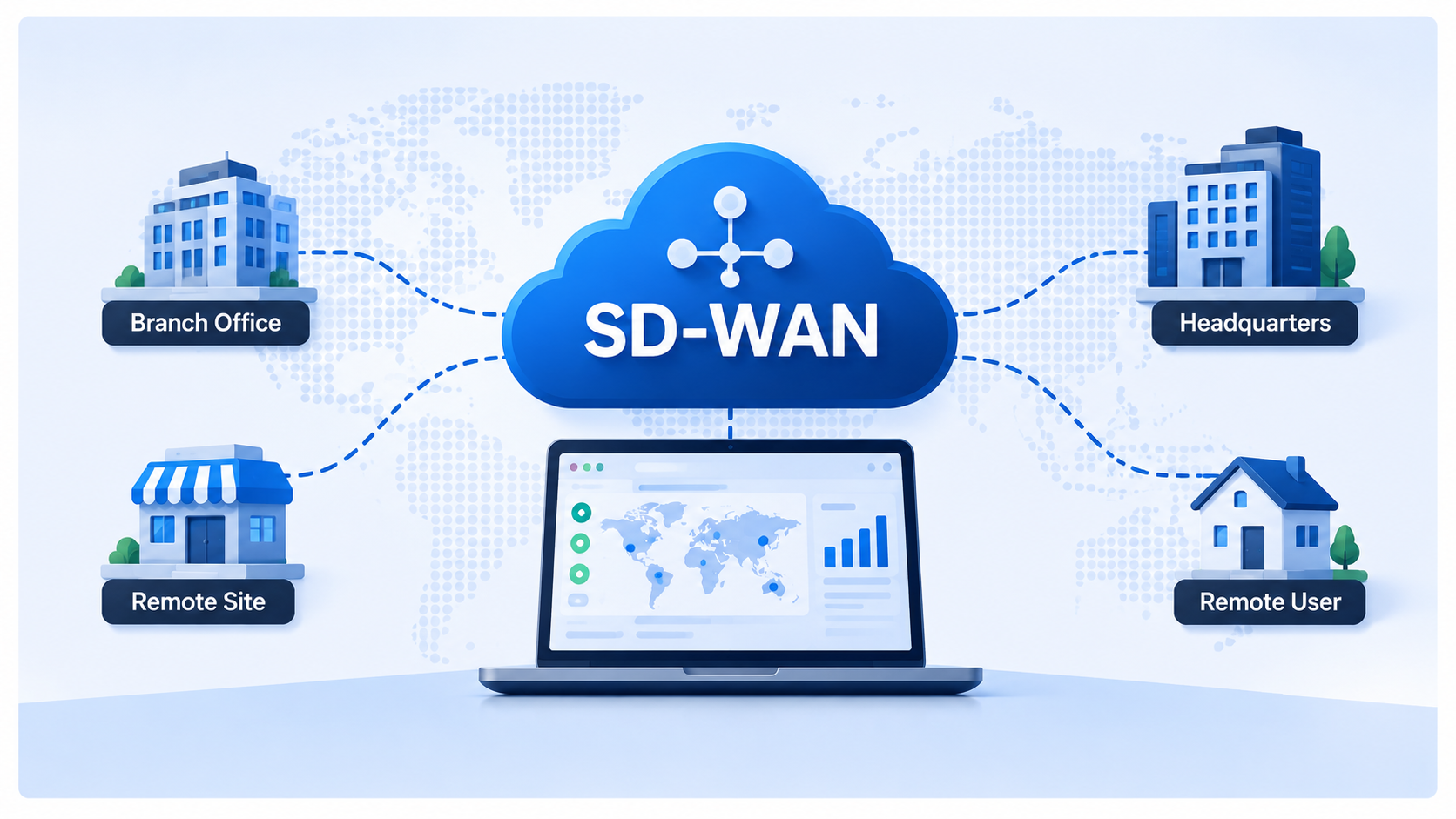
Imagine a company with offices in three different cities. Employees in each office need to access the same applications, communicate with each other, and share company data. How can all these offices stay connected?
Traditionally, companies used WAN technology to connect their offices. Today, SD-WAN offers a smarter and more flexible way to manage these connections.
In this guide, we will explain what SD-WAN is, how it works, and why businesses are increasingly using it.
Quick Summary
SD-WAN (Software-Defined Wide Area Networking) is a technology that connects different company locations and manages their internet connections intelligently. It can choose the best available connection for each application, improve network reliability, and make network management easier.
Table of Contents
- What Is WAN?
- What Is SD-WAN?
- How Does SD-WAN Work?
- A Real-Life Example of SD-WAN
- Understanding SD-WAN Architecture
- Traditional WAN vs. SD-WAN
- Main Benefits of SD-WAN
- SD-WAN vs. MPLS
- Is SD-WAN Secure?
- Popular SD-WAN Solutions
- When Do Businesses Need SD-WAN?
- Conclusion
- Frequently Asked Questions
1. What Is WAN?
Before understanding SD-WAN, let’s first understand WAN.
WAN stands for Wide Area Network. It is a network that connects computers and smaller networks across different geographical locations.
For example, imagine a company that has three offices:
- Office 1 in London.
- Office 2 in Paris.
- Office 3 in Berlin.
Each office has its own local network (LAN). However, employees need to communicate, share files, and access company applications hosted at headquarters.
A WAN connects these offices so they can communicate as if they were part of the same company network.
2. What Is SD-WAN?
Now that we understand WAN, let’s look at SD-WAN.
SD-WAN stands for Software-Defined Wide Area Networking.
It is a technology that makes managing WAN connections easier and smarter.
To understand the difference, imagine a company with two internet connections:
- Fiber internet.
- A 4G connection.
Both connections can provide internet access to the company’s office.
But what happens if the fiber connection becomes slow or stops working?
With a traditional network, administrators may need to configure routing and failover rules manually.
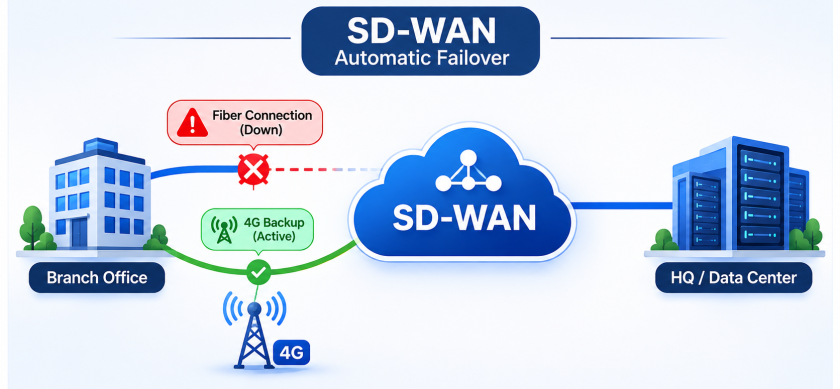
With SD-WAN, the network can monitor both connections and automatically choose the most suitable one based on predefined rules.
For example:
- If fiber works normally, the network uses it.
- If fiber becomes unstable, SD-WAN can move important traffic to 4G.
- When fiber recovers, SD-WAN can move traffic back according to its policies.
This is one of the main advantages of SD-WAN.
In simple words: SD-WAN is like a smart traffic controller for your company’s network.
It decides which connection should carry each type of network traffic.
3. How Does SD-WAN Work?
Let’s understand how SD-WAN works through a simple example.
Imagine an office using the internet for three activities:
- Employees make video calls using Microsoft Teams.
- Employees download large files.
- Employees browse websites.
These activities do not have the same network requirements.
A video call needs a stable connection with low delay. A large file download can usually tolerate some delay.
SD-WAN can identify these different types of traffic and apply appropriate network rules.
Here is how it works:
Step 1: Connect Multiple Internet Connections
The company connects its office to different network services, such as:
- Fiber internet.
- Broadband internet.
- 4G or 5G.
- MPLS.
These connections provide different paths for network traffic.
Step 2: Monitor the Connections
SD-WAN continuously checks the condition of available connections.
It looks at three important measurements:
| Term | Simple explanation |
|---|---|
| Latency | How long data takes to reach its destination. |
| Jitter | How much the delay changes over time. |
| Packet loss | How much data gets lost during transmission. |
For example, if one connection starts losing packets or becomes too slow, SD-WAN can detect the problem.
Step 3: Choose the Best Connection
SD-WAN uses predefined rules to decide where traffic should go.
For example:
- Video calls use a connection with low delay.
- File downloads use another available connection.
- Important business applications receive priority.
This process is called intelligent traffic routing.
Step 4: Switch Connections When Something Goes Wrong
Imagine the office is using fiber internet, but the connection suddenly stops working.
SD-WAN can detect the failure and redirect traffic to the available 4G connection.
Employees may continue working without manually changing anything.
This is called automatic failover.
4. A Real-Life Example of SD-WAN
Let’s imagine a supermarket company with 20 stores in different cities.
Every store needs to connect to the company’s central systems to:
- Check product availability.
- Process customer payments.
- Update inventory.
- Access internal applications.
Now imagine that one store loses its main internet connection.
Without a backup connection, employees may lose access to important business applications.
With SD-WAN, the store can use a second connection, such as 4G or 5G, when the primary connection fails.
The network automatically redirects supported traffic to the backup connection.
This helps the store continue its operations.
Another advantage is that the IT team can manage all 20 stores from one centralized platform instead of configuring each location separately.
This is why SD-WAN is useful for businesses with multiple offices or branches.
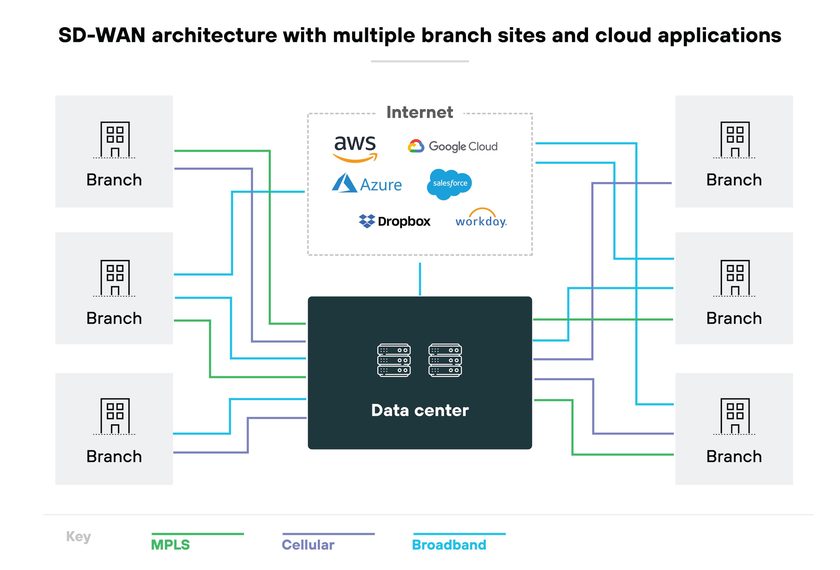
5. Understanding SD-WAN Architecture
You may come across some technical terms when learning about SD-WAN.
Let’s explain the most important ones in simple language.
5.1 SD-WAN Edge Device
An edge device is a physical or virtual device installed at a company location.
Think of it as the device responsible for connecting the office to the SD-WAN network.
It manages traffic, monitors connections, and applies network rules.
5.2 SD-WAN Controller
The controller helps manage the SD-WAN network.
It distributes network policies and coordinates how different locations communicate.
For example, an administrator can create a rule that gives video conferencing higher priority across all company branches.
5.3 Management Platform
This is the interface that network administrators use to manage the entire network.
From this platform, they can:
- Monitor internet connections.
- Check network performance.
- Configure policies.
- Identify connectivity problems.
- Manage different company locations.
5.4 Underlay and Overlay
These are two important SD-WAN concepts.
Underlay: The actual network connections, such as fiber, broadband, MPLS, and 4G/5G.
Overlay: The logical network created on top of those connections to connect different locations.
Think about it this way:
- Underlay = The roads.
- Overlay = The routes your company chooses to travel.
The underlay provides connectivity, while the overlay provides the logical connections used by SD-WAN.
6. Traditional WAN vs. SD-WAN
What makes SD-WAN different from traditional WAN?
The main difference is how the network is managed.
With traditional WAN, network administrators often configure individual devices and routing rules manually.
With SD-WAN, administrators can manage multiple locations through centralized software.
Here is a simple comparison:
| Traditional WAN | SD-WAN |
|---|---|
| Often requires manual configuration | Centralized software management |
| Can rely heavily on MPLS | Supports broadband, MPLS, and 4G/5G |
| Routing is based on configured network rules | Can select paths based on application and network conditions |
| Managing many locations can be complex | Makes managing multiple locations easier |
| Failover depends on configured mechanisms | Can automatically switch between available connections |
Important: SD-WAN does not eliminate traditional networking. It makes managing WAN connections more flexible and automated.
7. Main Benefits of SD-WAN
Why would a company choose SD-WAN?
Here are the main advantages.
7.1 Lower Network Costs
Traditional WAN networks often depend on expensive MPLS connections.
SD-WAN allows businesses to use more affordable internet connections alongside MPLS.
This can reduce networking costs, depending on the company’s requirements.
7.2 Better Application Performance
Not every application needs the same network conditions.
For example, video calls need a stable connection, while downloading files is generally less sensitive to network delays.
SD-WAN can prioritize important applications and select suitable connections for them.
7.3 Easier Network Management
Imagine managing 50 branch offices.
Configuring and monitoring every router individually can take a lot of time.
SD-WAN provides centralized management, allowing administrators to manage multiple locations through one platform.
7.4 Better Reliability
If one internet connection stops working, SD-WAN can redirect traffic to another available connection.
This helps businesses maintain connectivity and reduce interruptions.
7.5 Better Cloud Connectivity
Many businesses use cloud platforms such as AWS, Microsoft Azure, and Microsoft 365.
SD-WAN can help connect branch offices directly to cloud services instead of sending all traffic through company headquarters.
This can reduce unnecessary network delays.
8. SD-WAN vs. MPLS
You will often see SD-WAN and MPLS mentioned together.
But are they the same thing?
No.
MPLS is a networking technology used to transport data across a network. SD-WAN is a technology used to manage WAN connections intelligently.
Think of MPLS as one type of road that carries network traffic.
SD-WAN is the traffic management system that can decide which road to use.
Here is a simple comparison:
| MPLS | SD-WAN |
|---|---|
| A WAN transport technology | A WAN management technology |
| Often uses private service-provider networks | Can use public internet and private connections |
| Often more expensive | Can reduce costs by using broadband |
| Provides predictable service characteristics under provider agreements | Selects connections based on configured policies and measured performance |
| Can be used with SD-WAN | Can use MPLS as an underlying connection |
Can SD-WAN Replace MPLS?
Yes, in some cases.
However, businesses do not always need to remove MPLS completely.
Many organizations use both technologies together.
For example:
- MPLS for critical business applications.
- Fiber internet for general traffic.
- 4G/5G as a backup connection.
SD-WAN manages these connections according to the company’s requirements.
9. Is SD-WAN Secure?
Yes, SD-WAN solutions can provide important security features.
For example, many solutions support:
- Encryption to protect data traveling between locations.
- Authentication to verify network devices.
- Network segmentation to separate different types of traffic.
- Security policies to control network access.
However, SD-WAN does not automatically protect a company against every cyberattack.
Organizations may need additional security technologies, such as firewalls, intrusion prevention systems, and endpoint protection.
What Is SASE?
Another term you may encounter is SASE (Secure Access Service Edge).
SASE combines networking and security technologies into a cloud-based architecture.
It can include SD-WAN, secure web gateways, cloud access security brokers, and Zero Trust Network Access.
In simple terms, SD-WAN focuses on connecting locations intelligently, while SASE combines connectivity with broader security services.
10. Popular SD-WAN Solutions
Several networking companies provide SD-WAN products.
Here are four well-known examples:
Cisco SD-WAN
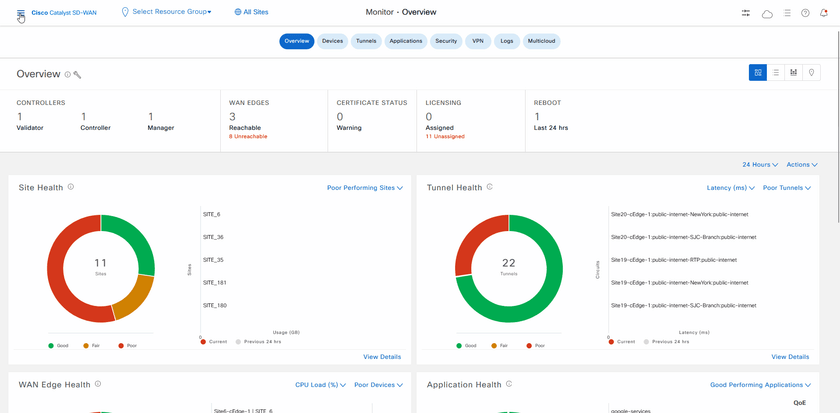
Website: https://www.cisco.com/
Fortinet Secure SD-WAN
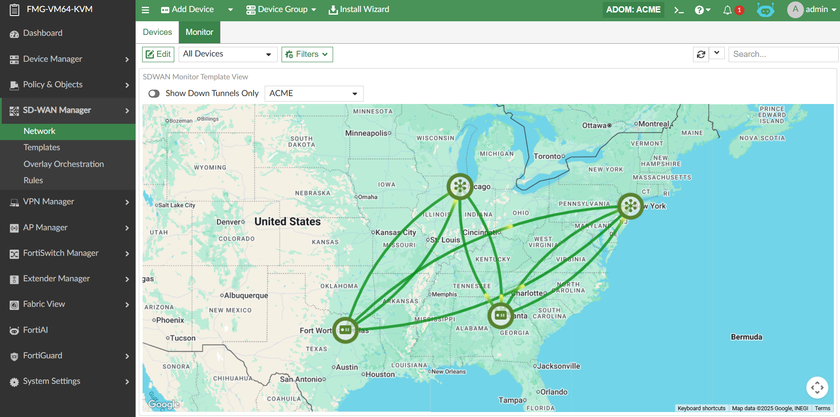
It combines network management and security features within the same platform.
Website: https://www.fortinet.com/
VMware VeloCloud
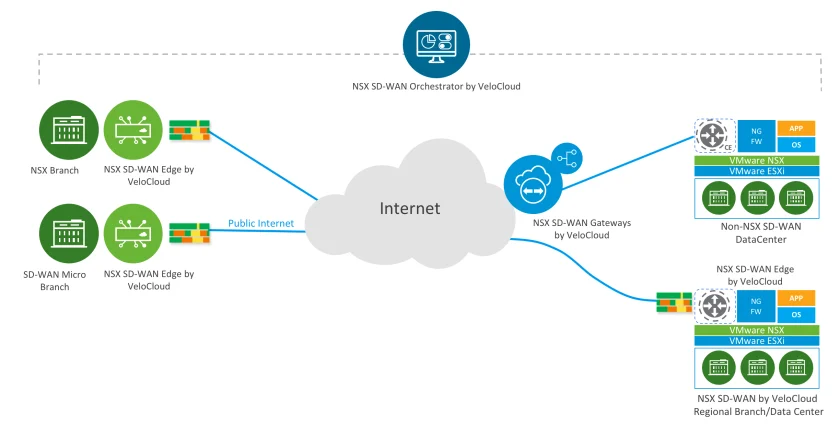
VeloCloud provides SD-WAN solutions for connecting branch offices, data centers, and cloud services. Its technology is now part of Broadcom.
Website: https://www.broadcom.com/
HPE Aruba Networking EdgeConnect
HPE provides SD-WAN solutions focused on network performance, centralized management, and secure connectivity.
Website: https://www.hpe.com/
11. When Do Businesses Need SD-WAN?
SD-WAN can be useful for companies that:
- Have several offices in different cities or countries.
- Depend on cloud applications.
- Need reliable internet connectivity.
- Want to reduce networking costs.
- Need to manage multiple locations from one platform.
- Want automatic switching between internet connections.
However, SD-WAN is not necessary for every company.
A small office with five employees and one internet connection may not need it.
But a company with 30 branches, cloud applications, and several network connections can benefit significantly from SD-WAN.
The important thing is to choose a solution that matches the organization’s networking requirements and budget.
Conclusion
SD-WAN is a modern way to connect and manage networks across different locations.
Instead of relying on one connection or configuring every device manually, it allows businesses to use multiple network connections and manage them through centralized software.
Its biggest advantages include easier network management, better application performance, automatic failover, and potentially lower networking costs.
The easiest way to remember it is:
WAN connects different locations. SD-WAN makes managing those connections smarter.
Frequently Asked Questions (FAQ)
1. What does SD-WAN stand for?
SD-WAN stands for Software-Defined Wide Area Networking. It is a technology that uses software to manage connections between different business locations.
2. What is the main purpose of SD-WAN?
Its purpose is to improve how businesses manage their WAN connections, route network traffic, and maintain connectivity between different locations.
3. Does SD-WAN require special hardware?
Not always. SD-WAN can run on physical appliances, virtual machines, or software-based devices, depending on the solution.
4. Can SD-WAN work with normal internet connections?
Yes. SD-WAN can use regular broadband and fiber internet connections, as well as MPLS and cellular connections.
5. Does SD-WAN make the internet faster?
Not necessarily. SD-WAN does not increase the bandwidth of an internet connection. However, it can improve application performance by choosing better network paths and prioritizing important traffic.
6. What happens if the main internet connection fails?
SD-WAN can detect the failure and redirect traffic to another available connection, such as a backup fiber or 4G/5G connection.
7. What is the difference between WAN and SD-WAN?
WAN connects networks across geographical locations. SD-WAN uses software to manage those connections more intelligently.
8. What is the difference between SD-WAN and VPN?
A VPN creates an encrypted connection between networks or devices. SD-WAN manages network connections and can use VPN tunnels to connect different locations securely.
9. Is SD-WAN suitable for small businesses?
Yes, but it depends on the business. Companies with multiple locations, cloud applications, or important connectivity requirements may benefit more than small offices with simple networks.
10. Is SD-WAN the future of networking?
SD-WAN is an important part of modern enterprise networking, particularly as businesses adopt cloud services, remote work, and multiple internet connections. It does not replace every traditional WAN technology, but it provides a more flexible way to manage network connectivity.
Enjoyed this article? Get the next one in your inbox.
Join our list for practical IT tutorials, security alerts and essential technology updates.
- Practical tutorials
- Security alerts
- Technology updates
No spam. Unsubscribe anytime.